




Is your PHP application running a fixed version right now?
On October 21, 2026, the PHP team released emergency fixes for two critical flaws known as PHP2Shell.
An unpatched PHP server can face remote code execution without an attacker logging in. That can put customer data, service availability, and business operations at risk. Check your PHP version now and install the fixed release for your branch.
Patching closes this hole, but lasting protection depends on who owns updates and how securely your team writes code. This PHP security checklist covers both sides:
This PHP security checklist covers both sides:
- Business leaders: Update ownership, patch timelines, and upgrade planning.
- Developers: Runtime security, input handling, and dependency audits.
As a custom software development company, we know security work doesn’t end at launch. Applications need regular maintenance as vulnerabilities emerge, dependencies change, and business requirements evolve.
Use this guide to identify what needs attention now and what belongs in your longer-term maintenance plan.
The Business Leader’s PHP Security Checklist
Managing PHP risk starts with two answers: where PHP runs, and who keeps it updated.
These five checks help decision-makers establish patch responsibility, plan upgrades, and document the work.
1. Identify Your PHP Versions and Exposed Applications
Ask your team for the PHP version running in production. Then compare it against the fixed releases below.
Project files can list a different version from the one serving live traffic, so ask your host or developers to confirm the running version.
List every application that uses PHP. Common places include:
- Public website or marketing site
- Customer portal or web app
- Internal admin tools
- APIs and background services
Assign each one a named owner.
For PHP2Shell, these are the minimum fixed versions:
| PHP branch | Minimum fixed version |
| PHP 8.5 | 8.5.12 |
| PHP 8.4 | 8.4.27 |
| PHP 8.3 | 8.3.36 |
| PHP 8.2 | 8.2.35 |
These releases fix CVE-2026-109618 and CVE-2026-109619, both rated 9.2 on the CVSS v4.0 scale. Check the official PHP release announcements before you plan the update.
Running PHP 8.1 or older? Treat it as an upgrade priority, because those branches no longer receive official security fixes.
Some hosts offer backported patches. Ask for written confirmation of exactly what they cover.
2. Prioritize PHP Security Updates and Vulnerability Response
Treat a critical PHP disclosure as an emergency change. Approve the fix as soon as your team confirms exposure.
For PHP2Shell, official PHP guidance is clear: updating is the only complete solution. Interim controls may reduce exposure to particular attack paths, but they do not make a vulnerable installation safe.
Agree on these roles before the next advisory lands:
- Who assesses a new vulnerability
- Who approves urgent production changes
- Who tests and deploys the fix
- Who confirms the live environment is patched
If an immediate patch is not possible, follow the risk-based response process in the section below. Do not assume that a firewall rule or application-code change resolves a vulnerability in the PHP runtime.
3. Establish a Supported PHP Upgrade Plan
Run your application on a supported PHP branch, and schedule the upgrade before that branch reaches the end of life.
Each PHP branch moves through three stages:
- Active support: maintainers fix bugs and security issues.
- Security-only support: maintainers fix critical security problems.
- End of life: the project releases no more fixes.
See the official PHP supported versions calendar when setting upgrade dates. PHP 8.2 reaches end of life on December 31, 2026, so teams using it should plan their next branch upgrade alongside the immediate PHP2Shell fix.
Moving off an old PHP version often means updating your framework and Composer packages too.
Ask your developers for a migration plan that lists compatibility issues and estimated effort. It should also explain how they will test critical workflows before launch.
Planned upgrades keep cost and timing in your hands.
4. Assign Clear Ownership for Ongoing Maintenance
Name one owner for every maintenance task, and put those names in writing.
Gaps appear when one team builds the product and another hosts it. Each assumes the other handles security updates.
Settle these responsibilities in your maintenance agreement:
| Responsibility | What to establish |
| Runtime maintenance | Who updates PHP and verifies the deployed version |
| Dependency maintenance | Who reviews and updates Composer packages |
| Production changes | Who tests and approves urgent releases |
| Incident response | Who investigates suspicious activity and coordinates recovery |
| Upgrade planning | Who tracks end-of-life dates and estimates migration work |
If an outside partner maintains your product, ask for evidence of this work, such as update logs or deployment records. A general promise to keep the software secure does not count.
5. Review Compliance and Security Requirements
Find out now what the law and insurers expect after a breach.
If attackers steal personal or payment data, the company may have to notify customers and cooperate with investigators. Your industry and country decide the exact rules.
Cyber insurance policies may also demand certain security controls or fast incident reporting. Ask your broker or a legal adviser what the policy requires, and whether a known unpatched flaw affects a claim.
Ask the technical team to keep proof of its security work:
- Vulnerability scan results
- Penetration-test findings
- Access reviews
- Evidence that fixes were completed
These records help answer auditors and insurers quickly. Security controls still do the actual protecting.
The Developer’s PHP Application Security Checklist
On the other side, developers secure a PHP application at two levels: the server configuration and the application code.
The six checks below cover both, from runtime settings and post-release testing.
1. Harden the PHP Runtime and Production Configuration
Hide error details from visitors and limit what PHP can do on the server.
Error messages can reveal database paths or query fragments, which helps attackers map the application.
Confirm these settings in production:
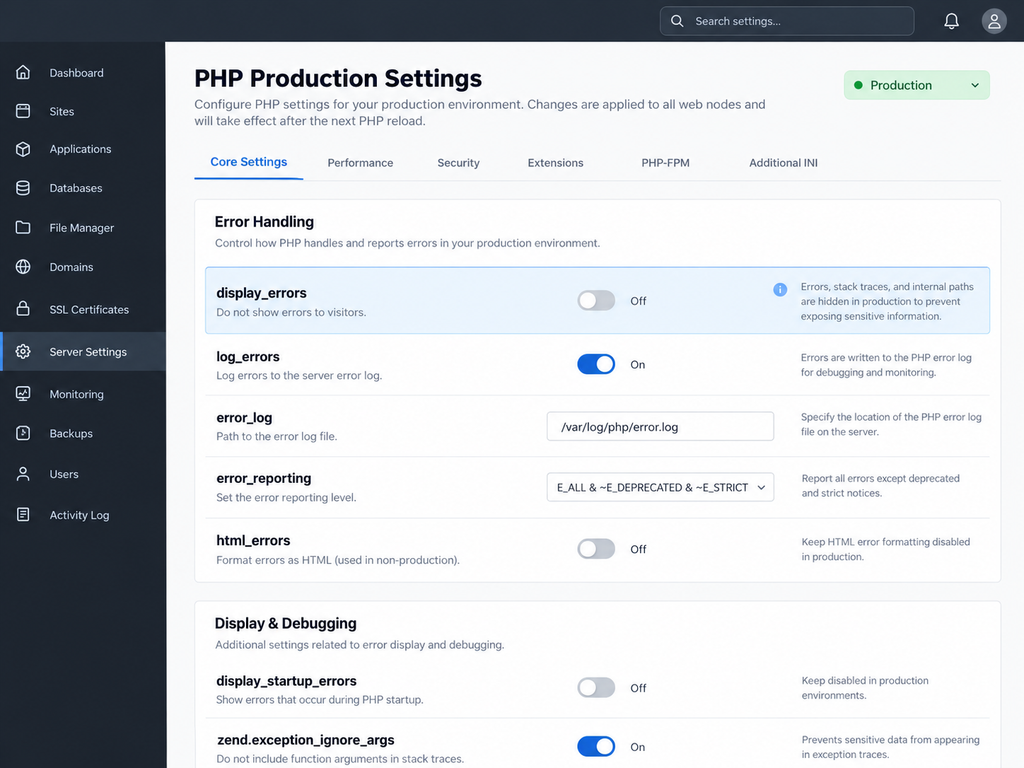
- display_errors is off, so visitors never see stack traces or internal paths.
- log_errors is on, with logs stored where access is restricted.
- File and directory permissions give the application only the access it needs.
- Unneeded PHP features stay disabled where the host allows it.
Functions such as exec(), system(), shell_exec(), and passthru() run operating-system commands. Restrict them if the application does not need them.
These settings support general hardening, but they do not fix PHP2Shell. The runtime patch remains necessary. Apply configuration consistently across production instances, including containers and services that may use separate PHP installations.
2. Prevent SQL Injection and Cross-Site Scripting
Parameterized queries stop SQL injection, and output encoding stops cross-site scripting (XSS). Both weaknesses start when code trusts user input.
SQL injection happens when untrusted input changes the meaning of a database query. PDO prepared statements keep SQL instructions and user values separate:
The database treats $email as a value, never as SQL. Use this pattern everywhere, and never build queries by joining user input into strings.
Prepared statements cannot parameterize column names or sort directions. Validate those choices against an explicit allowlist.
XSS happens when untrusted content reaches a page in a form the browser runs as script. Encode output for the context where it appears. For ordinary HTML text, htmlspecialchars() works:
HTML attributes, JavaScript, and URLs each need their own encoding, so one function cannot cover every context.
Use the framework’s built-in escaping where possible, and never place untrusted values inside executable JavaScript.
3. Secure File Uploads and File Storage
Treat every uploaded file as untrusted until the server proves otherwise. Attackers can disguise scripts as images or send oversized files to drain server resources.
A filename extension alone proves nothing. Build the upload process around these controls:
- Allow required types only. Check the extension and the file’s MIME type or signature, since no single check proves safety.
- Cap file size. Set limits for each file and for the whole request.
- Rename files on the server. Never use a user-supplied name as a storage path.
- Check permissions. Confirm the user may upload or retrieve each file.
- Store files outside the web root. If they must be public, serve them through a controlled handler.
- Block execution. Configure storage so uploads cannot run as server-side code.
Take a customer portal that accepts identity documents. The application validates each upload, stores it in a restricted location, and checks authorization on every download. Guessing a file’s URL should never expose another customer’s data.
Higher-risk products may also need malware scanning or content processing. Match the controls to the file types accepted and the harm a misuse could cause.
4. Audit Composer Dependencies and Framework Versions
Run composer audit to catch known security advisories in installed packages.
Severity varies, and not every advisory applies to every deployment. For each finding, decide whether the package needs an update or a replacement.
Add the command to the CI/CD pipeline so the team catches known flaws before a release reaches production.
Good dependency maintenance also includes:
- Reading the framework’s security announcements
- Keeping composer.lock in version control, so deployments use the intended versions
- Testing package updates against existing functionality
- Removing dependencies the application no longer uses
A clean audit covers package advisories only. Runtime patching, code review, and testing for application-specific weaknesses still matter.
5. Protect Credentials, Sessions, and Access Controls
Secure input handling still fails when secrets leak or access checks are missing. Three areas need attention:
- Secrets: Keep database passwords and API keys in a secrets manager or protected deployment config, never in source control. If one leaks, rotate it and check for misuse.
- Sessions: Regenerate the session ID at login and when privileges change. Set cookies to Secure, HttpOnly, and a suitable SameSite value, and enforce HTTPS.
- Authorization: Authentication confirms who the user is. Authorization decides what that user can access, and the server must check it on every request.
Deleting a leaked key from the latest commit does not protect it, because the old version stays in history.
Consider an order history page. It must confirm that the signed-in customer owns the requested order. Hiding another customer’s order in the interface does not stop a direct API request.
6. Test Security Fixes Before and After Deployment
Try every security update in a controlled environment first, then confirm the live runtime after release.
A patch can fix one vulnerability and break something else, such as a framework behavior the product relies on.
For a critical, exposed vulnerability, use an expedited process with focused tests and a rollback plan. Testing should reduce deployment risk without creating an avoidable delay in applying a critical security fix.
At minimum, validate these areas:
| Test area | What to verify |
| Runtime | The intended fixed PHP version runs in the live environment |
| Core workflows | Login, checkout, forms, and other critical features still work |
| Integrations | Database connections and external API calls behave correctly |
| Access control | Users cannot reach data or actions outside their permissions |
| Error handling | Production errors expose no sensitive implementation details |
| Monitoring | Logs and alerts capture unexpected errors and suspicious activity |
After deployment, check the actual runtime rather than assuming the rollout worked. Hosting platforms often run several PHP versions across services and containers.
If the application was exposed before the update, follow the incident-response process to investigate possible compromise.
A patch fixes the vulnerability, but it does not automatically remove malicious changes or invalidate stolen credentials.
How to Respond When You Cannot Patch Immediately
If you cannot patch a vulnerable PHP application immediately, reduce its exposure and take it offline if necessary. For PHP2Shell, updating to a fixed release remains the priority.
Production constraints can delay an update. An application may depend on an older runtime, or the team may need to resolve deployment issues before applying the fix. These constraints affect the timeline, not the severity of the vulnerability.
The UK National Cyber Security Centre urges organizations to act immediately. NHS England’s advisory recommends taking vulnerable devices offline until patching is possible.
Follow this response sequence:
- Confirm exposure. Identify the affected PHP runtime and every service that uses it.
- Prioritize the fix. Find the fastest safe route to a fixed release or a verified vendor backport.
- Limit exposure. Follow the official advisory and your incident-response procedures. Take the affected service offline if you cannot protect it adequately.
- Check for compromise. Review available logs and look for unexpected file changes, suspicious accounts, or other signs of unauthorized access.
- Verify recovery. Confirm the fixed runtime is active and investigate any remaining signs of compromise.
A web application firewall or temporary code change may reduce some risk, but neither replaces the PHP runtime fix. If the application was exposed before patching, investigate possible compromise rather than assuming the update has resolved every problem.
When to Patch, Modernize, or Rebuild a PHP Application
PHP2Shell calls for an immediate security fix, not an automatic rebuild. Once the vulnerability is addressed, assess whether the application can remain secure and maintainable on supported software.
The right choice depends on the application’s current condition, the effort required to maintain it, and the business needs it must continue to serve.
| Option | When it makes sense | What the work involves | Main consideration |
| Patch | The application runs on a supported PHP branch, and its framework and dependencies remain compatible and maintained. | Update PHP, verify the deployed version, and test critical workflows. | Confirm every production environment received the fix. |
| Modernize | The application still meets business needs, but outdated frameworks, dependencies, or code make routine maintenance increasingly difficult. | Upgrade PHP, the framework, and dependencies; resolve compatibility issues; improve weak areas in the existing codebase. | Estimate migration effort carefully and upgrade in manageable phases. |
| Rebuild | Fundamental architectural limitations, accumulated technical debt, or the cost of continued maintenance make replacement a stronger business decision. | Redesign the application, migrate data and integrations, and replace the existing system in planned phases. | Account for migration complexity, operational disruption, and the risks of introducing a new system. |
Consider an older customer portal that relies on a framework incompatible with currently supported PHP releases. Each security update then requires extensive compatibility work before the team can apply it.
Modernization may be the better choice if the portal still supports the business well and the team can restore maintainability without replacing the entire product.
A rebuild becomes more reasonable when the existing architecture blocks essential features, integrations, or access controls, or when a technical assessment shows that continued maintenance costs more than a replacement over a realistic planning period.
Before choosing, assess three things:
- Technical viability: Can the application run securely on supported software without disproportionate effort?
- Business fit: Does the current product support the workflows, integrations, and capabilities the business needs?
- Total cost and risk: How do the costs and risks of patching or modernization compare with rebuilding, including migration and operational disruption?
The decision should follow that assessment, not the age of the application or the existence of a single vulnerability.
Build a Repeatable PHP Security Maintenance Process
Four habits turn the next critical advisory into a routine task instead of an emergency.
- Keep an application inventory. Record each application’s PHP version, framework, host, and owner. Update it whenever the architecture changes.
- Automate security checks. Run composer audit in CI/CD and scan code with suitable tools. Automation catches known issues early but cannot find every flaw.
- Schedule upgrades early. Track the official PHP support calendar and plan compatibility work well before end of life. Budget time for testing and deployment too.
- Review after every major incident. Measure how fast the team found affected systems and applied the fix. Then close any gaps in ownership or deployment.
Engineers get consistent routines, and business leaders see risk before it becomes an emergency.
Conclusion: Make PHP Security Part of Product Maintenance
PHP2Shell shows that application security starts with the software beneath the features customers use.
A vulnerable runtime needs attention today. An unsupported framework or neglected package creates a slower problem that grows with every release.
Each side has a clear job:
- Business leaders: confirm which systems are affected and approve urgent fixes.
- Developers: apply the correct updates and verify the result.
Inceptives Digital builds custom software with life after launch in mind, from dependency updates to changing business needs.
Is your PHP application still exposed?
Get a PHP assessment from engineers who confirm the running PHP version and return a clear upgrade plan.
Get My PHP Assessment!Frequently Asked Questions
PHP2Shell is the name for two critical PHP vulnerabilities, CVE-2026-109618 and CVE-2026-109619, both rated 9.2 on the CVSS v4.0 scale.
Attackers could use them to run code on an unpatched server without logging in. PHP released fixes on October 21, 2026.
PHP 8.5.12, 8.4.27, 8.3.36, and 8.2.35 contain the fixes. Any earlier release on the same branch needs updating.
PHP 8.2 reaches end of life on December 31, 2026, so plan a move to a newer branch.
Every PHP installation that serves web requests is at risk, including PHP-FPM, Apache mod_php, php-cgi, FrankenPHP, and LiteSpeed.
The flaws sit in the PHP runtime, so secure application code does not remove the exposure.
Update the PHP runtime that serves web requests to the fixed release for your branch. Then restart Apache, PHP-FPM, and any long-running PHP workers.
Confirm the live version afterward, and check logs for signs of compromise if the application was exposed before the patch.
Follow the official advisory to reduce exposure, and take the affected service offline until the update is installed.
Treat this as a temporary measure. Updating PHP remains the only complete fix.
No. Web application firewall rules and code changes may reduce some risk, but PHP states that only updating fully protects a server.
Operating-system memory limits such as RLIMIT_AS are not a substitute either. PHP warns they can trigger the same vulnerable path.
PHP 8.1 and older no longer receive regular security updates, so treat them as an upgrade priority.
PHP published minimal source backports for 7.4, 8.0, and 8.1 as an emergency measure. Ask your host for written proof of what its packages cover.
Ask your host or developers to confirm the version running in production, not the version listed in project files.
Command-line php -v can differ from the web server’s version, so confirm the one that serves live traffic.
Rarely. Patch first, then assess whether the application stays maintainable on a supported PHP branch.
Rebuild only when the architecture blocks business needs or upkeep costs more than a replacement.















“A product is not proven when it ships. It is proven when it operates reliably under real users, workflows, and constraints.”
Hannan Shahnoor, CEO, Inceptives Digital