
Mobile games don’t fail because of ideas. Most of the time, it comes down to decisions made long before the first level is even playable, and the engine is usually the biggest one.
If you’re trying to figure out the best engine for mobile game development, you’ll keep running into the same names: Unity, Unreal Engine, Godot, Cocos, and a few others that sit in more specific lanes. They don’t compete on the same things, which is where most people get stuck.
Mobile gaming itself isn’t a small corner of the industry anymore. Global revenue crossed roughly $80–90 billion in 2025, according to Sensor Tower data, which says a lot about how much pressure sits behind every technical choice in development. For any mobile game development company, the engine isn’t just a preference. It quietly shapes performance, cost, and how far a game can realistically scale once it hits real users.
This guide breaks down the main engines used across mobile game development today, what they’re actually good at in practice, and where they start to fall short. Not in theory, but in the kind of situations developers run into once production begins.
What is a Game Engine and How Does it Work?
The game engine is the central software that powers your video games, including all the core systems, while developers can work on gameplay and creativity. To get a clear understanding, here are the important functions of a game engine:
- Offers graphics, sound, physics, and input handling.
- Provides tools for level design, scripting, and asset management.
- Integrate code, systems, and assets to develop a playable game.
- Makes development easy by skipping the build of core systems from scratch.
Game engines are the backbone of modern mobile games. The hard-core technical portion is handled by them, allowing the mobile game development companies to be more efficient and smarter.
Now that we have this groundwork set up, it is time to discuss the best mobile game engines that are leading the way.
Best Engine For Mobile Game Development (Quick Answer)
There isn’t one perfect engine for every mobile game. A fast 2D puzzle game has completely different technical needs compared to a heavy 3D multiplayer title, which is why the “best” option usually depends on what you’re actually building.
Here’s the short version:
- Unity still feels like the safest all-around choice for most mobile projects. Strong 2D and 3D support, massive community, and reliable cross-platform workflows.
- Unreal Engine makes more sense when visuals are the priority. It’s heavier, harder to learn, but difficult to beat for high-end 3D graphics.
- Godot has become a favorite for indie developers who want something lightweight, flexible, and free without sacrificing too much control.
- Cocos Creator works especially well for performance-focused 2D mobile games where smaller builds and efficiency matter more than flashy visuals.
- Defold keeps things lean. Small file sizes, fast iteration, and surprisingly smooth performance on lower-end mobile devices.
- GameMaker Studio is still one of the easiest ways to build 2D games without getting buried in complex systems early on.
- Buildbox sits in a different category altogether. More drag-and-drop than traditional development. Useful for hyper-casual concepts and quick prototypes.
The tricky part is that most engines look good on paper. The differences usually show up later, once optimization, device compatibility, and production speed start becoming real problems instead of feature checklists.
Best Mobile Game Engines Comparison Table
| Game Engine | Best For | 2D / 3D Support | Learning Curve | Mobile Performance | Pricing |
| Unity | Overall, mobile game development | Strong in both | Medium | Excellent | Free + Paid plans |
| Unreal Engine | High-end 3D mobile games | Best for 3D | Difficult | Heavy but powerful | Royalty-based |
| Godot | Indie and lightweight mobile games | Strong 2D, moderate 3D | Easy | Lightweight | Free & open-source |
| Cocos Creator | Performance-focused 2D games | Mainly 2D | Medium | Excellent | Free |
| Defold | Small-sized mobile games | 2D focused | Easy | Very lightweight | Free |
| GameMaker Studio | Beginner-friendly 2D games | Primarily 2D | Very easy | Good | Paid |
| Buildbox | No-code hyper-casual games | Limited | Very easy | Moderate | Paid subscription |
Best Mobile Game Engines by Use Case
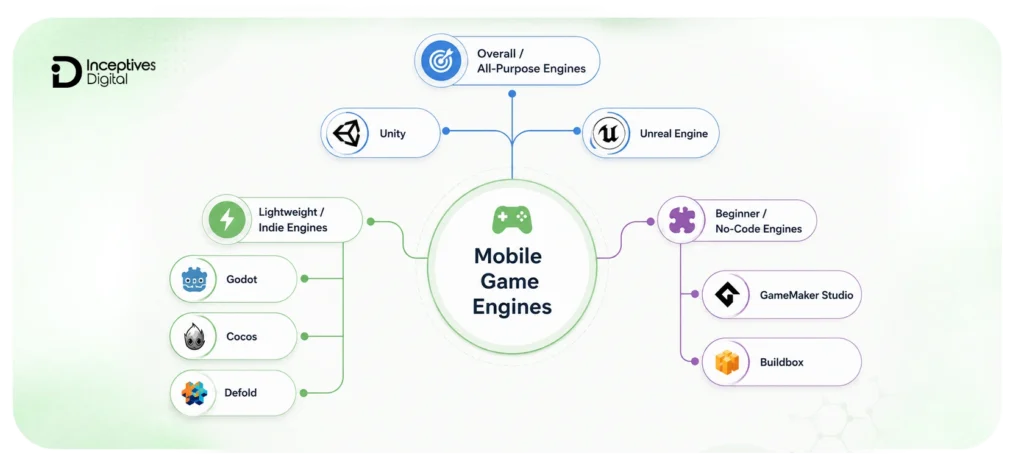
Not every mobile game engine is built for the same kind of project. Some are better for large-scale 3D production, while others work best for lightweight 2D games or fast prototyping. The right choice usually depends less on popularity and more on what your game actually needs once development gets serious.
Below is a breakdown of the best mobile game engines based on real-world use cases, performance demands, learning curve, and development flexibility.
1. Best Overall Mobile Game Engines
These engines dominate mobile development for a reason. They handle both 2D and 3D projects well, support large-scale production, and come with mature ecosystems that make long-term development easier.
1.1. Unity
Unity game development still sits at the center of game development. A huge percentage of mobile games on both Android and iOS are built on it, partly because it balances flexibility, performance, and scalability better than most engines in the market.
It works equally well for casual 2D games, multiplayer experiences, and larger 3D projects. That range is difficult to ignore, especially for studios planning to scale a game after launch instead of treating it like a short-term project.
What Makes Unity Strong For Mobile Games?
- Reliable cross-platform development for Android and iOS
- Mature optimization tools for FPS, memory, and asset management
- Massive asset store and plugin ecosystem
- Strong support for both 2D and 3D workflows
- Large developer community with extensive documentation
Where Does Unity Start to Struggle?
- The editor can feel overwhelming for beginners
- Larger projects become difficult to manage without a clean architecture
- Mobile optimization still requires experience, especially for battery usage and memory handling
- Build sizes can grow quickly if assets are not managed carefully
Best Suited For
- Cross-platform mobile games
- Multiplayer projects
- Mid-sized to large-scale productions
- Teams planning long-term live-service support
1.2. Unreal Engine
Unreal Engine is usually the first choice when visual quality becomes the priority. Mobile games built with Unreal can look genuinely impressive, especially in high-end 3D environments where lighting, textures, and cinematic effects matter heavily.
That said, Unreal is not always the practical choice for every mobile project. Smaller teams often underestimate how demanding optimization becomes once performance testing starts across different devices.
What Makes Unreal Strong For Mobile Games?
- Exceptional real-time rendering and visual fidelity
- Blueprint visual scripting reduces coding complexity
- Strong tools for large-scale 3D environments
- Advanced profiling and performance systems
- Console-quality visuals on modern smartphones
Where Does Unreal Start to Struggle?
- Heavier engine compared to most mobile-focused alternatives
- Large project sizes can impact mobile downloads
- Steeper learning curve for beginners
- Lower-end devices may struggle without aggressive optimization
Best suited for
- AAA-style mobile games
- High-end 3D experiences
- Cinematic gameplay
- Teams focused heavily on graphics quality
2. Best Lightweight & Indie Mobile Game Engines
Not every mobile game needs advanced rendering pipelines or massive production systems. Lightweight engines usually move faster, export smaller builds, and perform better on lower-end devices where mobile optimization becomes far more noticeable.
For indie developers, especially, these engines often make development less frustrating.
2.1. Godot Engine
Godot has grown quickly over the last few years, especially among indie developers looking for more control without dealing with expensive licensing or bloated workflows.
Its lightweight structure and node-based system make it surprisingly fast to work with, particularly for 2D mobile games.
What Makes Godot Strong For Mobile Games?
- Completely free and open-source
- Lightweight engine with small project footprints
- Fast iteration during development
- Beginner-friendly workflow compared to larger engines
- Strong support for 2D game development
Where Godot Starts to Struggle?
- 3D tools still lag behind Unity and Unreal
- Smaller ecosystem compared to larger engines
- Fewer advanced mobile optimization tools
- Limited AAA-level production support
Best Suited For
- Indie mobile games
- Pixel-art and 2D projects
- Small development teams
- Developers wanting open-source flexibility
2.2. Cocos Creator / Cocos2d-x
Cocos has always leaned heavily toward performance-focused mobile game development. It’s particularly strong for 2D mobile games where lightweight builds and runtime efficiency matter more than advanced visual effects.
A lot of hyper-casual and fast-loading mobile games benefit from this approach.
What Makes Cocos Strong For Mobile Games?
- Fast 2D rendering performance
- Lightweight builds with efficient runtime behavior
- Good optimization for lower-end Android devices
- Flexible architecture for mobile-focused workflows
- Cross-platform deployment support
Where Cocos Starts to Struggle?
- Limited 3D capabilities
- Smaller plugin ecosystem
- Less beginner-friendly than GameMaker or Buildbox
- Fewer learning resources compared to Unity
Best suited for
- Hyper-casual mobile games
- Performance-focused 2D projects
- Lightweight Android games
- Fast-loading mobile experiences
2.3. Defold
Defold doesn’t get talked about as often as Unity or Unreal, but it handles mobile-focused 2D game development surprisingly well. The engine stays lean, exports compact builds, and performs smoothly even on weaker devices.
That simplicity is part of the appeal.
What Makes Defold Strong For Mobile Games?
- Extremely lightweight engine
- Small build sizes optimized for mobile distribution
- Fast prototyping workflows
- Lua scripting keeps development relatively simple
- Smooth performance on low-end devices
Where Defold Starts to Struggle?
- Limited support for advanced 3D game development
- Smaller community and fewer plugins
- Less flexibility for large-scale productions
- Fewer enterprise-level tools
Best Suited For
- Small 2D mobile games
- Indie projects
- Lightweight casual games
- Developers prioritizing performance over visual complexity
3. Best Beginner-Friendly & No-Code Game Engines
Some developers simply want to start building quickly without dealing with complicated production pipelines immediately. These engines focus more on accessibility and rapid development than deep technical customization.
3.1. GameMaker Studio 2
GameMaker has been one of the easiest entry points into game development for years. Its drag-and-drop tools simplify the learning process, while its scripting system still gives developers room to grow later.
What Makes GameMaker Strong For Mobile Games?
- Beginner-friendly interface
- Fast 2D development workflows
- Strong prototyping speed
- Helpful tutorials and community resources
- Multi-platform export support
Where GameMaker Starts to Struggle?
- Limited 3D support
- Advanced customization eventually requires scripting
- Paid licensing for broader platform exports
- Better suited for smaller-scale games
Best Suited For
- Beginner developers
- 2D mobile games
- Rapid prototypes
- Small indie projects
3.2. Buildbox
Buildbox targets a completely different type of developer. It focuses on no-code workflows, making it possible to create simple mobile games through drag-and-drop systems instead of traditional programming.
For hyper-casual projects and quick prototypes, that speed can be useful.
What Makes Buildbox Strong For Mobile Games?
- No coding required
- Fast drag-and-drop workflows
- Beginner-friendly setup
- Quick hyper-casual game production
- Easy prototyping process
Where Buildbox Starts to Struggle?
- Limited customization flexibility
- Not ideal for complex game systems
- Weak 3D capabilities
- Smaller plugin ecosystem
Best Suited For
- Hyper-casual mobile games
- Quick prototypes
- Non-technical creators
- Simple gameplay concepts
What Actually Matters in a Mobile Game Engine?
Most game engine comparisons focus on features. Mobile development usually comes down to trade-offs instead.
An engine can look perfect during early testing and still become frustrating later once optimization, device compatibility, and performance issues start showing up. That’s where the real differences appear.
1. Build Size Matters More Than Most Developers Expect
Large mobile builds hurt installs. Especially on slower networks or lower-storage devices.
Smaller engines like Defold, Godot, and Cocos usually export lighter builds, while larger engines like Unreal Engine often need more aggressive optimization to keep file sizes manageable.
For hyper-casual games, lightweight builds often matter more than ultra-realistic graphics.
Why Does it Matter?
- Faster installs
- Better retention
- Lower storage usage
- Smoother updates
2. Mobile Performance Isn’t Just About FPS
A stable 45 FPS experience usually feels better than a game constantly jumping between 60 and 25 FPS.
Mobile devices heat up, throttle performance, and behave differently during long sessions. That’s why frame stability matters as much as raw performance.
Engines that balance mobile performance well
- Unity
- Defold
- Cocos
Engines that require heavier optimization
- Unreal Engine
3. Android Optimization Can Get Messy Fast
Testing on one Android device is never enough.
Different chipsets, GPUs, screen sizes, and OS versions create inconsistencies that are easy to miss during development.
This is one reason Unity remains a popular mobile game development engine. Its ecosystem around Android profiling, debugging, and cross-device testing is much more mature compared to smaller engines.
Things developers usually struggle with
- Device fragmentation
- Memory usage
- GPU compatibility
- Performance drops on low-end phones
4. Battery Usage Quietly Affects Player Retention
Players notice when a game drains battery too quickly, even if they never mention it directly.
Heavy rendering, unstable frame pacing, and poor optimization can reduce session time over time.
This becomes more noticeable in:
- Multiplayer games
- Open-world environments
- Graphics-heavy 3D projects
High-end visuals help attract users. Efficient performance optimization helps keep them.
5. Faster Development Often Beats More Features
A technically powerful engine doesn’t automatically speed up production.
Smaller teams usually prefer engines that:
- Prototype faster
- Debug more easily
- Require less setup
- Stay manageable long-term
That’s why engines like Godot, GameMaker, and Defold continue growing among indie developers despite Unity and Unreal dominating larger productions.
6. The Best Engine Depends on the Game You’re Building
A lightweight 2D puzzle game and a cinematic 3D action game don’t need the same engine priorities.
Some developers need:
- Smaller builds
- Faster iteration
- Easier workflows
Others care more about:
- Visual quality
- Advanced rendering
- Large-scale production systems
The best engine for mobile game development usually comes down to choosing the one that creates the fewest problems for your specific project, not the one with the longest feature list.
Key Factors to Consider When Selecting a Mobile Game Engine
For mobile game development, the engine you choose is the backbone of your success, which influences every pixel, frame, and interaction. Choosing the perfect engine ensures smooth performance, workflows, and projects that scale, so it’s necessary to consider these key factors before making any decision.
1. 2D and 3D Development Capabilities
Not every engine aligns with your projects when it comes to 2D and 3D game development. Select an engine that fits your game genres, visual complexity, and projected gameplay style to get ideal results.
2. Ease of Use & Learning Curve
For beginner developers, engines with intuitive editors, thorough documentation, and tutorials will accelerate their development process. Meanwhile, for experienced developers, advanced scripting and customization options help in tackling complex projects efficiently.
3. Pricing, Licensing & Revenue Models
Budget evaluation is critical. Developers must compare free, paid, and subscription-based engines, and analyse open-source options. Don’t overlook any royalty requirements that might affect commercial release.
4. Cross-Platform Deployment (iOS & Android)
A high-performance engine should support cross-platform development by using a single codebase and tools to optimize builds for different devices, operating systems, and screen sizes.
5. Asset Store, Plugin Ecosystem & Community Support
Enable ready-made assets, plugins, and templates that can drastically speed up your project development. A strong developer community provides guidance, troubleshooting, and additional resources to resolve challenges quickly.
6. Performance & Optimization
Analyse how efficiently the engine manages memory usage, build sizes, and frame rates. Perform testing on both high-end and budget devices to get consistent performance, smooth gameplay, and minor crashes across your target users.
Which Game Engine Should You Choose?
At some point, every engine starts looking good on paper. The easier way to decide is to stop comparing features and start comparing priorities.
Here’s the simpler breakdown.
Choose Unity If You Want the Most Balanced Option
Unity still covers the widest range of mobile game development scenarios without forcing major compromises.
It works well for:
- 2D and 3D mobile games
- Cross-platform Android and iOS development
- Multiplayer projects
- Live-service games
- Teams planning long-term scalability
If you’re unsure where to start, Unity is usually the safest choice because of its ecosystem, documentation, and mobile optimization support.
Choose Unreal Engine If Visual Quality Matters Most
Some games rely heavily on atmosphere, lighting, realism, and cinematic presentation. That’s where Unreal Engine stands out.
Best suited for:
- High-end 3D mobile games
- Open-world environments
- Console-style visual experiences
- Advanced rendering workflows
The trade-off is complexity. Unreal demands stronger hardware, larger build sizes, and more optimization work during production.
Choose Godot If You Want a Lightweight Open-Source Engine
Godot makes a lot of sense for indie developers who want flexibility without dealing with licensing costs or bloated workflows.
A strong fit for:
- 2D mobile games
- Pixel-art projects
- Smaller indie teams
- Developers who prefer open-source tools
It may not compete with Unity or Unreal in high-end 3D production, but for lightweight mobile games, it handles surprisingly well.
Choose Cocos or Defold If Mobile Performance Is the Priority
Not every game needs advanced rendering systems.
If your focus is:
- Smaller build sizes
- Fast-loading games
- Smooth low-end Android performance
- Lightweight 2D gameplay
Then Cocos and Defold are often better choices than heavier engines.
These engines are especially useful for:
- Hyper-casual games
- Endless runners
- Lightweight multiplayer projects
- Performance-focused mobile apps
Choose GameMaker If You’re New to Game Development
GameMaker removes a lot of the complexity that slows beginners down early.
It’s easier to prototype with, easier to learn, and better suited for smaller 2D games than large-scale productions.
A good option for:
- Beginner developers
- Solo creators
- Fast prototypes
- Simple 2D mobile games
The drag-and-drop workflow helps shorten the learning curve without completely limiting customization later.
Choose Buildbox If You Want a No-Code Workflow
Buildbox sits in a completely different category from most engines here.
Instead of traditional development pipelines, it focuses on:
- drag-and-drop creation
- hyper-casual gameplay
- rapid prototyping
- no-code workflows
It won’t give the same level of control as Unity or Unreal, but for quick mobile game ideas, that simplicity can actually be useful.
To Sum up
Choosing the best engine for mobile game development ultimately comes down to what you’re building and how you plan to scale it. Unity remains the most balanced option for most projects, Unreal Engine fits better when visuals are the priority, while Godot, Cocos, Defold, GameMaker, and Buildbox each solve more specific needs around performance, simplicity, or speed of development. There’s no universal winner, only better fits for different types of mobile games. If you’re still weighing your options, it often helps to get a second perspective based on real project requirements instead of feature lists alone. Working with teams that offer mobile game development services can make it easier to match the right engine with your mobile game idea, budget, and performance goals without overcomplicating the early decisions.
We Build Mobile Games That Don’t Need Emergency Fixes After Launch
Our focus is stability, optimization, and smart engine selection so your game performs under real player load.
Build With ConfidenceFrequently Asked Questions (FAQs)
Unity is still the most widely used option for mobile game development because it supports both 2D and 3D projects, works across Android and iOS, and has a strong ecosystem. Unreal Engine is preferred when high-end graphics are the main focus, while Godot and Cocos are often chosen for lighter, indie-style mobile games.
Unity and Unreal Engine are the most reliable choices for Android and iOS development because they support cross-platform deployment and have mature optimization tools. Unity is generally easier to manage for most mobile projects, while Unreal is better suited for graphics-heavy games.
GameMaker Studio and Buildbox are considered the easiest because they reduce or remove the need for coding. GameMaker uses a beginner-friendly workflow, while Buildbox allows drag-and-drop game creation, making both suitable for simple mobile games and quick prototypes.
It depends on the type of game. Unity is more flexible and works better for a wide range of mobile projects, including 2D and mid-scale 3D games. Unreal Engine delivers higher visual quality but requires more optimization and is better suited for advanced 3D mobile games.
Godot, Cocos, and GameMaker are strong choices for 2D mobile games. They focus on lightweight performance, faster development cycles, and simpler workflows compared to heavier 3D-focused engines like Unreal Engine.
Mobile game development costs usually range from $5,000 to $20,000 for simple 2D games, $20,000 to $100,000 for mid-level games, and can exceed $100,000 for complex 3D or multiplayer games. The final cost depends on features, design, platform, and overall game complexity.


