Just remember how many times it has happened, that after downloading an app, it crashes or lags, and you still stick to using it. Most likely, the chances are you abandoned that app without giving it a second chance.
You are not alone, this is a common user behaviour. Mobile apps live or die by first impressions. An industry estimate is that around 370–380 million apps are uninstalled every day just because of crashes and poor performance. This is the reason a well defined mobile app testing strategy is essential. Even a slight negligence in testing can cost you a big chunk of your user base and app reputation.
The purpose is not just to check the functionality, but to ensure a secure and consistent performance across devices, operating systems, and to please the user in the very first impression. You would be amazed to know that apps that improve the UI through better mobile app testing and quality assurance strategies experience a 400% boost in conversion rates.
So, testing your app before launching should be your main focus, both as a startup and as an established mobile app development company. Conduct the testing and quality assurance without any reductions because any compromises can create serious problems that can damage your application’s reputation and ROI potential.
To make things simple, we have prepared this guide to show you how to build a practical mobile app strategy, the best tools, and the common pitfalls that you have to be careful about during the mobile testing process.
Let’s start by understanding what mobile app testing is and why it is important for your mobile app success.
What Is Mobile App Testing and Why Does It Matter?
Mobile app testing uses various testing methods together with particular testing tools to verify that the application is free of all bugs, defects, security vulnerabilities, and performance problems before the official release. A modern mobile app testing strategy consists of different layers. Instead of doing just a few tests. The app needs to be tested in real-world operational conditions, conducted on various hardware platforms and software environments. The testing process ensures the app remains functional and performs up to par after the release.
What is Involved in Mobile App Testing?
- Does every feature function as intended?
- Does the app remain stable under heavy usage?
- Is the user experience smooth and intuitive?
- Is user data protected and secure?
Core Scope of Mobile App Testing
A strong testing approach is usually structured around four key areas:
1. Functionality Testing
This ensures the app actually works.
- Login/signup flows
- Navigation between screens
- APIs and backend responses
- Feature behavior under different inputs
2. Performance Testing
This checks how the app behaves under pressure.
- Load time on different networks
- Battery and memory usage
- App responsiveness during peak usage
3. Usability Testing
This focuses on how real users interact with the app.
- Clarity in UI/UX design flow
- Ease of navigation
- User journey completion rates
4. Security Testing
This ensures the app is safe from threats.
- Data encryption
- Authentication and authorization
- API vulnerability checks
- Protection against data leaks
These layers together make a solid base for a reliable mobile application testing strategy. Executing them properly ensures the stability and trustworthiness of your app.
Why Is Mobile App Testing Important?
User expectations are rising for mobile apps, as a lot of alternatives are available in the market. They now expect apps that load fast, promptly respond, and perform without any errors. Users will stop using applications that fail to deliver the expected results.
In order to interpret the effects of mobile apps testing and optimization effectively, we need to consider areas that have a direct and vital influence on UX, retention, and revenue alike.
1. User Expectations and Behavior
Modern users evaluate app experiences by using top-performing applications like Uber, Amazon, and Instagram as the benchmarks. This practice establishes a new standard that demands all industries to deliver services with faster and more dependable performance.
2. Impact on Retention and Ratings
Even small performance issues can have a measurable impact:
- Users are quick to abandon apps that crash or lag
- App store ratings drop significantly after repeated negative experiences
- Poor reviews reduce organic installs and visibility
This is why companies invest heavily in a structured mobile testing strategy, especially during early development stages.
3. Revenue Risks of Poor Testing
Testing issues don’t just affect UX—they directly impact revenue:
- Lower engagement reduces in-app purchases
- Poor performance reduces session time
- Bugs in payment flows can lead to lost transactions
- Users rarely return after a frustrating first experience
In competitive app categories, even minor issues can create long-term revenue loss.
Which App Types Should You Include in Your Mobile Testing Strategy?
It is important to consider different types of app architectures to make an effective mobile app testing strategy. This is because each type is different from the others in terms of performance and development, thus requiring specialized app testing and quality assurance processes.
1. Native Apps (What is a Native App in Mobile Testing)
Native apps are built specifically for a single platform, like iOS or Android.
- Swift/Objective-C are used in iOS app development.
- Kotlin/Java are used in Android app development.
Why testing matters here:
- Deep integration with device hardware
- High performance expectations
- OS-specific behavior differences
For native apps, extensive device-level testing is required to ensure speed and performance across various OS versions.
2. Hybrid Apps
Hybrid applications use both web technologies and native components for their operation. They operate within a native environment yet depend mostly on web view functionality.
Testing focus areas:
- Web view rendering issues
- Cross-platform consistency
- Performance gaps compared to native apps
Hybrid apps often require more compatibility testing due to mixed architecture.
3. Mobile Web Apps (Mobile Web Application Testing Strategy)
Mobile web apps run in browsers rather than being installed.
A strong mobile web application testing strategy focuses on:
- Cross-browser compatibility (Chrome, Safari, Firefox)
- Responsive design behavior across screen sizes
- Page load speed on mobile networks
- Touch interactions and usability
Mobile web app development includes complete browser functionality to operate, making the testing process essential to achieve uniform performance across different environments.
Why This Matters for Your Overall Testing Strategy
Understanding how these apps operate helps in making a mobile app strategy that caters to the specific needs of every type of architecture. Don’t limit testing as a one-step process; even modern mobile game development companies now integrate it with every iteration of the mobile game development lifecycle. This approach makes sure of a stable and secure launch.
What Makes a Strong Mobile Application Testing Strategy?
The mobile application testing strategy provides a complete testing framework that guides testing activities during the entire mobile app development process. Execution and strategy should be handled separately, while the testing strategy establishes testing parameters, including test schedule and success measurement methods.
Without a strategy, mobile application testing becomes reactive, and teams miss out on important issues, making it impossible to meet deadlines. An important test strategy for mobile applications keeps testing aligned with the product goals, and quality is consistent right from the start.
Core Elements of a Mobile Testing Strategy Document
Suppose the mobile app testing strategy document serves as a light house for teams that helps them navigate the testing and QA process through the process. It makes every step very clear to ensure an efficient and effective testing process.
Here are the core elements included in a mobile app testing strategy document:
1. Scope and Objectives
This defines what will be tested and why.
- Core features and critical user flows
- Business goals tied to testing (e.g., reduce crash rate, improve load time)
- Areas that require deeper validation
2. Device Coverage (Mobile Device Testing Strategy)
Mobile apps run on a wide range of devices, OS versions, and screen sizes. A strong mobile device testing strategy ensures coverage reflects real user distribution.
- Popular devices in your target market
- OS versions to support
- Screen resolutions and hardware variations
3. Testing Types and Priorities
Not all tests carry equal weight. Prioritization ensures critical areas are tested first.
- Functional testing for core features
- Performance testing for speed and stability
- Security testing for data protection
- Usability testing for user experience
4. Tools and Frameworks
The right mobile app tech stack makes testing faster and more reliable.
- Automation tools (e.g., Appium, Espresso)
- Performance testing tools
- Cloud-based device testing platforms
- CI/CD integration tools
5. Reporting Workflows
Clear reporting ensures issues are tracked, prioritized, and resolved efficiently.
- Bug tracking systems
- Severity and priority classification
- Reporting formats and dashboards
- Communication between QA and development teams
Key Components of a Mobile Testing Strategy Document
| Component | Description |
| Test Scope | Features and modules to validate |
| Device Coverage | OS versions and devices |
| Testing Types | Functional, performance, security |
| Automation Plan | Tools and scripts |
| Reporting | Bug tracking and metrics |
Types of Testing Every Mobile App Strategy Must Include
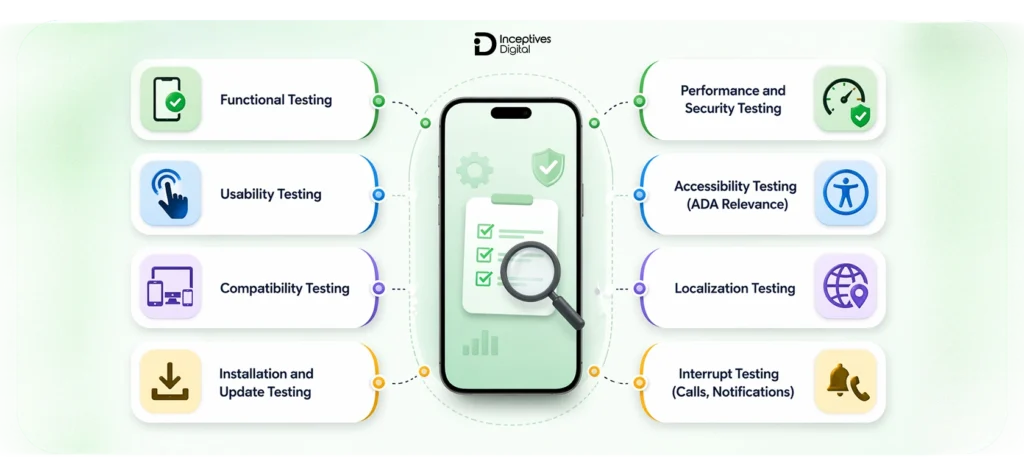
A rightly built mobile app testing strategy has to be accurate and should include the right types of testing layers, not just random testing scenarios. Each testing layer carries equal importance, and skipping any of these could result in costly errors in performance, security, and user experience.
1. Core Testing Areas
These are the essentials every mobile app must go through before release.
a. Functional Testing
This ensures the app works exactly as intended.
- Verifies core features and workflows
- Tests user actions like login, payments, navigation
- Validates API responses and backend integration
b. Usability Testing
Focuses on how real users interact with the app.
- Checks ease of navigation
- Evaluates UI clarity and design consistency
- Identifies friction points in user journeys
c. Compatibility Testing
Ensures the app performs consistently across devices.
- Different screen sizes and resolutions
- Multiple OS versions (iOS and Android)
- Various hardware configurations
d. Installation and Update Testing
Validates the app lifecycle from install to upgrade.
- Fresh installation behavior
- App updates without data loss
- Uninstall and reinstall scenarios
2. Performance and Security Testing
These layers are critical for long-term stability and trust.
a. What Is Mobile App Performance Testing
Mobile app performance testing assesses an application’s speed, stability, and responsiveness during various testing scenarios. It centers on:
- Load time and responsiveness
- Behavior under high traffic
- Memory and battery usage
b. How to Do Mobile App Performance Testing
- Simulate real-world network conditions (3G, 4G, Wi-Fi)
- Test under peak user loads
- Monitor CPU, memory, and battery consumption
- Identify bottlenecks and optimize performance
c. What Is Mobile App Security Testing
Security testing ensures that user data and app functionality are protected from threats.
- Data encryption validation
- Secure authentication and authorization
- API security checks
- Protection against data leaks
d. What Is Mobile App Penetration Testing
Penetration testing goes a step further by simulating real-world attacks to identify vulnerabilities.
- Ethical hacking techniques
- Identifying weak points in the system
- Testing resistance against unauthorized access
3. Advanced Testing Layers
These go beyond basics and help create a more refined, real-world-ready app experience.
a. Accessibility Testing (ADA Relevance)
Ensures the app is usable for people with disabilities.
- Screen reader compatibility
- Color contrast and readability
- Voice navigation support
b. Localization Testing
Validates the app for different regions and languages.
- Language translations
- Currency and date formats
- Cultural UI adjustments
c. Interrupt Testing (Calls, Notifications)
Test how the app behaves during interruptions.
- Incoming calls or messages
- Push notifications
- App switching and background behavior
You must conduct testing on every level of the application to confirm that your mobile application testing strategy meets both complete testing and actual user behavior requirements.
Step-by-Step Mobile App Testing Strategy
The mobile app testing process requires structured execution rather than random testing steps. You need to pay attention to specific essentials and potential dangers to achieve a stable mobile app. So, to help you do it in the right way, below is a step-by-step guide on how to do mobile app testing.
Step 1: Define Goals and KPIs
The best approach to start mobile app testing is to establish definite testing results that enable testers to assess their performance against pre-established goals during their testing activities, while completing their work in the most efficient time possible.
Focus on:
- Crash rates (aim for near-crash-free sessions)
- Load time benchmarks (fast response across networks)
- User journey success rates (can users complete key actions without friction?)
These KPIs guide what needs the most testing attention.
Step 2: Identify Devices and Platforms
Understandably, your app will not run in a constrained environment after publishing on the app stores. It will run on diverse classes of real devices (no specific configuration). So you have to test the app for different devices and screen sizes.
Key considerations:
- Real-world device mix based on your target audience
- Different screen sizes and hardware capabilities
- OS fragmentation (multiple Android and iOS versions in use)
Assuring the good performance of your app across various platforms begins with a vigorous device strategy.
Step 3: Choose Testing Approach
Decide how testing will be executed.
Manual testing works best for:
- Usability and UI validation
- Exploratory testing
- Real user behavior scenarios
Automation works best for:
- Regression testing
- Repetitive test cases
- Performance validation at scale
Most teams adopt a hybrid approach to balance speed and accuracy.
Step 4: Set Up Test Environments
Set up mobile app testing environments that are as close to real-world scenarios as possible.
Options include:
- Real devices for accurate performance insights
- Emulators and simulators for faster, cost-effective testing
Also include:
- Network simulation (3G, 4G, 5G, unstable connections)
- Different user conditions (low battery, background apps running)
Step 5: Execute and Monitor
Once everything is set up, testing moves into execution—but it shouldn’t stop at finding bugs.
Focus on:
- Structured bug tracking workflows (clear severity and priority levels)
- Continuous monitoring of app behavior
- Regular feedback loops between QA and development teams
This ensures issues are not just identified, but resolved efficiently.
Step 6: Optimize with Continuous Deployment
Modern apps require continuous updates, which makes ongoing testing essential.
A mobile testing strategy for continuous deployment ensures:
- Testing is integrated into every release cycle
- New features don’t break existing functionality
- Faster release cycles without compromising quality
This is the reasoning behind the shift-left testing approach, which starts early in development and not at the very end.
Doing mobile app testing in this way will convert your mobile app testing strategy into a standard approach, ensuring a better quality with each release.
Manual vs Automated Mobile App Testing
If you want a strong mobile app testing strategy, you should consider both instead of picking one between manual and automated mobile app testing. Manual testing helps in understanding the user behaviour, and automation speeds up the testing process when the same tests need to be conducted repeatedly.
Manual vs Automated Testing
| Factor | Manual Testing | Automated Testing |
| Speed | Slower | Fast |
| Accuracy | Human-dependent | Consistent |
| Best Use Case | UX and exploratory | Regression and load |
How to Automate Mobile App Testing?
Generally, automated mobile app testing involves 3 basic steps:
1. Framework Selection
The very first step is that you have to select a suitable automation framework for your app. For example, tools like Appium are widely used due to their cross-platform mobile app testing capability, supporting both Android and iOS.
2. Test Script Creation
Once the framework is in place, the next step is writing test scripts.
- Define test cases for critical user flows
- Automate repetitive scenarios like login, navigation, and transactions
- Ensure scripts are reusable and easy to update
3. CI/CD Integration
Automation becomes most useful when coupled with the development lifecycle.
- Run tests automatically on every build
- Catch bugs early in the development cycle
- Maintain consistency across releases
Real-World Example
How Appium Handles Mobile App Testing
Appium works by simulating real user interactions across devices. It enables teams to create one test script that is capable of functioning on both Android and iOS platforms. Its flexibility makes it a popular choice for teams building scalable automation frameworks.
Monitoring and Continuous Testing with Splunk
You can achieve real-time log monitoring, anomaly detection, and performance issue tracking by integrating Splunk into your testing workflow. When combined with automation, this helps teams not only run tests but also continuously observe how the app behaves in production environments.
A good blend of automated and manual approaches together makes a strong and thorough mobile app testing strategy, ensuring a scalable final product.
Mobile App Testing Tools and Platforms You Should Know
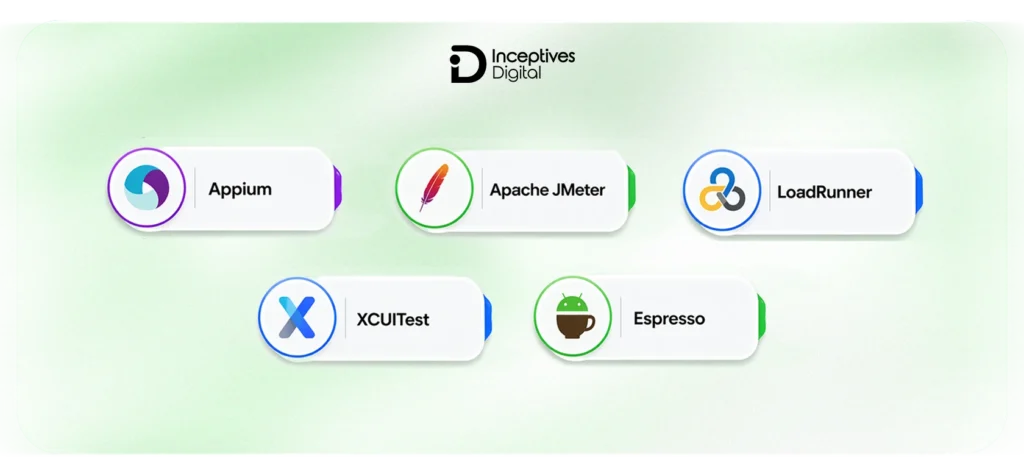
Your decision to choose the tool has a direct impact on your mobile app testing strategy. Each tool has specific roles like automation frameworks, performance tracking, and cloud platforms. There is no need to use every tool available, but the one that best suits your app type and testing requirements.
Popular Mobile App Testing Tools
These are widely used for functional and automated testing across mobile platforms.
- Appium
A flexible, open-source framework that supports both Android and iOS. Ideal for cross-platform automation with reusable test scripts. - Espresso
Designed specifically for Android apps. Known for fast execution and deep integration with Android Studio. - XCUITest
Apple’s native testing framework for iOS apps. Offers strong performance and reliability for UI testing within the Apple ecosystem.
Performance Testing Tools
Performance testing tools help evaluate how your app behaves under load and real-world conditions.
- Apache JMeter
Commonly used to simulate heavy traffic and measure app performance under stress. - LoadRunner
An enterprise-grade tool used for large-scale performance testing and detailed analytics.
Advanced Mobile App Testing Platforms
Modern testing goes beyond local environments. These platforms help scale testing across devices and conditions.
Cloud-Based Platforms
- Enable testing on real devices without maintaining physical labs
- Support multiple OS versions and device configurations
- Allow parallel test execution for faster results
AI-Driven Testing Tools
- Automatically generate and optimize test cases
- Detect UI changes and potential issues faster
- Improve test coverage with minimal manual effort
Which Tool Is Best for Mobile App Testing?
There’s no single “best” tool. The right choice depends on several factors:
- App type: Native, hybrid, or mobile web
- Scale: Small app vs enterprise-level product
- Budget: Open-source vs paid enterprise tools
- Team expertise: Familiarity with specific frameworks
- Testing goals: Automation, performance, or security
Most of the time, software development teams prefer to use more than one tool to maintain a balanced and flexible mobile app testing strategy.
Mobile Application Security Testing Strategy
Security isn’t something you add at the end. A strong mobile application security testing strategy is built into the development process from the start, ensuring user data stays protected and the app remains resilient against real-world threats.
What Is Mobile App Security Testing
Mobile app security testing focuses on identifying vulnerabilities that could expose sensitive data or allow unauthorized access. It ensures the app is secure at every layer, from the device to the backend.
Key areas include:
- Data protection
Safeguarding user data through encryption, secure storage, and safe data transmission practices - Authentication
Ensuring only authorized users can access the app through secure login systems, multi-factor authentication, and session management - API security
Validating that backend APIs are protected against unauthorized access, data leaks, and injection attacks
What Is Mobile App Penetration Testing
Penetration testing takes security a step further by actively simulating real-world attacks to find weaknesses before attackers do.
This involves:
- Mimicking hacker behavior to test app defenses
- Identifying vulnerabilities in code, APIs, and infrastructure
- Evaluating how the app responds to security breaches
The goal is to uncover hidden risks that standard testing might miss.
Who Offers the Best Mobile App Security Testing
There isn’t a single “best” provider. The right choice depends on your app’s complexity, industry, and compliance requirements.
Common options include:
- Enterprise security firms
Large organizations that offer end-to-end security testing and compliance support - Specialized QA and testing agencies
Focused teams that provide mobile-specific security testing and penetration services - Independent security experts
Ethical hackers and consultants who perform targeted penetration testing
Key Security Testing Practices
A strong security strategy relies on consistent and thorough validation across multiple areas.
Encryption Validation
- Ensure sensitive data is encrypted both at rest and in transit
- Verify encryption standards and implementation
Secure API Testing
- Test APIs for authentication flaws and data exposure
- Validate access controls and rate limiting
Reverse Engineering Risks
- Check how easily the app can be decompiled or tampered with
- Protect source code and sensitive logic from exposure
A well-implemented mobile app testing strategy always includes security as a core component, not an afterthought.
Native App Testing vs Mobile Web App Testing Strategy
Not all apps behave the same, which means your testing approach can’t be one-size-fits-all. A mobile web application testing strategy focuses on browser-based behavior, while native app testing goes deeper into device-level performance and OS integration.
Differences Between Mobile Web and Native Apps
Mobile web apps run in browsers like Google Chrome or Safari, so their performance depends on browser rendering and network conditions.
Native apps are installed on devices and built for platforms like Android or iOS, allowing better performance and direct access to device features.
When to Use a Mobile Web Testing Strategy
A mobile web testing strategy is most relevant when your app:
- Runs primarily in a browser environment
- Targets a wide audience across devices without requiring installation
- Needs strong cross-browser compatibility
- Depends heavily on responsive design and fast page load times
In these cases, testing should focus on browser behavior, layout consistency, and performance across different network conditions.
Mobile Web vs Native Testing
| Factor | Mobile Web Apps | Native Apps |
| Performance | Browser-dependent | Device optimized |
| Testing Scope | Cross-browser | Device + OS |
Understanding these differences helps you choose the right testing approach and ensures your mobile app testing strategy aligns with how your app is built and used in real-world scenarios.
Common Challenges in Mobile Testing (And How to Solve Them)
Even with a solid mobile app testing strategy, teams run into practical challenges that can slow down testing or create gaps in coverage. The key is not just identifying these issues, but knowing how to handle them efficiently.
Key Challenges in Mobile App Testing
1. Device Fragmentation
There are thousands of device combinations in the market, especially across Android and iOS.
- Different screen sizes and resolutions
- Hardware variations
- Device-specific behavior issues
Testing on every device isn’t realistic, which makes this one of the biggest challenges.
2. OS Updates
Frequent operating system updates can break existing functionality.
- New OS versions introduce compatibility issues
- Older versions still need support
- Features may behave differently across updates
3. Network Variability
Users don’t always have stable internet connections.
- Slow networks (3G, weak signals)
- Sudden connection drops
- Switching between Wi-Fi and mobile data
Apps must perform reliably across all these conditions.
4. Limited Testing Time
Tight deadlines often reduce the time available for thorough testing.
- Pressure to release quickly
- Incomplete test coverage
- Increased risk of bugs in production
Solutions
1. Device Prioritization
Instead of testing on every device, focus on the most relevant ones.
- Identify popular devices in your target market
- Prioritize high-usage OS versions
- Use analytics to guide testing decisions
2. Cloud Testing Platforms
Cloud platforms allow testing on real devices without maintaining physical labs.
- Access to multiple devices and OS versions
- Parallel test execution
- Scalable testing environments
3. Automated Regression Suites
Automation helps maintain quality without slowing down releases.
- Re-run critical test cases quickly
- Catch bugs after every update
- Reduce manual effort for repetitive tasks
Addressing these challenges proactively ensures your mobile testing strategy remains efficient, scalable, and aligned with real-world usage conditions.
Mobile App Testing Best Practices That Deliver Results
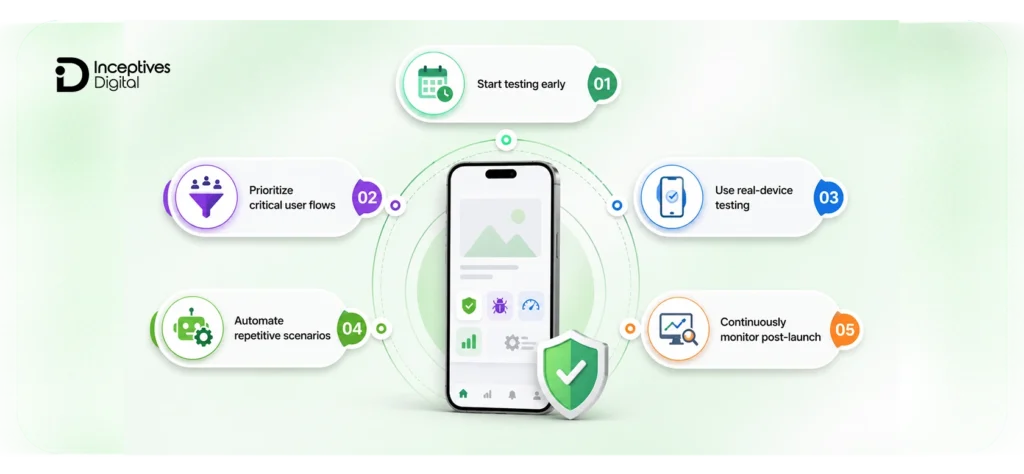
A strong mobile app testing strategy isn’t just about tools and processes. It’s about following practices that consistently improve quality, reduce risk, and keep your app stable as it grows.
1. Start Testing Early
Testing should begin as soon as development starts, not at the end.
- Catch issues before they become costly
- Validate features during development
- Reduce last-minute fixes
This aligns with the shift-left approach, where quality is built into every stage.
2. Prioritize Critical User Flows
Not all features carry the same importance. Focus on what users rely on the most.
- Login and onboarding
- Core actions (search, booking, payments)
- High-traffic user journeys
Ensuring these flows work flawlessly has the biggest impact on user experience.
3. Use Real-Device Testing
Simulators can help, but they don’t fully reflect real-world conditions.
- Test on actual devices for accurate performance
- Identify hardware-specific issues
- Validate real user scenarios
A mix of real devices and virtual testing works best.
4. Automate Repetitive Scenarios
Automation improves efficiency and consistency.
- Run regression tests quickly
- Reduce human error
- Free up time for exploratory testing
Focus automation on tasks that are repeated frequently.
5. Continuously Monitor Post-Launch
Testing doesn’t stop after release. It is a key part of mobile app maintenance after the launch.
- Track performance in real-world usage
- Monitor crashes and errors
- Gather user feedback
Ongoing monitoring helps catch issues early and maintain a high-quality user experience over time.
What is the Cost of Mobile App Testing?
The cost of mobile app testing can vary widely depending on how complex your app is and how thorough your testing strategy needs to be. A simple app with basic features will require less effort, while a feature-rich app with integrations, security layers, and high user traffic demands more extensive testing.
Estimated Mobile App Testing Cost Breakdown
| App Complexity | Estimated Cost (USD) |
| Basic App | $5,000 – $15,000 |
| Mid-Level App | $15,000 – $50,000 |
| Advanced App | $50,000 – $150,000+ |
Factors Affecting Mobile App Testing Cost
1. App Complexity
The more features your app has, the more testing it requires. Apps with integrations, real-time functionality, or advanced user flows need deeper validation across multiple scenarios.
2. Number of Devices
Testing across a wider range of devices increases cost. Supporting multiple screen sizes, OS versions, and hardware configurations requires more time and resources.
3. Automation Level
Automation can reduce long-term costs but requires an initial investment. Setting up automated test scripts and frameworks takes time, but it helps speed up testing in future releases.
4. Security Requirements
In fintech or healthcare app development, where sensitive data is involved, they require additional security testing. This includes penetration testing, encryption validation, and compliance checks, all of which add to the overall cost.
A well-planned mobile app testing strategy helps balance cost and quality by focusing resources where they matter most.
Future Trends in Mobile App Testing
Mobile testing is evolving quickly with changing mobile app development trends, users becoming more demanding, and release cycles getting shorter. A modern mobile app testing strategy is no longer just about finding bugs; it’s about predicting issues, automating decisions, and continuously validating performance in real time.
1. AI-driven testing
AI is changing how testing is planned and executed. Instead of relying only on manually written test cases, AI-powered systems can analyze user behavior, identify high-risk areas, and even generate test scenarios automatically. This helps teams improve coverage while reducing repetitive manual effort, especially in large-scale applications with frequent updates.
2. Continuous testing ecosystems
Testing is moving deeper into development workflows through continuous integration and deployment. In a continuous testing setup, every code change triggers automated tests, ensuring issues are caught early rather than after release. This approach reduces bottlenecks, improves release speed, and keeps quality consistent across updates.
3. 5G performance testing
With the rollout of faster networks like 5G, user expectations around speed and responsiveness are increasing. Apps now need to be tested under different network conditions to ensure they perform well, not just on fast connections but also under unstable or low-bandwidth environments. This makes performance testing more dynamic and real-world focused.
4. Security-first development
Security is no longer treated as a separate phase, especially in sectors like fintech app development. It is becoming part of the core development process. Modern testing strategies focus on identifying vulnerabilities early, validating encryption methods continuously, and ensuring apps are protected against evolving threats. This shift helps reduce risks before the app reaches production.
These trends show that the future of mobile testing is more automated, more continuous, and more closely tied to real-world usage patterns than ever before.
Final Thoughts: Building a Scalable Mobile App Testing Strategy
A well-planned mobile app testing strategy is what separates stable, high-performing apps from those that struggle with crashes, poor reviews, and early user drop-offs. From functional and performance testing to security, usability, and real-device validation, every layer plays a role in shaping the final user experience. When testing is treated as an ongoing process rather than a final step, it becomes much easier to deliver apps that perform consistently across devices, networks, and real-world conditions.
If you’re building or scaling an app, having the right testing approach in place can save a lot of time and costly fixes later in development. Many teams choose to work with experts who offer structured mobile app development services that include testing as a core part of the process, helping ensure the app is stable, secure, and ready for real users from day one.
Ready to 2x Your App’s Performance with Better Testing?
Improve app stability, performance, and user experience with a proven mobile app testing strategy built for real-world success.
Get Expert Help Now!FAQs Regarding Mobile App Testing Strategies
Mobile app testing is the process of evaluating an app to ensure it works correctly, performs well, and provides a smooth user experience across different devices, operating systems, and network conditions. It covers functionality, performance, usability, and security to make sure the app is reliable before release.
Mobile app testing typically accounts for around 15% to 25% of the total mobile app development cost, depending on the app’s complexity. Advanced apps with heavy security requirements, multiple devices, or automation needs may push this percentage higher.
Testing usually takes about 20% to 40% of the total mobile app development timeline. The duration depends on app complexity, number of features, and whether testing is done manually, through automation, or as part of a continuous deployment process.
Mobile app testing is performed by executing a combination of manual and automated tests. This includes checking core functionality, testing performance under different conditions, validating security, and ensuring compatibility across devices and operating systems.
Mobile app testing can be automated using frameworks like Appium, Espresso, or XCUITest. Test scripts are created for repetitive scenarios such as regression testing and then integrated into CI/CD pipelines to run automatically with every build or update.