Mobile app development in 2027 comes down to how you build, what you spend, and who builds it.
- If you want peak performance, go native; if cost and speed matter more, go cross-platform or hybrid.
- Skipping any of the seven stages, from research to post-launch support, means expensive rework later.
- Plan for 10,000–30,000 for a simple app, $100,000+ for a complex one, and 15–20% of the build cost yearly for maintenance.
- Starting with an MVP gets you real user feedback sooner, and most apps launch within two to twelve months.
- Build security and testing in from day one, and choose a monetization model that fits how your users behave.
- Choose a partner with a strong portfolio and a transparent process.
Have you ever wondered how apps like TikTok, Uber, or Instagram grew from simple ideas into billion-dollar businesses?
Each of these apps started by addressing a problem or need that brought millions of people to their platforms. But turning an app idea into a successful product takes more than inspiration.
From choosing the right features to managing development costs, businesses face several decisions before their apps reach the market. A clear development strategy helps avoid costly mistakes, and working with an experienced mobile app development company can help businesses make informed technical decisions.
This mobile app development guide for 2027 walks you through everything you need to understand: the development process, technologies, costs, timelines, and trends to help you plan your app with a clearer understanding of what’s involved.
What Is Mobile App Development?
Mobile app development is the process of building applications for smartphones and tablets. It starts with an idea and turns it into an app that people can use to shop, book services, manage tasks, or connect with others.
But building an app involves more than designing screens and writing code. Here’s what goes into the process:
- Planning: Understand who will use the app, what problem it solves, and which features matter most.
- UI/UX design: Map out how users will move through the app and create screens that are easy to navigate.
- Development: Build the app’s interface and connect it to databases, APIs, and other systems that support its features.
- Testing: Check whether features work correctly, user data stays secure, and the app performs well across devices.
- Launch and maintenance: Publish the app, fix issues, and make improvements based on user feedback.
Developers typically use Swift for iOS apps and Kotlin for Android apps. Frameworks like Flutter and React Native also allow teams to build apps for both platforms using a shared codebase.
The choice comes down to what your app needs to do and how you plan to develop it.
Mobile App Development Market and Outlook for 2027
As businesses plan mobile apps for 2027, market patterns reveal where users spend their time and which opportunities deserve investment.
- Consumers spent $167 billion on mobile apps in 2025, up 10.6% from 2024, as in-app spending increased.
- Global app downloads approached 150 billion in 2025, yet slower growth presents new challenges for customer acquisition.
- Users spent 5.3 trillion hours on mobile apps in 2025, so businesses must prioritize experiences that bring users back.
- Android captured 69.17% of worldwide mobile OS usage share in September 2026, while iOS held 30.81%.
Types of Mobile App Development Approaches
If you are thinking of building an application for your business, you should consider these key factors before choosing the type of application:
- Budget
- Target audience
- Performance needs
- Time to market
- Long-term goals
Below are the types of applications discussed in detail to help you decide between Native vs hybrid vs cross-platform app development.
1. Native App Development
Native applications are platform-specific, for example, Swift for iOS app development and Kotlin for Android app development. Native apps are best for performance and device hardware integration. However, native development is costlier and more time-consuming because you need to build separate versions for iOS and Android.
2. Cross-Platform App Development
Cross-platform applications are capable of running on both iOS and Android platforms with a single codebase powered by technologies like Flutter, React Native, or Xamarin. If you want to reduce development cost and time, you should definitely consider cross-platform app development.
3. Hybrid App Development
Hybrid applications merge web technologies such as HTML, CSS, and JavaScript with features of native apps, so they can run on multiple platforms at the same time. If you want to develop faster and access device features (camera, GPS, notifications) without developing completely in native, hybrid app development is a good option.
4. Progressive Web Apps (PWAs)
Web app development provides browser-based applications but with offline access like native apps, push notifications, and home screen installation. Web apps are easy to maintain but lack hardware integrations.
When to Choose Which Type:
| App Type | Best When You Need | Avoid If… |
| Native Apps (Swift, Kotlin) | Maximum performance, security, and advanced features (e.g., banking, gaming, AR apps) | Budget and timeline are limited, or you need both iOS & Android quickly |
| Cross-Platform Apps (Flutter, React Native, Xamarin) | Faster launches on both iOS & Android with a single codebase | You require highly complex, platform-specific features |
| Hybrid Apps | Quick, budget-friendly solution for simpler apps or MVPs | You want high performance and advanced UI/UX |
| Progressive Web Apps (PWA) | Wide accessibility, lightweight apps, easy updates without app store approvals | You need full device integration (camera, GPS, sensors) or complex offline functionality |
Top Mobile App Development Ideas for Startups & Businesses
If you’re planning to build an app but aren’t sure where to start, exploring proven mobile app development ideas can help you find the right direction. The most successful apps are not always the most complex; they are the ones that solve a real problem or improve an existing experience.
Here are some trending mobile app ideas that are gaining traction across industries.
Trending Mobile App Ideas
- AI-Powered Apps: Chatbots, virtual assistants, and personalized recommendations, built through AI chatbot development services, are in high demand across industries.
- Health & Fitness Apps: Workout tracking and diet planning through fitness app development, plus mental wellness and telehealth through healthcare app development, continue to grow.
- E-learning Apps: Platforms for skill-based learning, online courses, and microlearning experiences.
- On-Demand Service Apps: From food delivery app development to ride-hailing, home services, and logistics, these apps remain highly in demand.
- Fintech Apps: Digital wallets, expense tracking, investment platforms, and payment solutions, all starting with fintech app development.
- Social Networking Apps (Niche-Based): Community-driven apps targeting specific audiences or interests.
- E-commerce Apps: Personalized shopping experiences with AI-driven recommendations and seamless checkout, delivered by an ecommerce app development company.
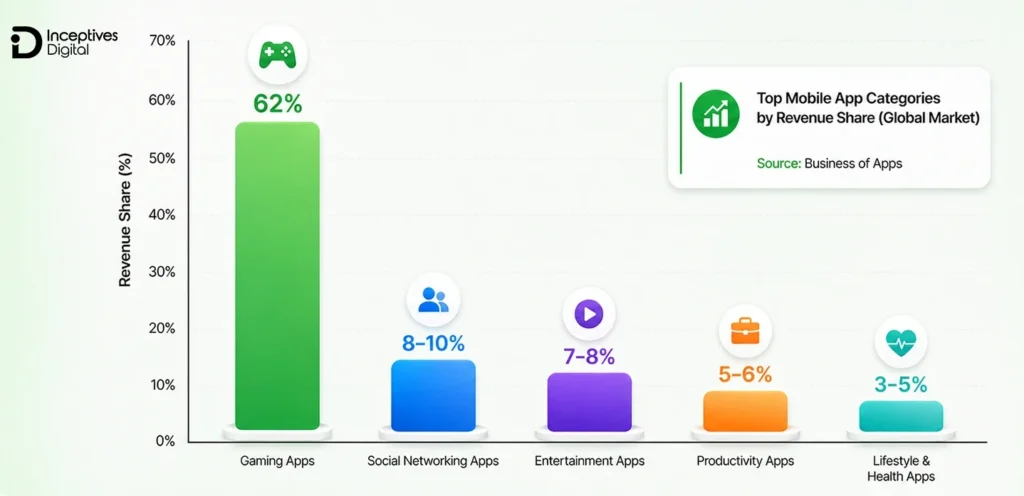
- Gaming Apps: Mobile gaming continues to dominate the app market, with high user engagement and strong revenue potential through in-app purchases, ads, and subscriptions.
How to Choose the Right App Idea
Before finalizing your concept, consider these key factors:
- Does your app solve a real problem?
- Is there proven market demand?
- Who are your competitors?
- Can your idea scale in the future?
Knowing how to validate your mobile app idea early can save time, reduce development costs, and increase your chances of building a successful mobile application.
Step-By-Step Mobile App Development Process
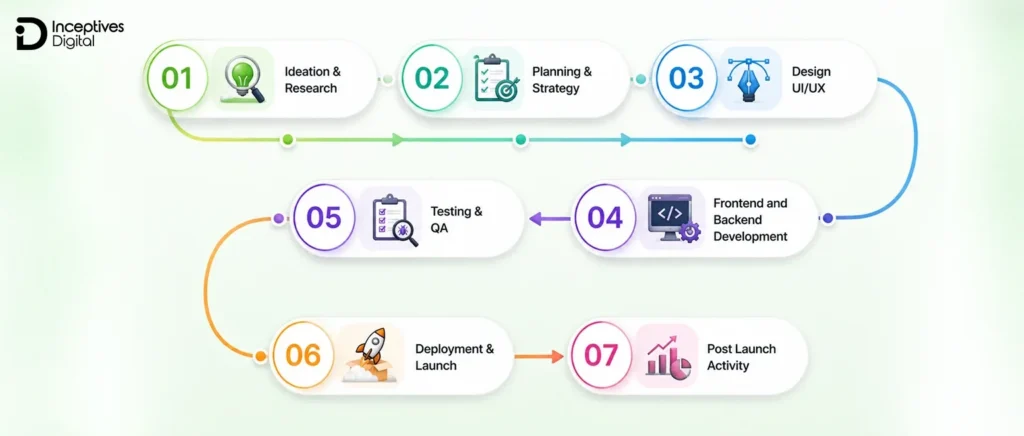
The mobile app development process isn’t just about writing code. You need to have an overall plan and structure for your development process to make sure that the app performs, is secure, and offers a great user experience. Below, we have identified the full mobile app development process and provided steps to take you through the process:
1. Ideation & Research
There are millions of applications published on the Play Store and App Store collectively, but how many do you know by name? There will definitely be a few of them. The reason behind most of the applications failing is poor planning and research.
For example, a research study revealed that 90% of mobile apps fail within the first year after launch, generally due to insufficient market research or poor implementation.
Below are the significant steps thorough market research should involve, and many teams compress them into a discovery sprint.
| Step | Description |
| 1. Problem Identification | Clarify the problem your app is gonna solve and how it is relevant to the users. |
| 2. Market Research | Examine current market trends, what’s in demand, and evaluate your idea. |
| 3. Competitor Analysis | Study your potential competitors to find market gaps, weaknesses, and strengths. |
| 4. User Persona Development | Do potential users’ profiling in terms of demographics, requirements, and behaviours. |
| 5. Value Proposition | Identify your app’s USP and why users should prefer it over competitors. |
| 6. Feature Brainstorming | Generate and prioritize feature ideas aligned with user and business needs. |
| 7. Feasibility Study | Evaluate the technical, financial, and operational viability of the concept. |
2. Planning & Strategy
After finalizing your mobile app development idea, it’s time to develop a strategy or a clear roadmap to avoid any delays and risks. Here is how to do that:
| Step | Description |
| 1. Define Objectives | Clearly articulate the purpose of the app, metrics for success (e.g. downloads, engagement, revenues), and anticipated deliverables (i.e. milestones). |
| 2. Feature Roadmap | Categorizes features based on user-derived priorities and business objectives. |
| 3. Technology Stack Selection | Choose the right programming language, frameworks, and tools that will allow flexibility to scale and future maintenance. |
| 4. Resource Allocation | Decide who takes on designer, developer, tester, and project manager roles. |
| 5. Budget Planning | Estimate the budget for design, development, testing, launch, and maintenance. |
| 6. Timeline & Milestones | Draft timeline for schedule development with achievable sprints or delivery phases. |
| 7. Risk Assessment | Apply app development risk management: identify technical, financial, and market risks, then plan mitigations. |
3. Design UI/UX
A user interface is the first thing visitors will encounter. And it is a fact that the first impression is the last impression. So a UI/UX design can make or break your app’s success. A study found that a good user interface can increase the conversion rate of an app up to 200%. Here is how you can achieve those numbers.
| Step | Description |
| 1. Requirement Gathering | Capture user requirements, business goals, and functional requirements through research in order to set the direction for the design. |
| 2. Wireframing | Make low-fidelity wireframes that demonstrate the app organization and navigation at the screen level. |
| 3. Prototyping | Use interactive prototyping to build a clickable prototype that visualizes the user flow and validates your idea. |
| 4. High-Fidelity Design | Design pixel-perfect UI screens in the final design tool for delivery, such as Figma, Adobe XD, or Sketch. |
| 5. Accessibility Compliance | Follow the WCAG guidelines to ensure the design can be usable for everyone, including those with a disability. |
| 6. Usability Testing | Conduct usability testing to get evidence from actual users on navigation, layout, and experience. |
| 7. Iteration | Use feedback from the usability testing to iterate on the designs before moving into development. |
4. Frontend and Backend Development
Once the design is ready, it is time to bring it to life by adding functionality and interactivity to your design. To do that, you have to develop a codebase for it. Adding a codebase means giving it a brain to function and interact. The app development process has two phases:
- Frontend development (for visual aspects)
- Backend API development (for structure, data, and logic)
Here are all the details about mobile app development phases:
| Aspect | Frontend Development | Backend Development |
| Definition | The client-side of the app that the user interacts with (UI & UX). | The server-side of the application. It handles data, logic, and integrations. |
| Main Role | The visual design, navigation, and interactive components of an app are designed to provide the user with a seamless experience. | The technology that allows an application to function. It handles how the application communicates with databases, APIs, authentication, and the server logic. |
| Technologies & Languages | Swift (iOS), Kotlin (Android), JavaScript, Dart (Flutter), React Native. | Node.js, Python, Java, PHP, Ruby, .NET, Firebase, AWS Lambda. |
| Key Components | Layouts, buttons, animations, gestures, typography, and responsiveness. | Databases (MySQL, MongoDB, PostgreSQL), APIs, cloud servers, and authentication systems. |
| User Interaction | Directly interacts with the end user (taps, swipes, inputs). | Works in the background to process user requests and send data to the frontend. |
| Performance Factors | All performance factors, including app responsiveness to the user request, overall load times, and the smoothness of element visuals. | Determines scalability, speed of data processing, and security. |
| Testing Focus | UI & UX testing, compatibility across devices, responsiveness, and accessibility (WCAG testing if required). | Security testing, API validation, database performance, and server load handling. |
| Dependencies | Dependent on the backend for data and business logic. | Relies on the frontend to display and interact with processed data. |
5. Testing & QA
Mobile app testing and quality assurance are more than bug hunting. It is a systematic way to assess functionality, performance, security, and cross-platform consistency before and after release.
An app that is poorly tested is at risk of high uninstall rates, issues driving compliance, and loss of consumer trust.
In a February 2026 survey of more than 1,000 U.S. app users, 15.4% of users found that they uninstall an app after a single crash, and more than half abandon it after two or three. You can avoid that outcome by following these core mobile app testing strategies:
Core Mobile App Testing Practices Include:
- Functional Testing: It verifies the functioning of features against specifications and business logic.
- Performance Testing: It determines how many users load, response times, and resource usage under load.
- Compatibility Testing: It tests the application on iOS, Android, device types, screen resolutions, and OS versions.
- Usability Testing: Confirms intuitive navigation, accessibility compliance (WCAG), and user experience standards.
- Security Testing: It simulates attacks to find vulnerabilities, reveals issues with encryption, and potential data leaks.
Tools Used:
- Appium
- Selenium
- Espresso
- XCUITest
6. Deployment & Launch
After passing the QA your application is ready to deploy and launch on app stores. You have to follow the Google Play Store and the Apple App Store guidelines, which include app security, design standards, data privacy, and performance requirements. The developers will create signed build files (APK for Android, IPA for iOS) and properly configure backend servers, APIs, and cloud hosting for the backend functionality of the application to be connected and operational.
Key steps include:
- App Store Compliance: Fulfilling rigid review standards from Apple and dealing with policy requirements from Google so that your app isn’t rejected or flagged for ethical violations.
- Release Management: Setting up signed binaries, app bundles, and provisioning profiles.
- App Store Optimization (ASO): Optimizing your titles, descriptions, keywords, and screenshots for discoverability.
- Phased Rollout: Using a staged rollout (via TestFlight or Google Play Console) and beta testing to get a sense of the app’s stability before full launch.
- Monitoring Tools: Setting up analytics (like Firebase, App Center) and crash reporting (like Sentry, Crashlytics) to monitor initial performance.
An app launch is more than pushing a “Publish” button. A solid product launch strategy covers stability, compliance, and discoverability so you maximize adoption from day one.
7. Post Launch Activity
Proper mobile app maintenance is essential to make sure your app runs smoothly even after the launch. The app’s launch is just the start of the process. Ongoing monitoring, revision, and improvement of app performance and functionality provide long-term app success.
Key activities typically include:
1. Bug Fixes & Patching: Fixing new errors and crashes reported by users rapidly preserves app stability.
2. Regular Updates: Regularly adding features, improvements to the user interface and user experience design, and enhancements to security preserve the value of the app in the marketplace.
3. Scalability Planning: Scalability planning helps to ensure proper functioning for existing and new users. For consideration is developing a business plan and user growth plans to alter the back-end APIs, databases, and infrastructure to provide growing user traffic while considering downtime.
4. User Feedback Integration: Regular collection of reviews and ratings, in-app analytics (for example, Mixpanel, Firebase Analytics) for improved usability in terms of use by end-users.
5. Security issues: Apply updates for regulatory compliance (for example, new GDPR, HIPAA, and PCI DSS updates were optioned). Patch all security-related vulnerabilities for data protection.
6 Performance Monitoring: Use Application Performance Monitoring (APM) tools (for example, New Relic, AppDynamics) to navigate load times and crashes, and overall responsiveness.
A well-planned post-launch strategy will help to ensure that your mobile app isn’t just surviving in an increasingly competitive market, but thrives because it provides end-user value in terms of consistent performance, user satisfaction, and business growth.
Ready to Turn Your App Idea Into a Product? Book a Free Strategy Call Today
Share your idea and get a clear scope, feature roadmap, and timeline from experienced mobile app strategists before you commit to a build.
Book a Free Strategy Call!Technology Stack for Mobile App Development
Choosing the right tech stack is critical for a successful mobile app development journey. The tech stack you choose will determine the performance, scalability, and long-term sustainability of your app.
1. Frontend Technologies
Native applications use Swift (iOS) and Kotlin (Android) for speed and reliability. For cross-platform apps, teams offer React Native app development and Flutter app development can deliver faster with “near-native” performance.
2. Backend Technologies
Backend technology enables applications, business logic, APIs, and integrations. Node.js is a common choice for real-time applications. Django and Ruby on Rails enable secure and rapid development. Many enterprises choose .NET for larger applications. GraphQL can also improve API efficiency and reduce the data load.
3. Databases
If your data is structured, MySQL or PostgreSQL is likely best for your app. If your data is unstructured, start with MongoDB. If you’re building chat or collaboration apps, your data probably needs to be updated immediately, so the Firebase Realtime Database will be a great choice.
4. Cloud Platforms
AWS, Azure, and Google Cloud deliver scalable hosting, AI services, and global reach.
5. DevOps & CI/CD
To manage your builds, testing, and deployments, use a tool like Docker, Jenkins, or Kubernetes. Your mobile app development team will have safer, faster releases!
In short, choose the right mobile app tech stack to set a strong foundation. It will influence the performance, scale, and evolution of your app and its ability to adapt over time. Here is a table of the technology stack by app type:
Mobile App Tech Stack by App Type
| App Type | Frontend | Backend | Database | Cloud / DevOps | Best For |
| Native iOS | Swift | Node.js / Django / .NET | MySQL / PostgreSQL | AWS / Azure + Docker, Jenkins | High-performance iOS apps with rich UI/UX |
| Native Android | Kotlin | Node.js / Ruby on Rails / .NET | PostgreSQL / MongoDB | Google Cloud + Kubernetes | Feature-rich Android apps with deep OS integration |
| Cross-Platform | React Native (JavaScript) / Flutter (Dart) | Node.js / Django | MongoDB / Firebase | AWS / Google Cloud + Jenkins | Cost-effective apps running on both iOS & Android |
| Hybrid Apps | HTML5, CSS, JavaScript (Ionic, Cordova) | Node.js / Django | MongoDB / Firebase | AWS + Docker | Simple apps with faster market entry |
| Progressive Web Apps (PWA) | Angular / React.js / Vue.js | Node.js | Firebase / MongoDB | Google Cloud | Lightweight, browser-based mobile experiences |
Future Trends in Mobile App Development
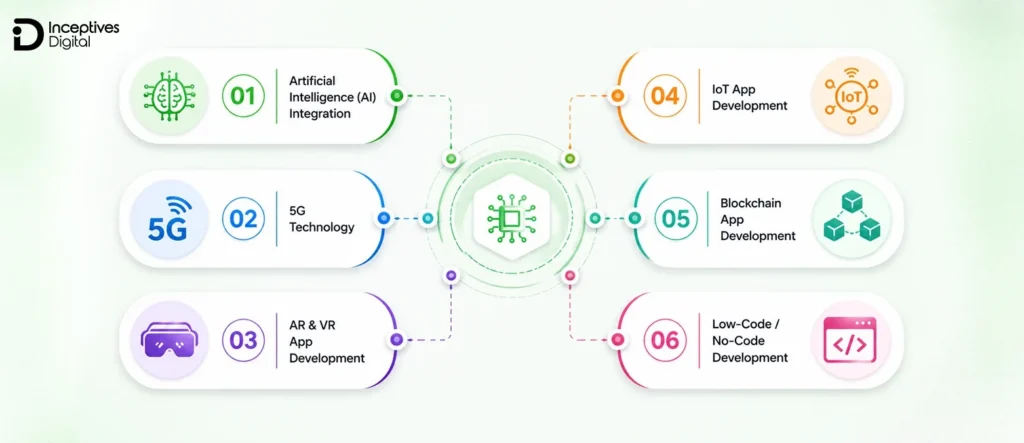
Technological advancements have had a great impact on every sector, and on mobile app development as well. You can achieve an edge on your competitors by effectively and smartly using these advanced technologies. Here are the trends you should consider:
1. Artificial Intelligence (AI) Integration
AI is now a core part of modern mobile applications. From personalized recommendations to chatbots and predictive analytics, AI helps apps deliver smarter, more customized experiences, and businesses increasingly rely on AI app development services to build them. It also improves automation, reduces manual effort, and strengthens decision-making within apps.
2. 5G Technology
5G is transforming mobile app performance by enabling ultra-fast connectivity and lower latency. This allows developers to build real-time applications such as high-quality video streaming apps, cloud-based gaming platforms, and instant communication tools without performance delays.
3. AR App Development & VR App Development
AR/VR technology is redefining user experiences across industries. AR app development enhances real-world environments by overlaying digital elements, making it widely used in retail, education, and eCommerce. On the other hand, VR app development creates fully immersive virtual environments, especially popular in gaming, training simulations, and real estate walkthroughs. Both technologies are driving the future of interactive mobile experiences.
4. IoT App Development
IoT app development is enabling seamless communication between mobile apps and smart devices. From wearable health trackers to smart home systems, IoT-powered apps allow users to control and monitor connected devices in real time. This technology is especially valuable in healthcare, logistics, and home automation industries.
5. Blockchain App Development
Blockchain app development is gaining popularity in industries where security, transparency, and trust are critical. It is widely used in fintech, supply chain management, and digital identity verification. Blockchain helps ensure secure transactions, decentralized data storage, and tamper-proof records, making mobile applications more reliable and secure.
6. Low-Code / No-Code Development
Low-code and no-code platforms are simplifying the mobile app development process by reducing the need for extensive coding. These tools allow faster development cycles, making it easier for startups and businesses to build and launch apps quickly while reducing development costs.
Why These Trends Matter
Adopting modern mobile app development trends helps businesses:
- Improve user experience
- Stay competitive in a fast-changing market
- Reduce development time with new tools
- Build scalable and future-ready applications
How Much Does Mobile App Development Cost?
Mobile app development cost can go anywhere from $10,000 for a basic application to $300,000 or more for a complex product. The final price depends on the features you need, the platforms you choose, and the amount of development work involved.
For example, a simple appointment booking app with user accounts and notifications will generally cost less than a ride-hailing platform that needs live GPS tracking, driver management, payments, and multiple user interfaces.
Before setting your budget, it helps to understand where your app fits in terms of complexity.
Average Mobile App Development Cost Breakdown
| App Complexity | Estimated Cost | Best For | Examples |
| Simple Apps | $10,000 – $30,000 | Basic features, straightforward screens, and limited backend requirements | Utility apps, basic business apps, simple MVPs |
| Mid-Level Apps | $30,000 – $100,000 | User accounts, payment integrations, admin dashboards, and moderate backend functionality | Fitness apps, booking platforms, eCommerce apps |
| Complex Apps | $100,000 – $300,000+ | Multiple user roles, real-time functionality, advanced integrations, and complex business logic | Ride-hailing apps, fintech platforms, large marketplaces |
Key Factors That Influence Mobile App Development Cost
Several variables directly impact the final budget:
- Features & Functionality
Real-time chat, payment gateways, AI features, and integrations increase cost. - Platform Choice
Building for both iOS and Android costs more than a single platform. - Development Approach
Native apps are generally more expensive than cross-platform solutions. - UI/UX Design Complexity
Custom animations and advanced user interfaces require more effort. - Backend Infrastructure
Scalable servers, APIs, and databases add to development costs. - Third-Party Integrations
Payment systems, maps, analytics tools, and APIs may involve additional costs. - Development Team Location
Hiring a mobile app development company in the US costs significantly more than outsourcing to offshore teams.
Hidden Costs in Mobile App Development Costs
Many businesses underestimate the ongoing expenses after development. These include:
- Mobile app maintenance cost (typically 15–20% of the initial cost annually)
- App Store Fees (Apple App Store & Google Play)
- Cloud Hosting & Servers
- Security Updates & Bug Fixes
- Feature Enhancements & Scaling
How to Optimize Your Mobile App Development Cost
Reducing the mobile app development cost strategically is crucial for a better chance of success for your mobile app. Despite saving money by compromising on quality standards, the best way to start is with what really matters initially.
One of the most effective ways to control your mobile app budget is to start with an MVP development. The main purpose of an MVP is to focus only on the core features that are needed for resolving the problem, ensuring a faster launch, and gathering real user feedback.
By building an MVP first, you can:
- Validate your app idea with real users
- Avoid spending money on unnecessary features
- Gather feedback for future improvements
- Reduce overall development time and risk
As your app gains traction, you can gradually invest in advanced features based on actual user needs. This phased approach not only controls your budget but also increases the chances of building a successful and scalable mobile application.
How Long Does it Take to Develop a Mobile App?
Once you have a rough idea of the cost, founders are often excited about their project and look to launch the product as soon as possible. But you have to keep yourself calm and composed, and ensure an optimal time for the app to get ready. The factors that affect the mobile app development timeline are almost similar to the cost.
Having a clear understanding of the mobile app development timelines helps in effective planning for launch, branding, and resource allocation. Here is the average time app development takes based on technical distinctions.
Average Mobile App Development Timeline
| App Complexity | Estimated Timeline | Best For |
| Simple Apps | 2 – 4 months | Basic apps with limited features |
| Mid-Level Apps | 4 – 8 months | Apps with backend integration and user accounts |
| Complex Apps | 8 – 12+ months | Advanced apps with real-time features and scalability |
Phase-Wise App Development Timeline
Breaking it down further helps you understand where time is actually spent:
- Research & Planning: 2 – 4 weeks
Market research, idea validation, and roadmap creation - UI/UX Design: 3 – 6 weeks
Wireframes, prototypes, and final interface design - Development: 2 – 6 months
Frontend and backend development based on features - Testing & QA: 2 – 4 weeks
Bug fixing, performance testing, and optimization - Deployment & Launch: 1 – 2 weeks
App store submission and approvals
What Affects the App Development Timeline?
Several factors can speed up or delay your project:
- Number of features and integrations
- Platform (single vs multiple platforms)
- Design complexity
- Third-party API dependencies
- Feedback and revision cycles
How to Launch Faster?
If speed is a priority, starting with an MVP (Minimum Viable Product) can significantly reduce your development timeline. It allows you to release a functional version of your app quickly and improve it based on real user feedback.
Get an Accurate Quote for Your Mobile App Project Within 48 Hours With No Obligation
Tell us your features, platforms, and budget range, and receive a transparent estimate you can plan your launch around.
Get My Free Quote!Monetization Strategies for Mobile Apps
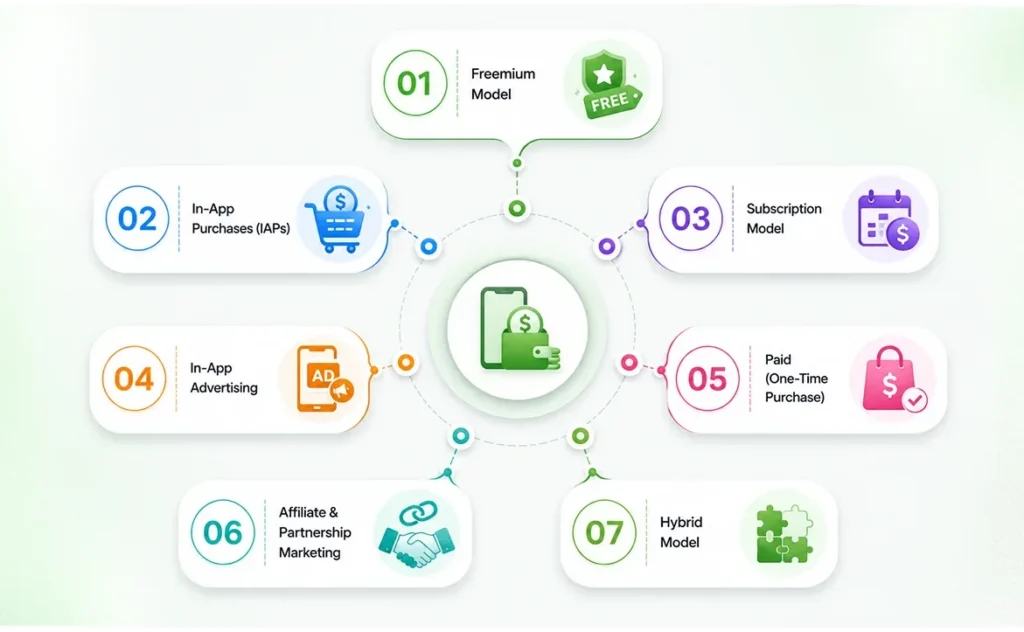
A smart mobile app monetization strategy is the key to making an app profitable, and the market is rewarding apps that get it right. As per the Sensor Tower’s State of Mobile 2026 report, in-app purchase revenue is recorded as $167 billion in 2025, up 10.6% year over year.
Here are the generally used mobile app monetization strategies that can really help you establish new revenue streams:
1. Freemium Model
In the freemium model, the basic features are available to users without a fee, but to access advanced and premium features, the user has to buy a plan. SaaS and productivity apps mostly use this model.
2. In-App Purchases (IAPs)
Applications like gaming and lifestyle use the In-app purchases model. The revenue is directly generated by selling in-app products like coins, skins, and premium features.
3. Subscription Model
Recurring payments could be monthly or yearly, and all payment models provide predictable revenue. Media apps like Spotify and Netflix rely primarily on this model. A great way to maximize retention is with tiered plans in case users want to upgrade (basic, premium, enterprise).
4. In-App Advertising
The use of ads, banners, interstitials, videos, or native ads can help a free application earn without upfront payments from the user. This is a scaling method, but it would warrant some consideration on the low-rate ends of these, because at high frequencies, the ads devalue the user experience. For example, leveraging platforms like Google AdMob will allow you to run highly-targeted chargeable campaigns as revenue grows.
5. Paid (One-Time Purchase)
Users pay a one-time download fee once and can access the features of the app. This model is typically best for niche or utility apps that limit ongoing costs.
6. Affiliate & Partnership Marketing
Apps that promote the partner’s products/services directly within the app and earn a commission when users convert are especially successful in the finance, travel, and e-commerce app areas.
7. Hybrid Model
Many apps are likely to apply some combination of strategies, for example, free download ads + optional subscriptions, combined to improve multiple revenue streams in an app.
Common Mistakes in Mobile App Development
Building a mobile app is a complex process, and even small missteps can lead to delays, increased costs, or poor user adoption. Understanding the most common mobile app development mistakes can help you avoid costly errors and improve your chances of success.
Skipping Proper Market Research
One of the biggest mistakes is jumping into development without validating the idea. Many apps fail because they don’t solve a real problem or lack demand in the market. Proper research, competitor analysis, and user validation are essential before writing a single line of code.
Overloading the App with Features
Trying to include too many features in the first version increases development time and cost while making the app harder to use. A better approach is to focus on core functionality through MVP development and expand gradually based on user feedback.
Ignoring User Experience (UX)
Poor design is one of the most common reasons users abandon apps. Many businesses overlook common UI/UX mistakes such as complicated navigation, inconsistent layouts, slow load times, and a lack of accessibility. Avoiding these common UI/UX mistakes ensures your app is intuitive, visually appealing, and easy to use, which directly impacts user retention and engagement.
Choosing the Wrong Technology Stack
Selecting the wrong tools or frameworks can limit scalability and performance, especially when weighing Flutter vs React Native Android app development. The stack should align with your app’s goals, target audience, and long-term growth plans.
Lack of Proper Testing
Skipping or rushing the testing phase often leads to bugs, crashes, and security vulnerabilities. A well-tested app ensures better performance, reliability, and user trust from day one.
Neglecting App Security
Security is often treated as an afterthought, which can lead to serious risks like data breaches and compliance issues. Implementing proper security measures from the start is essential, especially for apps handling sensitive data.
No Post-Launch Strategy
Many businesses focus only on development and launch, but ignore what comes after. Without regular updates, performance monitoring, and user feedback integration, even a good app can lose relevance over time.
Common Challenges in Mobile App Development & How to Overcome Them
Developing a mobile application entails more than pursuing a software coding exercise. It is about tackling technical, regulatory, and mobile app marketing challenges. Below are some hurdles encountered most commonly in the mobile app development process, along with tested solutions to overcome them:
1. Security & Data Privacy
Mobile apps generally handle sensitive user data, which makes them juicy targets for cyber crooks.
Solution: Follow mobile app security best practices: end-to-end encryption, GDPR/CCPA compliance, secure APIs, and timely vulnerability fixes. Run penetration testing for every release cycle.
2. App Store Rejection
App Store and Google Play Store maintain strict guidelines concerning everything, from UI/UX guidelines to data policy.
Solution: Before even formatting your app for submission, you must read App Store Review Guidelines and Google Play Policies to understand and check that your metadata is correct. Finally, stage your app in real world beta testing on TestFlight or through Play Console.
3. Device Fragmentation
Device fragmentation often compromises app performance when there are maximum possible device display sizes, the most distinct OS versions in history, and the level of hardware configurations. These items quickly determine how an application behaves and experiences.
Solution: Consistency across platforms would also mean testing an app with responsive design, various devices, and emulators, supplemented by cross-platform frameworks like Flutter or React Native.
4. Scalability
An application might work perfectly for a thousand users, but it will probably not work well for a million unless it has been built for scalability purposes.
Solution: Use a cloud platform (AWS, Google Cloud, Azure) and implement load balancing and a microservice architecture for scalability.
5. High Competition
Hundreds of thousands of applications make it a troublesome phase where discoverability and retention become issues.
Solution: Apply ASO strategies to increase your app store rankings, run user-centric paid ads, and use user-centered design with continuous feedback to improve retention.
How to Choose the Right Mobile App Development Company?
Choosing the right mobile app development company is one of the most important decisions in your app journey. The success of your project depends not just on the idea, but also on the team that builds it. A strong development partner can help you reduce risks, control costs, and deliver a scalable product, while the wrong choice can lead to delays, poor performance, and budget overruns.
Check Their Portfolio and Experience
Start by reviewing the company’s past work. A strong portfolio shows whether they have experience in building apps similar to your idea. Look for diversity in industries, design quality, and technical complexity. This helps you understand their capability beyond just marketing claims.
Evaluate Technical Expertise
A reliable mobile app development company should have expertise in modern technologies like Flutter, React Native, Swift, Kotlin, Node.js, and cloud platforms. Their ability to work with scalable architectures, APIs, and third-party integrations is essential for building a future-ready app.
Understand Their Development Process
A professional team follows a clear and structured mobile app development process that includes discovery, planning, UI/UX design, development, testing, and deployment. Transparency in their workflow ensures better communication, fewer misunderstandings, and smoother project execution.
Check Client Reviews and Testimonials
Client feedback gives real insight into how the company works. Reviews on platforms like Clutch or Google can help you understand their reliability, communication quality, and ability to meet deadlines.
Discuss Communication and Support
Effective communication is critical during app development. Make sure the company provides regular updates, clear reporting, and accessible support. Post-launch maintenance and long-term support are equally important for app stability and growth.
Compare Pricing and Value
While cost matters, the cheapest option is not always the best. Focus on value rather than price alone. A good mobile app development partner balances quality, scalability, and cost efficiency to deliver long-term results.
Wrapping Up
Mobile app development is not just a coding task. It’s a structured process that involves the right strategy, technology, design, and continuous improvement. From choosing the right development approach to understanding costs, timelines, trends, and common mistakes, every step plays a role in determining your app’s success in a competitive market. Managing all these tasks single-handedly can be hectic, and getting stuck somewhere is very likely.
If you’re planning to turn your idea into a scalable product, having the right team can make the journey much smoother. With the right mobile app development services, you can build an app that not only meets user expectations but also supports long-term business growth without unnecessary risks or delays.
Launch Your Mobile App With a Team That Builds, Tests, and Scales It With You
Partner with our experts to design, build, and launch a scalable app that drives real results. Start your project with confidence.
Start Your App Project!Mobile App Development FAQs
Below are the 7 stages of mobile app development:
1. Ideation and Research
2. Planning and Strategy
3. UI/UX Designing
4. Development
5. QA and Testing
6. Deployment and Launch
7. Maintenance
The main types of app testing include:
1. Functional
2. Usability
3. Performance
4. Security
5. Compatibility testing
AI will not replace mobile development but rather change it. AI tools can help be more efficient in coding, testing, and design recommendations. But to create a successful app, human creativity, strategy, and understanding of user needs are required, which AI will not equally possess. So, we do not see AI replacing developers. We see AI supporting developers in their productivity to enhance their overall output and innovation in mobile app development.
In short, yes. The global mobile app development market is estimated at approximately $585.68 billion. So, investing in mobile app development as a business provides access to take advantage of the huge market potential.
AI enhances mobile app development by automating wireframing, coding, and testing. It enables features like chatbots and fraud detection. While not replacing developers, AI speeds up the process, cuts costs, and aids in creating smarter, personalized apps.
Typically, an MVP (Minimum Viable Product) costs between $10,000 and $50,000, depending on features, platform, and development approach. Simple MVPs cost less, while apps with backend integration or custom UI may cost more.