Android app development is a step-by-step process of creating applications exclusively for the Android operating system. These are developed using modern programming languages such as Kotlin and Java on Android Studio, which is the official IDE (Integrated Development Environment) for Android.
Android devices are best selling smartphones due to their affordability and easy availability. As of early 2026 Android operating system has a global market share of 70–73% and has over 3 billion active users. Looking at these numbers, we know how big a market opens for a business after developing an Android application.
Good coding skills are not enough to develop a successful Android application. It requires a suite of skillsets, like UI/UX designing, performance optimization, security implications, and scalable architecture that can support growth with time. These tasks require deep technical expertise, especially when developing apps at higher scales. This is the reason most businesses prefer to hire an Android app development company.
You are in the right corner if you are looking for an easy explanation of Android app development. In this blog, we will walk you through the whole Android app development process, tools and technologies used, challenges, and how to tackle them. Let’s dive deep.
Understanding the Android Ecosystem
Android vs General Mobile App Development
Mobile app development is a general practice that covers multiple platforms such as iOS (Swift), Android, and cross-platform. Android app development is a subset of mobile app development that focuses on creating apps solely for the Android OS using Java or Kotlin. It requires different technologies, tools, architecture, and compliance requirements. Let’s begin with the working and the Architecture of the Android operating system.
Android OS Architecture Explained
An Android system provides robust system performance, flexible operation, and better data protection through a layered architectural design.
- Linux Kernel – Responsible for memory management, handling hardware, and security features.
- Android Runtime (ART) – Executes application code with high efficiency.
- Application Framework – Enables system services, which include Activity Manager and resource management functions.
- Applications Layer – Serves as the runtime environment for both system applications and user-installed applications.
Every app functions within a dedicated sandbox environment, which safeguards user information and maintains operational stability.
History and Evolution of Android Development
Android was initially created as an operating system for smart cameras by Andy Rubin and his team in 2003. As it started shifting towards smartphones, Google acquired Android in 2005 to enter the mobile market.
It was 2008 when the first commercial Android device, the HTC Dream, was launched. Early on, Android was only Java-based and dessert-themed, with a naming scheme that progressed from Cupcake to Pie. With every version update android applications improved performance, security, and user experience.
Android Studio became the official IDE as the Android development ecosystem changed with time. It improved both the development and debugging process. Subsequently, in 2017, Kotlin was introduced as an official language and is now favored by the majority of developers for Android app development.
Modern Android development uses Kotlin as its primary programming language and Jetpack Compose for user interface development, indicating a shift towards extensible, declarative, and maintainable architecture.
Android Studio and Modern Android App Development Tools
The official integrated development environment (IDE) for developing Android applications running on smartphones, tablets, TVs, and wearables is Android Studio. The core of modern Android development (MAD) is preferred development tools and libraries established by Google as guidelines for smooth application development.
Android Studio provides:
- Intelligent code editing
- Build automation with Gradle
- Device emulators for testing
- An AI assistant that helps generate and fix code
Essential Tools Required for Android App Development
- Kotlin (Programming Language).
- Jetpack Compose (Declarative UI Toolkit).
- Firebase (Backend Services Platform).
- Cloud Firestore (Cloud Database).
- Firebase Realtime Database (Realtime Database).
- Firebase Crashlytics (Crash Reporting Tool).
- Espresso (UI Testing Framework).
- JUnit 5 (Unit Testing Framework).
- Figma (UI/UX Design Tool).
- Adobe XD (Prototyping Tool).
- Git (Version Control System).
- GitHub (Code Hosting Platform).
Key Components of an Android Application
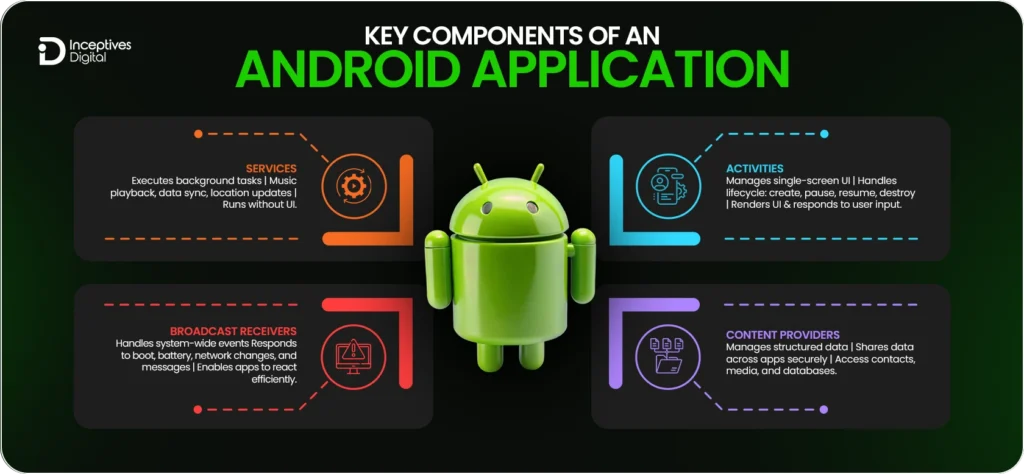
Android applications are built upon core components defined by the system architecture. These components allow a software developer to create quality and flexible code. Four such elements make up the Android applications: Activities, Services, Content Providers, and Broadcast Receivers. Each has its own function in the operation and interaction of the Application with the system.
Activities: Managing Single-Screen User Interfaces
An Activity creates a complete user interface presentation through a single display screen. Every time a user opens up an app, navigates to a new screen, or switches between them, an activity gets called.
Activities handle:
- Rendering UI elements
- Responding to user input
- Managing screen navigation
- Controlling lifecycle states such as creation, pause, resume, and destruction
The activity lifecycle needs to be understood because Android devices have a pattern of continuously switching between applications. The complete application lifecycle needs to be managed correctly because it protects system resources while keeping applications operational.
Services: Background Processes and Functionality
A Service operates background tasks that do not require a graphical user interface. Services operate when applications need to execute tasks that require ongoing processing beyond user interaction.
Common use cases include:
- Playing music in the background
- Syncing data with a server
- Tracking location updates
- Handling long-running network operations
Android development services deliver uninterrupted operational capacity through functionalities that enable users to perform multiple tasks simultaneously while their system resources remain optimized for extended battery life.
Content Providers: Sharing Data Across Apps
A Content Provider manages structured data that it shares with multiple applications. The system enables one application to securely access data from another application after users obtain the necessary permissions.
Content providers are typically used for:
- Accessing contacts
- Managing media files
- Sharing database records
- Handling structured app data
Android ecosystems strictly adhere to mutually standardized protocols that control data exchanges and security compliance.
Broadcast Receivers: Handling System-Wide Events
The role of the Broadcast Receiver is to examine outbound announcements or system requests. Those events can be initiated by the operating system or another application.
Examples include:
- Device boot completion
- Battery low notifications
- Network connectivity changes
- Incoming SMS alerts
Content providers and broadcast receivers allow apps to react to system changes without running all the time, improving efficiency.
Programming Languages For Android Development
It is a bit difficult to declare one as the best programming language because it totally depends on the project requirements. The one that is perfect for someone might not be for others. However, Android development has moved towards Kotlin-first from Java, while cross-platform app development tools are also quite popular now.
Java: The Traditional Language
Java served as the first language for developing Android and has found universality in use, particularly in legacy and enterprise applications. It offers:
- Strong community support
- A mature ecosystem
- Stable performance
Many older Android apps are still built and maintained in Java.
Kotlin: Google’s Preferred Modern Language
Android development has adopted a “Kotlin-first” approach since 2019, when Google announced it as the preferred choice, which has resulted in multiple new APIs and features that include Jetpack Compose for UI development being developed to support Kotlin users. It offers:
- Concise and cleaner syntax
- Built-in null safety
- Better readability and maintainability
C/C++ and Cross-Platform Tools
C and C++ are supported through the Android Native Development Kit (NDK). Developers prefer these languages in projects that require high computation and direct access to computer hardware. These are best for performance-intensive Android applications such as games and physics simulations. Through better memory management and faster program execution, C/C++ provides superior-performing Android applications.
For cross-platform Android apps, frameworks like:
- Flutter
- React Native
- Xamarin
Cross-platform frameworks facilitate Android and iOS app development using a single set of code, resulting in reduced development time and expense.
Top Android Development Tools for Debugging, Testing, and Performance
Apart from Android Studio, additional tools are required to ensure stability, performance optimization, and high-quality maintainable code of an Android application. Those tools, along with the IDE, provide deeper insights into the app’s behaviour. Here are the tools and their usage explained briefly.
Debugging Tools for Android App Development
Debugging tools assist developers in detecting and resolving problems that occur throughout the development process. Following are the most frequently used options:
- Logcat – Real-time system log monitoring
- Stetho – Android debug bridge for inspecting apps via Chrome
- ADB (Android Debug Bridge) – Command-line tool for device communication
Testing Frameworks for Android Apps
Testing plays a vital role in the stability, performance, and user-friendliness of an application. The most common testing tools used for Android devices are:
- Espresso – UI testing framework
- JUnit 5 – Unit testing framework
- Mockito – Mocking framework for automated tests
Performance Monitoring Tools
Performance tools track app efficiency, memory usage, and crashes:
- Firebase Crashlytics – Crash reporting and diagnostics
- LeakCanary – Detects memory leaks
- Profiler (built into Android Studio) – CPU, memory, and network performance tracking
All these Android app development tools play a very important role in developing fast, secure, and maintainable professional-grade Android projects.
Step-by-Step Guide on Android App Development Process

Android app development process involves different stages that need to be executed with technical precision. Each phase has significance that should not be underestimated, as neglecting any phase can result in costly errors that affect the reliability, stability, and user experience. This is a step-by-step guide with Android app development cost and timeline estimations.
1. Concept and Idea Validation
The first stage requires you to determine the application’s purpose and its potential market value. This phase verifies that your solution solves actual user problems while being possible to implement.
Tasks include:
- Identifying target users requires understanding both their needs and their difficulties.
- Conducting competitor and market analysis
- Outlining core features and monetization strategies
- Validating feasibility for technical, budget, and business constraints
Timeframe: 1–2 weeks
Estimated Cost: $500–$2,000
Early validation of the idea ensures avoiding costly mistakes later on in the development process.
2. Wireframing and Designing UI/UX
Once you validate and finalize your idea, it is time to visualize it. Designers create wireframes and prototypes to give a blueprint of how the application would behave when a user interacts with it. This is an important step to make sure that the user experience will be intuitive.
Tasks include:
- Low-fidelity wireframes to define layouts
- Uses high-fidelity interactive prototypes to show the visual design elements
- UI/UX testing and stakeholder feedback
- Ensuring accessibility, color schemes, navigation, and consistency
Timeframe: 2–4 weeks
Estimated Cost: $1,000–$5,000
A strong UI/UX design reduces user friction and improves adoption rates.
3. Coding and Development
This is the main and most crucial stage of the development process. It encompasses frontend development, backend development, API integrations, and the implementation of basic app logic.
Best Practices:
- Use Kotlin or Java.
- Implement reusable software components.
- Build architectural components using Android Jetpack and manage them throughout the lifecycle
- Seamless integration of databases, authentication services, and third-party APIs.
Timeframe: 6–12 weeks
Estimated Cost: $5,000–$30,000+
4. Testing and Debugging
Rigorous testing is essential for assuring the safety, functionality, and smooth user experience. This phase identifies any bugs and vulnerabilities to ensure a seamless launch on app stores.
Tasks include:
- Unit testing using JUnit
- UI testing with Espresso
- Integration testing for front-end and back-end workflows
- Performance monitoring and crash reporting via Firebase Crashlytics
- Debugging and fixing critical issues
Timeframe: 2–4 weeks
Estimated Cost: $1,000–$5,000
5. Deployment and Publishing on Google Play Store
The final stage ends with the application becoming available for end users. This process involves tasks like creating the application package, developing the store listing, and establishing the analytics system.
Tasks include:
- Creating signed APKs or AABs for release
- Establishing a Google Play developer account
- Writing the app description, including screenshots, and submitting the application
- Observing user responses together with reviews and system performance measurements after the product launch.
Timeframe: 1–2 weeks
Estimated Cost: $25–$100
Summary of Android App Development Process:
| Phase | Time | Estimated Cost | Key Outcome |
| Concept & Idea Validation | 1–2 weeks | $500–$2,000 | Feasible and validated idea |
| UI/UX Design | 2–4 weeks | $1,000–$5,000 | User-friendly wireframes and prototypes |
| Development | 6–12 weeks | $5,000–$30,000+ | Fully functional app |
| Testing & Debugging | 2–4 weeks | $1,000–$5,000 | Stable, optimized, and bug-free app |
| Deployment & Publishing | 1–2 weeks | $25–$100 | Live app with store presence |
| Total | 12–24 weeks | $7,525–$42,100+ | Complete Android app ready for launch |
A well-defined and planned Android app development process ensures efficient, risk-free, and application of the highest quality.
Types of Android Applications
Understanding the various categories of Android applications can help businesses in selecting the appropriate development strategy based on their budgetary constraints, performance expectations, and the characteristics of their intended audience.
1. Native Android Apps
Native apps are built specifically for Android using languages like Kotlin or Java. They offer deep OS integration, better performance, and full access to device features such as camera, GPS, and notifications.
Best for: High-performance apps, mobile game development, fintech, and complex applications.
2. Hybrid Android Apps
Hybrid apps use web technologies such as HTML, CSS, and JavaScript encapsulated within a native container, enabling cross-platform functionality from a single codebase across both Android and iOS platforms.
Best for: Startups and businesses looking for faster development with lower costs.
3. Web App for Android
Web app is a mobile-optimized website accessed via browser. They do not require installation from the Play Store and are simpler to maintain.
Best for: Content-based platforms, simple service portals, and budget-conscious projects.
Common Challenges in Android Development
Every project comes across technical and strategic challenges during development. Being aware of those pitfalls earlier helps in better planning and risk reduction, ensuring a smoother development process.
1. Device Fragmentation and OS Version Differences
Android operates on many devices with various screen dimensions, different hardware specifications, and multiple operating system versions. Achieving compatibility between smartphones, tablets, and foldable devices requires developers to conduct extensive testing while creating user interfaces that can adapt to different device types.
Challenge: Ensuring consistent performance across multiple devices and versions of Android.
2. Performance, Battery, and Memory Optimization
Device performance issues occur when applications lack efficient design. The system requires efficient background processing together with optimized code and resource management practices.
Challenge: Balancing performance against power efficiency while emphasizing feature-rich capability.
3. User Engagement and Retention Issues
Attracting downloads is only part of the equation. Many apps fail to retain users because the onboarding process is ineffective, the load times are excessive, and they do not provide continuous value to users.
Challenge: By providing a smooth and tailored user experience with periodical content updates for constant engagement.
Future of Android Development: Key Trends Shaping 2026 and Beyond
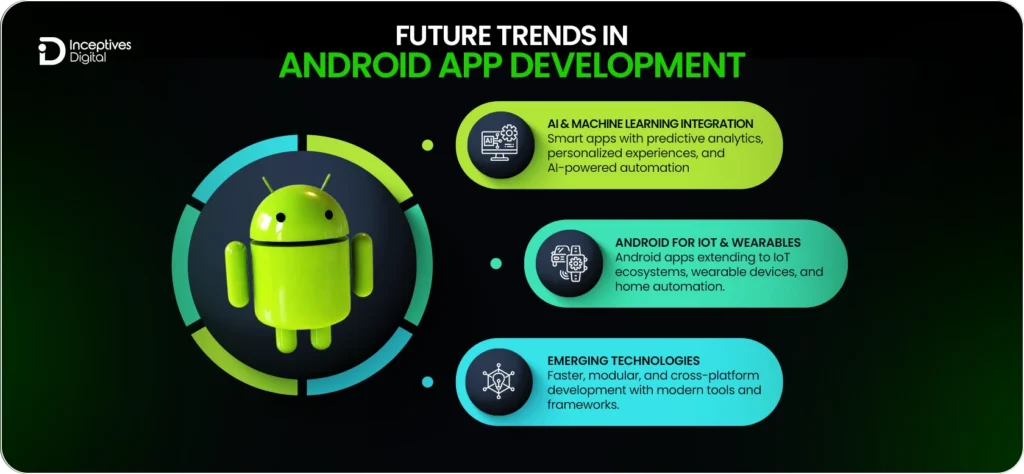
Android maintains its development through ongoing technological advancements that enhance system performance, user experience, and enable device-to-device communication. Businesses that align with these trends can build smarter, future-ready applications.
1. AI and Machine Learning Integration in Android Apps
Modern applications now use artificial intelligence as their fundamental component. AI improves the user experience by providing personalized recommendations, operating intelligent chatbots, and enabling organizations to forecast future trends through automated processes.
Android applications now use ML Kit and on-device processing tools to provide users with immediate insights while safeguarding their data and maintaining application performance.
2. Android for IoT Devices and Wearables
Android operates on smartphones but is expanding its reach toward IoT ecosystems, smart home devices, automotive systems, and wearable technology. The development of Wear OS and Android Things has created new possibilities for users to experience seamless application connectivity.
Businesses can now create applications that enable users to move between their smartphones, smartwatches, TVs, and IoT devices without interruptions.
3. Emerging Technologies: Flutter, Jetpack Compose, and Instant Apps
Modern development frameworks create new methods for building Android applications.
- Flutter enables developers to create cross-platform applications at a faster pace because it requires only one codebase.
- The declarative approach that Jetpack Compose uses makes it easier to create user interfaces.
- Instant Apps provide users with access to app features, which they can use without needing to download the complete application.
The technologies permit quicker development processes while developers gain more design options, and all users receive better access to the products.
Final Thoughts on Android App Development
Android app development is continuously improving with better tools, languages, and UI design practices. The success of your Android app depends on planned and researched backed decision making. You should be well prepared for the upcoming challenges and keep evolving with the emerging trends.
If you are thinking of launching a startup or expanding an already developed product, the best way to do that is by collaborating with an experienced mobile app development company. Choosing the right partner can make a notable difference in your app journey. They know the common pitfalls, accurate budgeting, and a smooth launch, making sure your app successfully attracts and retains users.
Launch a High-Impact Android App That Drives Growth
Stop planning and start building. Get a powerful, scalable Android app designed to attract users, increase engagement, and generate measurable business results.
Book Your Android App ConsultationFAQs About Android App Development
The process of Android app development involves creating software applications designed to function on devices that operate the Android operating system, which includes smartphones, tablets, and wearable technology.
Kotlin is the main choice for current Android app development, but Java is widely adopted too and is fully supported.
The time required to develop an Android application depends on its complexity because basic apps need 2 to 3 months for completion, while complex apps with advanced features need 4 to 6 months or more to develop.
Absolutely yes!; beginners may start with learning Android development, but learning the basic concepts of programming will make the learning process all too easy and quicker!