


- A clear user problem should guide every decision about AI.
- AI can speed up development, but it cannot replace product judgment.
- Working AI-generated code is not necessarily ready for production.
- Poor data and missing context often lead to unreliable AI responses.
- The most powerful AI model is not always the best choice.
- Security risks become harder to manage when addressed too late.
- Users should remain in control of how AI suggestions affect their work.
- Traditional software testing cannot catch every AI-related failure.
- AI operating costs can rise quickly as more people use the app.
- A successful launch depends on continued monitoring and clear ownership.
- High AI usage means little if users cannot complete meaningful tasks.
AI makes app development feel faster.
You can generate code, create screens, draft product requirements, build prototypes, test prompts, connect APIs, and move from idea to demo much faster than before.
That speed is useful. It is also dangerous.
The biggest mistake when building apps with AI is assuming that faster output means better product decisions. AI can help you build. It cannot fully understand your users, business rules, security risks, data quality, monetization model, or long-term maintenance needs unless you define those clearly.
From our experience in AI app development services for mobile apps, web platforms, marketplaces, and healthcare products, AI rarely fails because it cannot generate something. The real problems usually appear later: the workflow is unclear, the code is hard to maintain, the AI output is unreliable, user trust is weak, costs rise with usage, or nobody owns the system after launch.
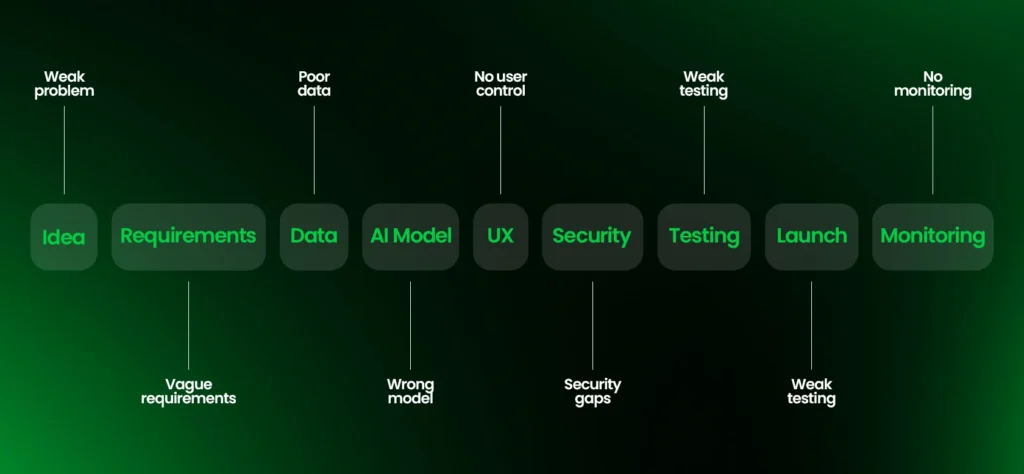
The most common mistakes when building apps with AI include starting without a clear product problem, letting AI define requirements, trusting AI-generated code too quickly, using poor data, choosing the wrong model, skipping security, ignoring user control, underestimating AI costs, testing like a normal app, and launching without monitoring.
Let’s break them down in the order they usually happen.
Mistake 1: Starting With AI Instead Of A Real Product Problem
Many AI app ideas start with the wrong sentence.
“We want to build an AI app.”
That sounds exciting, but it is not a product strategy.
A stronger starting point comes from product strategy consulting:
“We want to help a specific user complete a specific task faster, better, or with less manual work.”
AI is useful when it improves a real workflow. That workflow may involve writing, searching, booking, analyzing, summarizing, recommending, classifying, matching, reviewing, or automating. But the user problem comes first.
| Weak Starting Point | Better Starting Point |
| We need an AI app | We need to reduce manual intake work for clinic staff |
| Add AI recommendations | Help users choose the right product based on budget and need |
| Build an AI chatbot | Let customers get approved answers without waiting for support |
| Make an AI marketplace | Help buyers find the right provider faster |
| Use AI for documents | Turn messy files into structured summaries for review |
Before building, ask:
- Who is the app for?
- What problem happens often enough to matter? Review how to validate your mobile app idea before committing to development.
- What does the user do today instead?
- What does the user do today instead?
- Where exactly does AI improve the workflow?
- What should AI not do?
- How will success be measured?
- Will users trust the output enough to act on it?
For example, “AI healthcare app” is too broad.
A better product problem would be:
“Clinic staff need to convert patient intake notes into structured summaries before provider review.”
Now AI has a clear role. The app has a workflow. The product team can define inputs, outputs, permissions, review steps, and success metrics.
That is how useful AI apps start. Many common reasons digital products fail begin with an unclear problem.
Mistake 2: Letting AI Define The Requirements For You
AI can help write product requirements, but it should not invent the product’s logic.
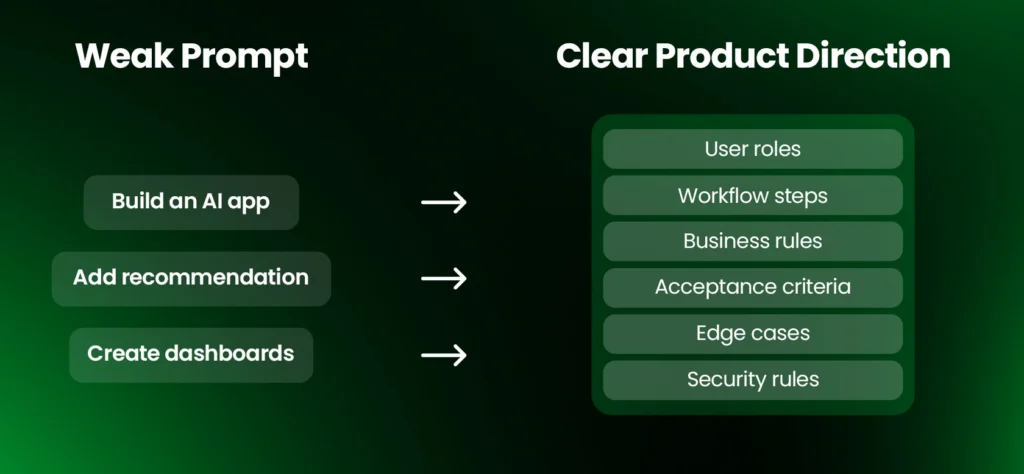
If the product brief is vague, AI fills the gaps. Those gaps often become missing validations, broken edge cases, weak user permissions, confusing screens, and business rules that do not match how the company actually works.
This is one of the most common AI app development mistakes because the early output looks polished. A generated requirement document can sound complete while quietly ignoring the details that matter.
| Vague Prompt | Better Product Direction |
| Build a booking app with AI | Build a salon booking app where users select services, view staff availability, pay deposits, receive reminders, and reschedule within policy |
| Add AI recommendations | Recommend three options based on user history, location, budget, availability, and saved preferences |
| Create an admin dashboard | Show users, payments, AI usage, failed outputs, support tickets, flagged content, and subscription status |
| Add AI search | Search approved content only, respect user permissions, and show source references where available |
A Discovery Sprint can clarify these requirements. Before using AI to generate requirements, define:
- User roles
- Core workflows
- Business rules
- Required data
- User permissions
- Acceptance criteria
- Edge cases
- Error states
- Payment rules
- Security expectations
- Admin needs
Our opinion is simple: AI performs better when the product team gives it boundaries.
A strong product brief, supported by digital product development, turns AI into an accelerator. A weak product brief turns AI into a confident guesser.
Mistake 3: Trusting AI-Generated Code Too Quickly
AI-generated code can look clean and still be wrong.
This is especially risky for non-technical founders because the code may run in a demo, show the right screen, and appear functional. But production software needs more than a working first impression. Custom software development requires reviewable architecture and maintainable code.
AI-generated code can still have:
- Missing input validation
- Weak authentication checks
- Poor error handling
- Duplicate logic
- Hardcoded values
- Inefficient database queries
- Exposed API keys
- Inconsistent architecture
- Security vulnerabilities
- Dependencies nobody reviewed
- Code the team does not fully understand
A simple analogy: AI-generated code is like a contractor finishing a room very quickly. It may look complete, but someone still needs to inspect the wiring, plumbing, structure, permits, and safety.
The same applies to apps.
Every AI-generated feature should go through:
- Human code review
- Unit testing
- Integration testing
- Security review
- Performance testing
- Documentation
- Developer ownership
This does not mean AI coding tools are bad. The AI app builders versus human developers comparison helps clarify their limits. They are extremely useful when guided by someone who understands architecture and product behavior.
The risk is not using AI to code.
The risk is shipping code nobody has properly reviewed.
Mistake 4: Giving AI Too Little Context Or Too Much Context
AI needs the right context.
Not no context. Not every document your company has ever created.
Too little context makes AI guess. Too much context makes the output noisy, slower, inconsistent, and sometimes more expensive.
A founder may paste a long business document into an AI tool and ask it to build the app. A developer may point AI at too many files and ask for a change. In both cases, AI may focus on the wrong details or miss the actual requirement.
| Useful Context | Usually Not Useful |
| Product goal | Long unrelated strategy documents |
| User roles | Old unused requirements |
| Current workflow | Random meeting notes |
| Tech stack | Duplicate feature ideas |
| API contract | Outdated technical decisions |
| Database structure | Entire codebase for a small task |
| Security rules | Vague brand language |
A practical fix is to create a short project context file that includes:
- Product summary
- Main users
- Core workflows
- Tech stack
- Design rules
- Data rules
- Security constraints
- API standards
- Features that are not in scope
- Things AI should avoid
Context should act like a map, not a warehouse.
When context is clean, AI can help faster. When context is messy, AI often multiplies confusion.
Mistake 5: Trying To Build The Whole App In One Shot
One-shot AI generation is useful for prototypes.
It is not a reliable strategy for production systems.
A prompt like “Build me a complete AI fitness app with login, workouts, nutrition, payments, admin dashboard, progress tracking, notifications, and AI recommendations” may create something impressive quickly. But the architecture is usually shallow. The frontend, backend, database, AI logic, and payment rules may not be designed to work together long term. A mobile app technology stack guide helps explain these dependencies.
A better approach is to use MVP development and build in controlled layers:
- Define the user workflow.
- Design the data model.
- Build authentication.
- Create the core user flow.
- Add the AI capability.
- Add payments or subscriptions.
- Add usage limits.
- Add admin controls.
- Test the full workflow.
- Monitor behavior after launch.
For example, instead of asking AI to build a complete AI fitness app, start with:
“Create the onboarding flow that collects user goals, injuries, workout schedule, equipment access, and experience level.”
That is specific enough to test. The AI MVP versus full product decision also helps control initial scope.
Good apps are not built from one large prompt. They are built from clear product decisions connected layer by layer.
Mistake 6: Choosing The Biggest Model Instead Of The Right Model
The most advanced AI model is not always the right model for your app.
Sometimes a smaller, faster, cheaper model is better. Machine learning development services should match model selection to the task. Sometimes a stronger model is justified. The decision depends on the task, risk, latency, cost, and expected output quality.
| App Need | Better Model Strategy |
| Simple classification | Use a smaller, faster model |
| Short text rewriting | Use a cost-efficient language model |
| Long document review | Use retrieval plus a stronger reasoning model |
| High-volume support chat | Use routing, caching, and escalation |
| Sensitive professional workflow | Use AI plus human review |
| Repeated prompts | Use reusable context and caching |
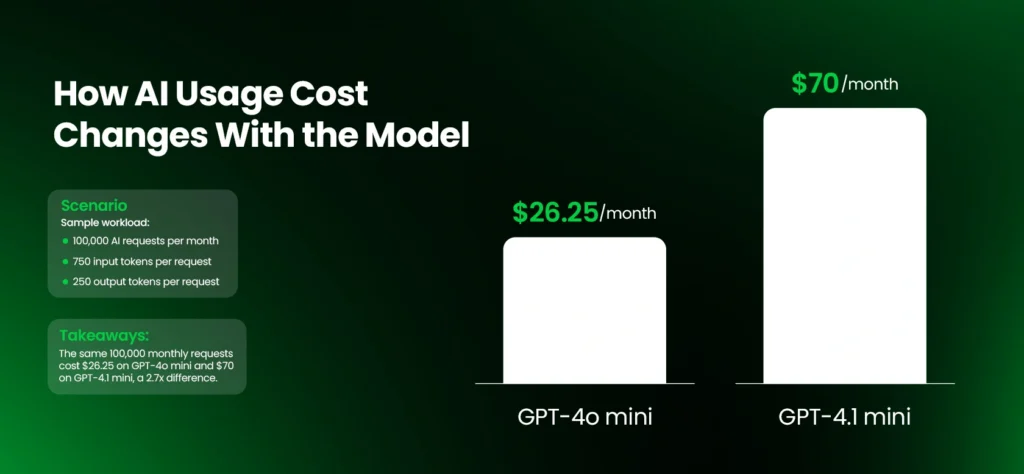
OpenAI explains that API usage is priced by tokens, and costs vary depending on model, input, output, and cached usage.
That means model choice affects more than technical quality. It affects margins.
If your app sends long prompts to an expensive model for every free user, the cost can grow quickly. If a simple categorization task uses a model designed for complex reasoning, the product may become slower and more expensive than necessary.
The question is not:
“Which model is the most powerful?”
The better question is:
“Which model gives the right result at the right speed, risk level, and cost?”
Mistake 7: Treating Data As An Afterthought
AI apps are only as useful as the data, documents, examples, and context they rely on.
Poor data creates poor output.
In AI app development, data issues can include:
- Outdated documents
- Duplicate records
- Missing fields
- Biased examples
- Unstructured files
- Inconsistent naming
- Sensitive data mixed with general data
- Data users should not be allowed to access
- No clear source of truth
This becomes especially important for apps that answer from company documents, product catalogs, policies, user records, or internal knowledge.
For those products, AI chatbot development services may use retrieval-augmented generation, often called RAG, to retrieve relevant information before the AI answers. But RAG is not a shortcut around data quality. If the source documents are outdated, inaccurate, or permission-sensitive, the AI can still produce risky results.
Before building, define:
- What data the AI needs
- Where the data comes from
- Who owns it
- How often it changes
- Which data is sensitive
- Which users can access it
- How data will be cleaned
- How output will be validated
- How source material will stay updated
In business apps, data readiness is often more important than model excitement. Assess whether your business is AI-ready before integrating models.
The model may be powerful. But if the app feeds it the wrong information, users will not trust the result.
Mistake 8: Ignoring Privacy, Security, And AI Governance
AI apps often handle sensitive inputs: user messages, documents, images, audio, locations, health details, payment data, business records, or private company knowledge.
Security cannot be added at the end.
OWASP’s Top 10 for LLM Applications identifies risks such as prompt injection and sensitive information disclosure in large language model applications. NIST’s Generative AI profile also frames AI risk management as part of the AI lifecycle, not a one-time checklist.
The mobile app security best practices also apply to many AI-enabled products. Common AI app security risks include:
- Prompt injection
- Sensitive data leakage
- Weak authentication
- Poor role-based access
- Unvalidated AI output
- Unsafe AI agent actions
- Exposed API keys
- Over-permissioned integrations
- Missing audit logs
- System prompt leakage
- Uncontrolled tool access
Here is the non-technical version:
If your AI app can access customer data, internal documents, payment information, admin tools, or third-party systems, it should not be treated like a helpful employee with unlimited permissions.
The app needs boundaries.
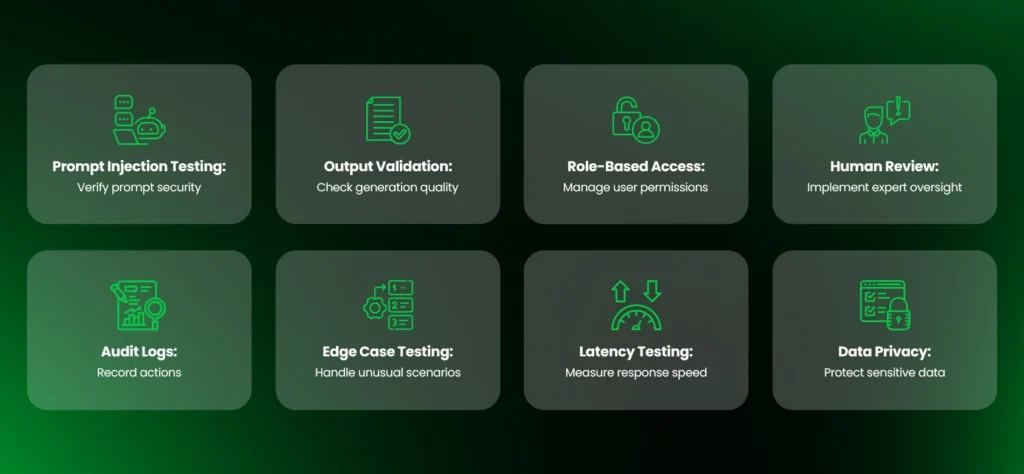
Practical controls include:
- Role-based access
- Input validation
- Output validation
- Human approval for sensitive actions
- Audit logs
- Data minimization
- Encrypted storage
- Secure API key handling
- Rate limits
- Security testing
- Restricted tool access for AI agents
This becomes even more important when AI can take action, not just answer questions.
A chatbot that suggests a response is one level of risk. An AI agent that can send emails, update records, trigger refunds, create bookings, or change account settings is a different level of risk. AI agent development requires tighter action controls.
When AI can act, governance becomes product architecture.
Mistake 9: Testing AI Apps Like Normal Apps
Traditional QA is not enough for AI-powered apps. Start with proven mobile app testing strategies, then add AI-specific evaluations.
A normal app is tested to confirm that screens, forms, buttons, APIs, payments, and workflows behave correctly.
AI apps also need testing for output quality, hallucinations, unsafe responses, messy inputs, bias, latency, model behavior, and changing performance over time.
| Test Type | What It Checks |
| Functional Testing | Screens, forms, login, payments, APIs |
| AI Output Testing | Accuracy, usefulness, tone, format |
| Edge Case Testing | Strange, incomplete, or messy inputs |
| Security Testing | Prompt injection, data leakage, role bypass |
| Performance Testing | Latency, load, API response time |
| Human Review Testing | Whether users can verify or correct output |
| Real-World Testing | How the app performs with actual users and data |
For example, an AI resume app should not only test whether it generates feedback.
It should test whether the feedback:
- Matches the target job
- Avoids false claims
- Handles incomplete resumes
- Uses appropriate tone
- Gives users editing control
- Avoids discriminatory suggestions
- Works with different resume formats
- Performs consistently under repeated use
A Generative AI development company building an AI support app should test whether answers come from approved sources, whether the AI admits when it does not know, and whether users can escalate to a human when needed.
AI testing is not only about whether the app works.
It is about whether the output is reliable enough for the user’s context.
Mistake 10: Designing Around AI Output Instead Of User Control
Many AI apps treat the AI result like the final answer. This overlaps with common UI UX design mistakes.
That is often a UX mistake. UI UX Design must account for how users verify AI output.
Users need to understand, review, edit, approve, reject, or question AI output. This is especially true in writing, healthcare, finance, legal, education, HR, operations, and customer support workflows.
Better AI UX patterns include:
- Showing source references when possible
- Explaining why a recommendation was made
- Letting users accept, reject, or edit AI output
- Saving history
- Allowing undo
- Showing review states
- Letting users report poor answers
- Providing fallback paths when AI fails
- Avoiding false certainty
A useful AI app does not force blind trust. It gives users a better workflow.
WordSmith Pro is a good example from our work. The product was not simply AI text generation. It was built around a writing improvement workflow: users could input text, receive AI and language review, see suggestions, accept or reject edits, track progress, and manage access through subscriptions and admin controls.
The AI layer mattered. But the product value came from the full experience around it.
That is the difference between an AI output and a usable AI product.
Mistake 11: Underestimating AI Cost, Latency, And Scalability
AI apps have operating costs that grow with usage. Our AI native product development costs guide examines the wider budget.
Every prompt, output, document scan, image request, embedding search, audio processing, or AI agent action can create cost. These are among the hidden costs of custom software.
If the app has free users, long prompts, retries, heavy outputs, or unlimited usage, costs can rise quickly.
| Cost Driver | Why It Matters |
| Token Usage | Longer inputs and outputs cost more |
| Model Choice | Larger models may cost more and respond more slowly |
| Retried Requests | Failed or poor outputs can double cost |
| Vector Search | RAG adds storage and retrieval cost |
| Image Or Audio Processing | Multimodal tasks often cost more |
| High Traffic | Infrastructure and rate limits become important |
| Free Plans | Free users can create real AI costs |
| Long Context | More context can increase latency and cost |
Practical fixes include:
- Add usage limits
- Route simple tasks to smaller models
- Cache repeated context
- Track cost per user
- Track cost per successful output
- Use plan-based limits
- Optimize prompts
- Avoid unnecessary long context
- Monitor latency
- Reduce failed retries
AI app scalability is not only about servers. Mobile app performance optimization techniques remain important as usage grows.
It is also about whether the app can afford its own usage. Backend API development can support metering, limits, and efficient requests.
A product can look popular and still lose money if each user costs too much to serve. Compare mobile app monetization strategies for businesses against actual usage costs.
Mistake 12: Launching Without Monitoring Or Ownership
AI apps are not set-and-forget products.
After launch, user behavior changes, source documents become outdated, prompts stop performing well, APIs change, costs move, and support issues reveal gaps in the workflow.
Someone needs to own the system after launch. Post-launch analytics iteration supports ongoing measurement and improvement.
That ownership may include product, engineering, support, operations, or a dedicated AI governance role depending on the app’s complexity.
Monitor:
- Output quality
- Hallucination reports
- User feedback
- AI cost per request
- AI cost per user
- Latency
- Failed requests
- Prompt versions
- Model versions
- User drop-off
- Conversion
- Retention
- Support tickets
- Security events
One metric we like for AI apps is output acceptance rate.
It asks: when AI gives a result, does the user accept it, edit it, reject it, export it, save it, or act on it?
That is more useful than counting how many prompts were submitted.
AI activity is not the goal. Useful outcomes are the goal.
Launch is the start of the learning cycle, not the end of development.
Mistake 13: Measuring The Wrong Success Metrics
An AI app can look active without being valuable.
If users generate thousands of outputs but do not save, approve, pay, return, or complete tasks, the product may be producing activity instead of value.
Avoid relying only on:
- Number of prompts submitted
- Number of generated outputs
- Number of signups
- Number of downloads
- Demo engagement
- Total API calls
Track stronger metrics instead:
| Better Metric | What It Shows |
| Task Completion Rate | Users reached the intended result |
| Output Acceptance Rate | Users found the AI output useful |
| Edit Rate | AI output needed improvement |
| Time To Value | Users reached value quickly |
| Retention | Users had a reason to return |
| Cost Per Successful Output | Value delivery is financially sustainable |
| Support Tickets | Users are confused or blocked |
| Conversion Rate | Users are willing to pay |
| Workflow Time Saved | The app improved the task |
This is where AI app development becomes product development.
The goal is not to prove that AI generated something.
The goal is to prove that the product improved a workflow enough for users to keep using it. That also matters when building a profitable app using AI.
Mistake 14: Assuming AI Will Fix Poor UX Or Weak Product Strategy
AI does not save a confusing product.
If onboarding is unclear, pricing is hard to understand, user roles are poorly designed, or the core workflow does not make sense, AI will not fix the experience.
Common UX mistakes in AI apps include:
- No clear first action
- AI feature hidden too deep
- Too much setup before value
- Output shown without context
- No editing controls
- No saved history
- No fallback when AI fails
- Technical language in user-facing screens
- No explanation of limits
- No way to correct poor output
For example, an AI scheduling app should not start by showing users a complex dashboard.
It should help them complete the first useful action: create, confirm, reschedule, or understand a booking.
Then AI can improve that workflow. Interactive prototyping can help test the experience before implementation.
Good AI UX is not about making the app feel futuristic. It is about making the user feel more capable, faster, and more confident.
How To Avoid These Mistakes Before Development Starts
The best way to avoid common mistakes when building apps with AI is to slow down before development and clarify the product.
Use this pre-development checklist:
| Question | Why It Matters |
| What exact problem are we solving? | Prevents AI-for-AI’s-sake |
| Who is the primary user? | Keeps UX and workflows focused |
| What should AI do? | Defines the AI’s role |
| What should AI never do? | Sets boundaries |
| What data does AI need? | Prevents weak output |
| Who can access what data? | Supports privacy and permissions |
| What metrics define success? | Keeps decisions measurable |
| What requires human review? | Reduces risk |
| What will this cost at scale? | Protects margins |
| Who owns the system after launch? | Prevents maintenance gaps |
At Inceptives Digital, we treat AI app development as product development first.
Before model selection, we clarify the workflow, user roles, business rules, data needs, risk, cost, UX, admin controls, and long-term ownership.
That process prevents AI from becoming a layer of polish over an unclear product.
When To Work With An AI App Development Company
AI tools are useful for prototypes, simple demos, and early exploration.
A professional AI app development company becomes more important when the product needs real users, secure data, monetization, integrations, governance, and scale.
Work with a team when the app needs:
- Custom mobile or web app development
- Backend architecture
- AI API integration
- RAG or private knowledge search
- Secure authentication
- Role-based access
- Payment or subscription logic
- Usage limits
- Admin dashboard
- Analytics and monitoring
- Compliance-aware workflows
- App Store or Google Play deployment
- Post-launch support
The right team providing AI MVP development should not start by asking only, “Which AI model do you want?”
It should ask:
- What problem are we solving?
- Who is the user?
- Where does AI improve the workflow?
- What data is required?
- What can go wrong?
- What needs human review?
- How will success be measured?
- How will the product be maintained?
Inceptives Digital helps teams build AI-powered apps around real product workflows, not surface-level AI features. The goal is to make AI useful, usable, secure, measurable, and maintainable after launch.
Final Takeaway: AI Speeds Up Building, But It Does Not Replace Product Judgment
The most common mistakes when building apps with AI happen when teams confuse speed with readiness. Similar common mobile app development mistakes affect non-AI products.
AI can generate code, screens, prompts, prototypes, and documentation quickly. But reliable AI apps still need a clear problem, strong requirements, clean data, secure architecture, user-centered UX, real-world testing, cost control, monitoring, and ownership.
Use AI to move faster.
Do not let it make the product decisions for you.
The strongest AI apps are not built around the model. They are built around a workflow users already care about, with AI placed carefully where it creates real value.
Build AI Into The Right Product Workflow
Avoid the common mistakes that slow down AI app development. Work with Inceptives Digital to define the product, shape the AI workflow, build the right architecture, and launch with confidence.
Plan My AI AppFAQs About Common Mistakes When Building Apps With AI
The most common mistakes include starting without a clear product problem, letting AI define requirements, trusting AI-generated code without review, using poor data, choosing the wrong model, skipping security, ignoring user control, underestimating AI costs, and launching without monitoring.
AI apps often fail because teams treat AI as the product instead of one capability inside the product. Weak requirements, unclear business value, poor data, bad testing, confusing UX, privacy gaps, and lack of post-launch ownership are common reasons.
Yes, AI-generated code can be used in production, but only after proper review. It should be tested, secured, documented, checked against the app architecture, and owned by developers who understand how it works.
Start with a clear user problem, define the AI’s role, prepare data early, write strong requirements, review AI-generated code, test with real-world inputs, add security controls, monitor costs, and plan maintenance before launch.
The biggest mistake is building around what AI can do instead of what users need. A strong AI app starts with a real workflow and uses AI only where it improves the outcome.
AI apps should be tested for normal software behavior and AI-specific behavior. That includes functional testing, integration testing, output quality testing, hallucination checks, prompt injection testing, latency testing, edge cases, and real-user scenarios.
Control AI app costs by choosing the right model, limiting unnecessary context, caching repeated prompts, setting usage limits, monitoring cost per user, tracking cost per successful output, and routing simpler tasks to lower-cost models.
An AI app builder can be useful for prototypes, simple tools, and early validation. For products with secure data, payments, custom workflows, private knowledge search, admin controls, and app store deployment, deeper product development is usually needed.
Hire an AI app development company when your app needs custom workflows, secure data, payments, AI integrations, RAG, admin controls, compliance-aware planning, scalable architecture, or long-term product support.