

What is Web
Development? Complete Guide
posted: May 1, 2026Each time you use Instagram, make a food delivery request via DoorDash, or watch movies on Netflix, you interact with large digital systems developed using modern software engineering and website development approaches.
Such software programs are designed, developed, and optimized using software engineers who concentrate on system design, performance, scalability, and reliability. From simple information websites to smart SaaS systems, all digital products are designed with well-thought-out engineering concepts. These engineering concepts, including front-end and back-end, APIs, and databases, are used to ensure smooth operations under heavy digital traffic.
With more than 5.4 billion internet users worldwide, there is immense pressure to create resilient, efficient, and reliable digital services.
According to data from Statista, the adoption of the Internet worldwide is on the rise each year. This further underscores the need for digital infrastructure capable of handling such high demand and delivering flawless end-user experiences.
Why Web Development Matters for Modern Businesses?
Website development plays an essential role in any modern business, helping build a successful digital image and win client’s trust. An excellent website provides an opportunity to create an online representation of one’s business, operates 24 hours a day, helps one reach clients worldwide, and makes one’s brand more popular.
First, a well-designed website improves the user experience by ensuring it functions efficiently, loads quickly, and is easy to navigate on mobile devices. In addition, a business can optimize its website under SEO guidelines.
Secondly, a well-designed website can help businesses turn prospects into customers by using appropriate design, well-created content, and interesting call-to-action sections. Moreover, a website helps businesses connect with their clients through communication and other interactive forums.
The demand for website development services is growing rapidly, as web developers are predicted to experience job growth of about 17% from 2023 to 2033, according to labor force statistics. This means the sector not only offers an excellent investment opportunity but also a career path in the tech industry.
Three Pillars of Web Development
The process of developing a website or web application is typically divided into three main pillars: front-end, back-end, and full-stack development. Each plays a critical role in website/web app development.
Learning all about these 3 helps one understand what goes on behind that simple click.
Front-end Development
Front-end website development refers to all activities related to client-side programming. It includes all aspects of visual design and interactivity that users experience in their web browsers, using languages such as HTML, CSS, and JavaScript.
There are 3 important technologies involved in front-end development:
- HTML is basically the structure of the site, providing tags to arrange content such as paragraphs, headings, and images.
- CSS helps add style to web pages by controlling fonts, colors, space, and designs.
- JavaScript is an important language used to make websites more interactive.
In front-end development, responsive design remains an ongoing need.
Backend Development
Backend development involves server-side development within web development. All processes that occur behind the scenes when someone uses a website are part of backend development.
Upon entering credentials or paying for a service through a frontend interface, the backend will:
- Process the request from you.
- Authenticate your credentials.
- Access information from databases.
Some important backend technologies are:
- Programming languages that run on servers: Python, Node.js, PHP, Ruby, and Java.
- Databases where your information is stored: MySQL, MongoDB, PostgreSQL.
- APIs: Communication between software components.
For instance, logging into Netflix involves verifying your password and retrieving user information in under a second.
Full-Stack Development
A full-stack developer is concerned with both ends; they are highly flexible and understand the entire system, from the interface to the server/database. Full-stack developers can work independently or as part of a team to create web applications.
Organizations consider full-stack developers useful because they reduce human resource expenses. Companies prefer full-stack developers because they work on an entire project without relying on multiple experts for different aspects.
Such expertise is called a “T-shaped methodology”:
- Knowledge of everything on the front-end web development.
- Specialization in something within that scope.
However, in the real world, a full-stack developer turns out to be “a jack of all trades, master of both sides of the web stack.”
| Pillar | Focus Area | What It Does | Example Technologies |
| Frontend Development | User interface (client-side) | Handles visuals and interactions that users see | HTML, CSS, JavaScript |
| Backend Development | Server-side logic | Processes data, authentication, and business logic | Python, Node.js, PHP, Databases |
| Full-Stack Development | Both frontend + backend | Builds complete web applications | A combination of both stacks |
Essential Technologies in Website Development
To gain insight into web development, one must become familiar with the primary tools required for website and application development. Though this may seem scary at first glance, everything becomes easier once you dissect it into its basic components.
Core Technologies Every Developer Uses
HTML, CSS, and JavaScript are the most popular tools for website design. While HTML is mainly used to structure data, CSS is used to create website designs. The third tool, JavaScript, is useful for making websites interactive.
Node.js and MongoDB are considered backend technologies. Git technology can be applied when designing a website in bulk.
HTML (HyperText Markup Language)
The full form of HTML is “Hypertext Markup Language.” This is the language that is used to create websites. Apart from structuring your content, HTML also provides structure and content for your website.
HTML provides the structure of a website. The new HTML has many attributes, including those related to multimedia. However, HTML is very easy to learn.
CSS (Cascading Style Sheets)
The website appears well-designed and well-developed. All aspects of the website, including aesthetics, colors, fonts, and even animations, have been designed with CSS. The website would look like mere text without CSS.
In other words, CSS makes any website dynamic and helps turn an ugly design into a beautiful one like Instagram’s. Using CSS, you can use different properties to create layouts for different screen sizes. Briefly, understanding CSS is not difficult, but mastering it is.
JavaScript
One should keep in mind that JavaScript can make a website interactive. Apart from HTML, which describes the structure of a website, and CSS, which can be applied when designing websites, there is JavaScript, which can give web pages interactivity. Numerous actions can be done using JavaScript on websites, from updating pages and validating forms to creating animations and sliders.
To sum up, whereas HTML coding lets you build a website, JavaScript adds more fun and makes it more interactive. Mastering JavaScript means learning some additional rules, yet it’s reasonable to start learning it, given its immense popularity.
Popular Frameworks and Libraries
Web development frameworks and libraries help speed up the building process by providing pre-built components and reusable code. Some popular tools for developing efficient apps include React and Vue.js.
Frontend Frameworks:
Why should we have a frontend framework at all in our current state of website development? These frameworks offer developers a way to build interfaces quickly without having to do the same thing over and over.
- React: A popular library that can be used to build user interfaces.
- Vue.js: A simple and flexible frontend framework designed for beginners.
- Angular: A highly advanced framework utilized in enterprise web applications.
These frameworks were developed to make web development easier and to solve problems associated with it.
Backend Frameworks:
The importance of back-end frameworks in website development lies in their ability to facilitate server-side coding, enabling developers to build applications faster without compromising quality.
- Node.js/Express.js: Allows JavaScript execution on the server-side, making it suitable for scalable applications.
- Django/Flask: Secure Python-based frameworks renowned for their efficiency and security.
- Ruby on Rails prioritizes rapid development and adheres to the convention-over-configuration principle.
- Laravel: PHP-based framework designed to create reliable web applications.
These backend frameworks can help developers build stable systems.
Databases Explained Simply
When creating a website, a database is used to manage and store all the website’s data. Every time you add information to the website, a database runs in the background to manage it.
There are two major categories of databases:
- Relational or SQL databases include MySQL and PostgreSQL. These are best for managing structured data, such as tabular data.
- Non-relational, or NoSQL, databases include MongoDB. These are best for unstructured data.
Any time you use a database, you create a website that requires data storage.
How Web Development Actually Works?
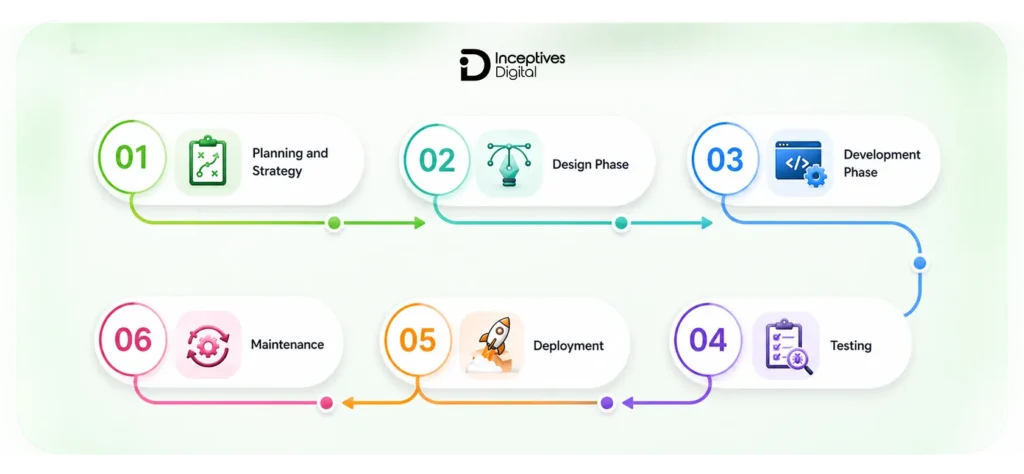
In web development, one must develop a website concept and implement it. It entails activities such as planning, designing, programming, testing, and implementation. Web developers collaborate to ensure the websites they build are effective and easy to use.
1. Planning and Strategy
The significance of this step cannot be overstated, as it serves as the foundation for an important website development project. The first step involves requirements gathering, goal setting, and deciding which features the website must include. The next step is to create wireframes or mockups of how the page will look. Finally, the right technology stack must be selected for the job.
2. Design Phase
In this step, focus shifts to the interface designs and appearance. The designers present the interface/user experience layout, mock-ups, and prototypes that showcase the website’s final look. All aspects, like colors, font types, and navigation, are sorted out. The website design gets approved by the client before moving to the next step, development.
3. Development Phase
This is where the website is developed. In this process, the environment is set up, and developers begin developing the website using front-end and back-end technologies. The front-end comprises elements related to the user’s visual experience.
4. Testing
Testing ensures that the website works properly under all circumstances. There will be functionality testing and browser and mobile testing to evaluate how the site performs across various platforms. Any performance issues and bugs are sorted out, which is vital for web development.
5. Deployment
After completing all testing, the website can now be launched. Hosting and domain name registration will be arranged to ensure the website is accessible to the public. After launching the website, it will then be analyzed.
6. Maintenance
After launch, maintenance must be continuous to keep the website updated and safe from potential threats. Software upgrades, performance enhancements, patch installations, and the creation of new website capabilities must all be done.
Timeline Example
Web development project time frames vary based on factors such as complexity, features, and project size, from small pages to complex applications.
- Landing Page: 1-2 weeks
- Website for business: 4-8 weeks
- E-commerce platform: 3-6 months
- Complex web application: 6-12+ months
How Much Does Web Development Cost?
Website development costs will vary depending on the type of website you intend to have developed by your website design firm. Irrespective of the type of website you need developed, it is important to understand costs before starting a project.
Average cost of website development per project type:
Overall, the cost of developing a website depends heavily on the level of functionality required. The following chart shows approximate prices;
- Website Development for Small Businesses: $3,000-$10,000
- Simple Website Development (landing page or portfolio): $500-$3,000
- E-commerce Website Development: $10,000-$50,000+
- Custom Web Application: $50,000-$200,000+
Cost Breakdown of a Website Development Project
Website development involves several processes to estimate the cost of developing the website. Understanding the distribution of total website development costs is important, as it guides organizations in managing their activities.
| Website Development Stage | Cost Allocation |
| Planning and Strategy | 10–15% |
| UI/UX Design | 15–25% |
| Development | 40–55% |
| Testing Q/A | 10–15% |
| Deployment | 5–10% |
| Maintenance and Updates | 10–20% |
Types of Websites and Web Applications You Can Build
Among the most interesting things about web development is the range of web applications one can develop. It may include anything from a basic webpage to an advanced digital platform. Knowing these categories will help beginners and business owners choose the right option for their needs.
1. Static Websites
Static websites are the most basic type of websites, built using fixed content that does not change unless manually updated by a developer. These websites typically use HTML and CSS and do not rely on databases or server-side processing.
2. Dynamic Websites
Dynamic websites are more advanced and interactive, as their content can change based on user behavior, preferences, or real-time data. These websites rely on backend technologies, databases, and server-side programming to deliver personalized experiences.
3. E-commerce websites
E-commerce websites are made for purchasing and selling things over the Internet. They offer features such as listing products, making payments, adding items to the shopping cart, and tracking order status. Some popular types include Internet shops that allow users to view products, purchase them, and pay for them easily through these websites.
4. Web Applications
A web application is an interactive environment that runs in a browser window. Social networking sites, project management software, and video streaming websites are examples of web applications. Web applications are designed for user interaction and functionality rather than just for displaying content.
5. Content Management Systems (CMS)
Users can easily edit content through the CMS without any technical knowledge. Content management systems such as WordPress make it easy for users to manage their websites without programming skills.
6. Progressive Web Apps (PWAs)
In PWA, the combination merges both web pages and applications. This happens because, although they are used in browsers, they can behave like applications due to their support for offline operation and push notifications.
All these websites and applications showcase the flexibility of web development services.
How Long Does It Take to Learn Web Development?
The skills needed for learning web development include your goals and dedication. The process of learning how to code using HTML, CSS, and JavaScript may take two to three months, depending on your dedication.
To be employable, an individual must have consistently worked with web development frameworks, APIs, databases, and other applications such as React and Node.js for 6 to 12 months. This point cannot be overemphasized, as web development is a lifelong process that requires continual improvement.
Complete Beginner to First Website
Since you are a novice developer, you need to dedicate 3 to 4 months of hard work (2 to 3 hours daily) to build a website. At this point, you will be capable of understanding the fundamentals of web development, including HTML, CSS, and JS for interactive websites. In this regard, you only need to understand how to build websites and their various components.
At this point, you will be capable of constructing portfolios, landing pages, and information websites. This is important because it allows you to gain real-world experience in web development.
Job-Ready Web Developer
An entry-level web developer can be trained in 6 to 12 months through intensive web development training, depending on how committed one remains throughout this period. This period covers full-stack development, including front-end and back-end programming, website development languages, database management, and advanced framework development with React and Node.js.
The result of this phase will be your ability to apply for junior-level developer positions or even venture into freelancing, based on the portfolio you have created, which will include real-life application development and deployment.
Experienced Developer
By now, a proficient web developer would have been equipped with the knowledge and skills required through two to three years of experience. Furthermore, the web developer would have accumulated some practical experience in application development. Consequently, the web developer would have moved away from the fundamentals of coding and would be well-versed in the latest technologies and techniques to increase efficiency and productivity.
The proficient web developer would now be competent to take on senior developer roles or tackle advanced tasks, including the design of web-based systems.
Factors That Affect Timeline
Various aspects determine how fast one learns web development skills and becomes ready for employment.
Background: People who have some previous knowledge in programming will advance more quickly than those with no prior knowledge.
Learning style: Bootcamps are intensive, self-learning is flexible, and university education is comprehensive but takes a long time.
Daily practice time: The number of hours invested in training per day determines the rate at which one learns.
Resource quality: High-quality materials, such as tutorials, can help one learn more efficiently.
Practice projects compared to tutorials: Practical application through projects is far better than tutorial lessons.
Web Development Tools and Resources
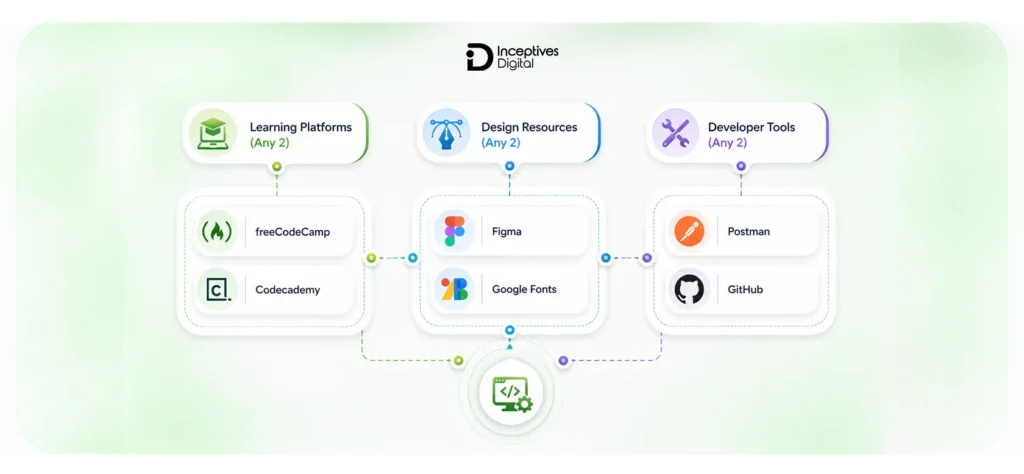
Nowadays, the availability of appropriate tools and materials is an essential aspect that affects the outcome of the entire procedure. By possessing relevant web development tools, developers can perform a range of coding, debugging, and testing activities. At the same time, they will have the possibility to interact with other team members during the deployment of a web project.
Among other popular tools for building websites is a code editor, such as Visual Studio Code. In addition, developers use browser-provided tools to ensure the website operates correctly. For instance, Google Chrome provides development tools that can identify and fix errors on websites. Besides, it should be emphasized that Git is a valuable tool while working on web projects alongside other team members.
When considering beginner-friendly materials, one should pay attention to the well-structured tutorials on MDN Web Docs, freeCodeCamp, and W3Schools. Designers have many options for developing website prototypes using software applications, including Figma. Finally, developers can easily deploy their websites with Netlify and Vercel.
Learning Platforms
A learning platform can be highly significant for budding web developers, helping them kick off their careers through gradual experience acquisition. The learning platform offers many lessons, along with practical training on real projects, to help new learners acquire knowledge through gradual development.
- freeCodeCamp: A free platform where you can complete structured courses and even earn certificates.
- Codecademy: This platform is known for its interactive approach, which lets students write code and receive instant feedback directly in the web browser.
- Udemy: Provides low-cost courses developed by professionals that help master all aspects of web development, from basic to advanced topics.
- Scrimba: This platform uses video lessons and interactive elements, enabling users to edit code on the go.
Design Resources
Design tools are an important part of web development, as they help select colors, typography, layout, and other components to create attractive, easy-to-use websites.
- Figma: An effective website designing tool for making wireframes, UI mockups, and interactive prototypes to help team members work together in real time while designing the website or application.
- Colors: A simple color palette generator that helps to maintain consistency throughout a website by using visually attractive color schemes.
- Google Fonts: A free source of many fonts that add value to web page design.
- Unsplash: A website with high-quality pictures that can be used royalty-free for web development.
Developer Tools
Web development requires developer tools to build, test, and maintain high-quality websites and applications. Developer tools help programmers debug, test APIs, experiment with code, and manage projects.
- Google Chrome DevTools: A browser tool used to help developers debug, modify, and examine HTML, CSS, and JavaScript. The tool is widely used for debugging layouts, performance optimization, and improving website speed.
- Postman: A tool used to develop, test, and monitor an API. Developers can use the tool to interact with an application programming interface (API).
- CodePen: A web-based environment to write, experiment, test, and share code for HTML, CSS, and JavaScript.
- GitHub: GitHub helps developers host and review code and perform version control on their projects.
How to Choose and Hire a Web Developer?
Web developers will be chosen based on how well they grasp the goals, features, and budgets involved in development. Review their portfolio to assess their experience with website development projects and their knowledge of front-end, back-end, or full stack web development.
In addition to communication skills, skill level, and client reviews, you should consider other factors, as a good web developer should understand what you want to achieve and offer sound suggestions. If you wish to hire for full web development, start small.
<strong>Looking to develop a high-performance website?</strong></p>
Partner with a professional web development company, Inceptives Digital, to build a scalable, secure, and user-focused website according to your business goals.</p>
Final Thoughts
Web development is more than programming; it is the foundation of every successful business in the online domain. Whether it’s developing a simple website or building complex applications, development helps businesses grow and interact with their customers effectively through HTML, CSS, JavaScript, and other technologies. With the assistance of a website development company, any business can be assured of effective online performance.
Frequently Asked Questions
Key skills include HTML, CSS, JavaScript, problem-solving, and an understanding of frontend and backend development. Knowledge of frameworks and databases is also helpful.
Web design focuses on visuals and user experience, while web development focuses on coding and functionality that makes a website work.
JavaScript is the most popular language for web development, but others such as Python, PHP, and Java are also widely used, depending on the project requirements.
Web developers use tools like code editors, browsers, version control systems, and frameworks to build and manage websites efficiently.
Web development costs vary by complexity, features, and design. It ranges from $500 for basic sites to $200,000+ for advanced applications.