
Skip to content
  • Services
    Services
    Application Development
    • Mobile App Development
    • Blockchain Development
    By Platform
    • iOS App
    • Android App
    • React Native App
    • Flutter
    • Kotlin Multiplatform
    By Type
    • Web App Development
    • Backend and API
    • Cross-Platform Development
    • Web Development
    • Mobile Game Development
    • AR App Development
    • VR Development
    Launch & Growth
    • App Store Optimization
    • Product Launch Strategy
    • Post Launch Analytics and Iteration
    Artificial Intelligence
    AI Services
    • AI Development
    • AI App Development
    • AI Chatbot Development
    • AI Agent Development
    • Generative AI Development
    • Machine Learning Development
    • NLP Development
    • AI MVP Development
    Automation
    • AI Automation
    • System Integration & API Automation Services
    • Business Process Automation Services
    • RPA Development
    • IoT Development
    Digital Product Development
    By Engagement
    • Digital Product Development
    • Discovery Sprint
    • MVP Development
    • Product Rescue & Scaling
    • Product Strategy & Consulting
    • Custom Software Development
    • Staff Augmentation
    By Craft
    • UI/UX Design
    • Interactive Prototyping
  • Industries
    Industries
    • Healthcare App Development
    • Fitness App Development
    • Fintech App Development
    • Education App Development
    • Real Estate App Development
    • Travel App Development
    • Food Delivery App Development
    • Dating App Development
  • Locations
    Locations
    • San Francisco
    • New York
    • Austin
    • Toronto
    • London
    • Dubai
    • Singapore
  • Case Studies
  • Company
    Company
    • About
    • Blogs
    • Press & Media
    • Partnership
    • Life At Inceptives Digital
    • Leadership
    • Founder's Letter
    • Contact Us
Inceptives Digital
  • (469) 788-8527
Get In Touch
  • Blogs
Fitness
  • Wearable Fitness App Integration in 2026: Challenges and Best Practices

Wearable Fitness App Integration in 2026: Challenges and Best Practices

  • Last Updated: October 6, 2026
  • Picture of Noshaba Noor Written By: Noshaba Noor
Atif Zaidy
Reviewed by: Atif Zaidy
On this page
Share
Wearable Fitness App Integration

Wearable integration sounds simple on paper. Connect the device, pull the data, show it in the app.

In practice, it’s rarely that clean. Apple Watch, Garmin, Fitbit, Oura, and Whoop each run their own APIs. Each has its own data format, its own sync cycle, and its own permission rules. Even their sensors don’t always agree on the same reading.

For the fitness app you’re building, those gaps show up fast. Users see sync delays, numbers that don’t match across devices, or data that never arrives at all. A fitness app development company has to account for these differences at the architecture level rather than treating wearable integration as a simple API connection.

This guide walks through the real challenges teams hit with wearable fitness app integration in 2026 and the practices that actually fix them.

Quick Summary: Wearable fitness app integration in 2026 means connecting apps to Apple Watch, Garmin, Fitbit, Oura, and Whoop through fragmented APIs, noisy sensors, and battery-draining sync. Solving it takes a unified data layer, smart architecture choices, and permission-first design.

Why Wearable Integration Is Central to Fitness Apps in 2026
Why Wearable Integration Is Central to Fitness Apps

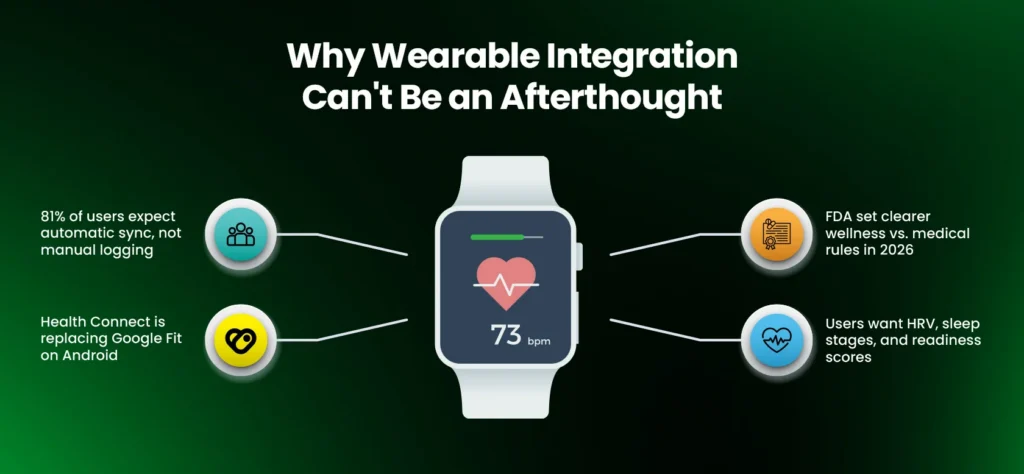
Wearable integration is no longer a differentiator. It’s the baseline. According to Straits Research, 81% of consumers now expect a fitness app to sync their activity, sleep, heart rate, and recovery data automatically, with no manual logging required.

Meeting that expectation is getting harder, and three shifts explain why.

  • Platforms are consolidating. Google shut down its core Google Fit APIs and pushed teams building on Android toward Health Connect instead. Apple’s HealthKit still runs the show on iOS, but the two platforms still don’t speak the same language.
  • Regulators drew a clearer line. In January 2026, the FDA clarified its wellness guidance for healthcare app development: apps can track HRV, SpO2, and sleep staging without qualifying as a medical device, as long as they stick to general wellness claims and stay away from diagnosis or treatment.
  • Users want more than step counts. They expect recovery-first metrics like HRV, sleep staging, and readiness scores, pulled automatically from whatever they’re already wearing.

Each shift raises the technical bar. Supporting both iOS’s HealthKit integration and Health Connect means you maintain two separate integration paths, each with its own permission model and update schedule. Recovery-first metrics demand deeper data access than a simple step count ever did.

For product teams, infrastructure has to flex as platforms change, regulations shift, and new data types become standard.

Comparison of Major Wearable Device APIs in 2026

Wearable integration doesn’t run through one universal API. It runs through six separate ecosystems, the same fragmentation that makes cross-platform app development tricky, and Apple, Garmin, Fitbit, Oura, Whoop, and Polar each handle authentication, data structure, access policy, and sync timing their own way.

That fragmentation is playing out inside a market that’s growing fast: global wearable tech is projected to grow from roughly $105 billion in 2026 to $238.7 billion by 2032.

DeviceHow It ConnectsWhere It’s Limited
Apple WatchOn-device SDK via HealthKitiOS-only; needs the user’s phone nearby
GarminServer-to-server REST APIRequires manufacturer approval; higher latency
FitbitHealth Connect (Android) + legacy Web API for historyMigrating off the older Web API
OuraREST API, OAuth-basedWeak on real-time streaming
WhoopREST API, subscription-gatedNo on-device screen; fully app-dependent
PolarREST API (AccessLink)Smaller install base than rivals

There’s no single “wearable API.” There are six, and each one behaves differently once real users start wearing the devices, which is exactly why choosing a mobile app tech stack up front matters so much. That fragmentation causes almost every challenge in this guide.

A few factors should guide which devices you tackle first:

  • User adoption: Apple Watch and Fitbit serve broad consumer audiences, while Garmin, Oura, and Whoop have stronger relevance among users focused on training and recovery.
  • API stability: Manufacturers manage their own endpoint lifecycles, field definitions, authentication requirements, and rate limits.
  • Rate limits: Manufacturer APIs restrict request volumes by user or application. Exceeding those limits can interrupt synchronization until the applicable limit resets.

Trying to support all six ecosystems on day one usually means doing all of them badly. The integration architecture should therefore accommodate API changes and device-specific behavior from the beginning.

What Are the Core Integration Challenges Teams Actually Hit?
Core Wearable Integration Challenges

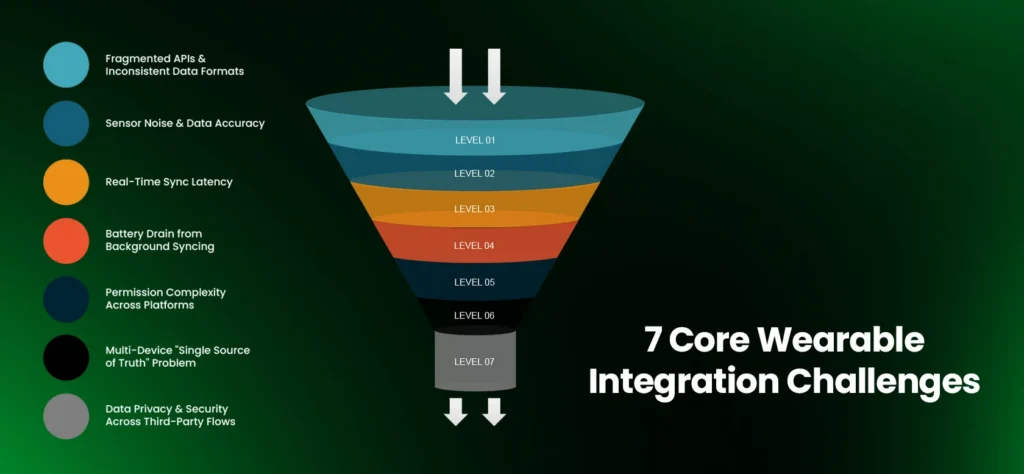
Wearable integration brings challenges well beyond connecting a backend to third-party APIs. The biggest ones involve data consistency, sensor quality, sync timing, battery usage, permissions, multi-device handling, and security.

1. Fragmented APIs and Inconsistent Data Formats

Apple, Garmin, Fitbit, and Oura define and structure metrics like heart rate, sleep stages, distance, and activity differently. Even when two platforms expose the same metric, the underlying measurement or format can differ.

Common mismatches include:

  • Timestamps and time zones represented differently across manufacturers
  • Units that need conversion before they enter your app’s internal model
  • Workout sessions that carry different fields and classifications depending on the source device

Without a translation layer, your app ends up displaying inconsistent values or dropping information it doesn’t recognize. Every new wearable ecosystem you add brings its own custom software development work: mapping and validation that doesn’t show up in a demo.

2. Sensor Noise and Data Accuracy

Wearable sensors produce variable readings depending on device placement, movement, skin contact, environmental conditions, and sensor technology.

Two devices worn at the same time can report different heart-rate numbers, especially during high-intensity activity where movement throws off wrist-based sensors.

Your app needs to validate incoming sensor data before it reaches the user, and that validation increasingly relies on machine learning. Useful processing includes smoothing, outlier detection, and confidence scoring.

Watch for these common data-quality issues:

  • Sudden changes that fall outside a plausible physiological range
  • Flat readings during periods of known activity
  • Mismatches between devices measuring the same period
  • Missing data during an otherwise continuous session

Each of these needs a different validation strategy. Filter too aggressively and you strip out legitimate changes along with the errors.

Chest-strap monitors generally beat wrist-based sensors on heart-rate accuracy during intense exercise, since skin tone, tattoos, and wrist hair can throw off optical sensors. 

It’s one of several healthcare app trends worth tracking as more products lean on wearable data. Build your data model to capture source and confidence alongside every measurement, so it can account for that gap.

3. Real-Time Sync Latency Across Devices

Users expect their wearable activity to show up in your app with almost no delay. How fast that actually happens depends heavily on your integration method and the manufacturer’s infrastructure.

Integration TypeTypical LatencyWhy
Direct on-device (HealthKit)SecondsPhone processes data locally
Server-to-server (Garmin Connect)MinutesDepends on manufacturer’s refresh cycle
Aggregator layerVariesInherits latency from whichever source API it pulls from

Synchronization runs through several stages: the sensor records the data, the wearable processes it, the manufacturer’s platform receives it, and your app retrieves and processes it. 

Getting that last step right without draining the device is largely a mobile app performance optimization problem.

Your app’s architecture can’t eliminate delays baked into a manufacturer’s sync cycle. Set your product requirements with that constraint in mind.

4. Battery Drain From Background Syncing

Background sync drains battery fast when your app polls for new wearable data too often or keeps unnecessary connections open.

Two platform constraints matter here:

  • iOS and Android both restrict background activity, so frequent polling doesn’t necessarily buy you fresher data.
  • Persistent Bluetooth connections burn more power than short, event-driven sync sessions.

Balance data freshness against battery cost, and set your sync frequency based on how important the data is in context rather than a single fixed polling interval, since getting this wrong later shows up in your app’s ongoing maintenance costs.

5. Permission Complexity Across Platforms

HealthKit and Health Connect use different permission models and UI/UX flows. HealthKit manages permissions by individual health-data type. Health Connect gives users one centralized permission screen for health apps.

Users often grant access to some data types and decline others. Someone might allow activity data but block sleep data, for example.

Your app needs to handle these partial permissions gracefully across the entire product experience. When a user denies access, send them to system settings instead of showing the same permission prompt again and again.

Permission education and UX deserve real attention during the initial integration flow, not an afterthought.

6. The Multi-Device “Single Source of Truth” Problem

Users often connect multiple wearables or switch between devices throughout the day, something fitness app startups need to plan for from day one. Without clear precedence rules, your app can receive overlapping or conflicting measurements.

Your architecture needs answers to questions like these:

  • Which device wins when measurements conflict?
  • How do you merge overlapping activity records without double-counting?
  • What happens when a user disconnects a device mid-sync?
  • How long should imported data stick around after a device is removed?

Build these rules into the data layer itself. Don’t leave individual screens or features to handle them independently.

7. Data Privacy and Security Across Third-Party Data Flows

Wearable data passes through several systems on its way to your app: the manufacturer’s platform, an aggregator (if you use one), your backend, and internal storage.

Each stage introduces its own security and privacy considerations. Healthcare apps in particular need to track this closely: as must-have healthcare app features increasingly include granular data categories, user consent needs ongoing management well after the initial connection.

Prioritize these controls:

  • Encryption for data in transit and at rest
  • Granular consent for different data categories
  • Clear controls for disconnecting devices and revoking access
  • Defined retention and deletion policies for disconnected or deleted accounts

Build these into your architecture and data lifecycle the same way telemedicine app development teams handle sensitive patient data end to end. Don’t rely on your privacy policy alone to cover them.

Which Integration Path Should You Choose?

Once you’ve nailed down your data requirements, the next decision is how your app will access wearable information. Three approaches dominate in 2026: direct SDK integration, server-to-server integration, and aggregator-based integration.

ApproachBest ForMain Trade-off
Direct SDKSingle-platform apps, tight native UXDoesn’t scale across device brands
Server-to-serverHistorical data, phone-independent syncHigher latency, manufacturer-dependent uptime
Aggregator layerMulti-device apps at scaleOngoing per-user cost, less low-level control

Your choice depends on how many ecosystems you support, what data types you need, how tight your sync expectations are, and how much engineering capacity you have.

If you’re targeting one or two priority ecosystems, direct integrations make sense. If you’re going after several wearable brands, an aggregator often becomes more practical as your requirements grow.

Think ahead to your device roadmap. Three or fewer ecosystems stay manageable with direct integrations. Beyond that, a unified integration layer starts to pay for itself.

Best Practices for Reliable Wearable Fitness App Integration
Practices for Reliable Wearable Integration

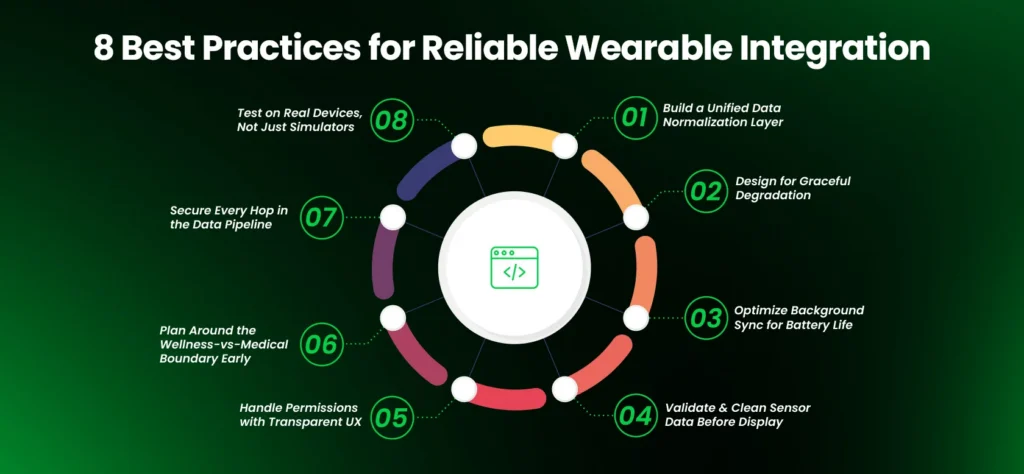
Architecture sets the foundation, but how you implement it determines whether wearable data actually reaches your users reliably.

1. Build a Unified Data Normalization Layer

Route incoming wearable data through one consistent internal model before it reaches your app’s features or interface.

Apple, Garmin, Fitbit, Oura, and every other platform then map their device-specific fields into that common structure. This layer standardizes units, timestamps, activity types, measurement sources, and other key attributes.

Define your normalization model before you build individual device integrations. That order matters. Build device-by-device first and you’ll end up restructuring your entire data model around one manufacturer later.

2. Design for Graceful Degradation

Wearable sync fails for plenty of the same reasons digital products fail generally: connectivity problems, expired credentials, API outages, device disconnection, or manufacturer-side changes.

Keep the last valid dataset and show users how old it is instead of silently presenting stale data as current.

A simple label like “Last synced 4 hours ago” gives users real context when fresh data isn’t available.

Use progressive backoff for retries instead of hammering an unavailable endpoint repeatedly. That cuts unnecessary traffic and helps you avoid rate-limit problems during temporary outages.

3. Optimize Background Sync for Battery Life

Match your sync frequency to context. An active workout justifies frequent updates. Background activity during an idle stretch doesn’t need the same treatment.

A few practices help here:

  • Use platform-provided background refresh mechanisms
  • Combine related requests where you can
  • Cut sync activity when battery levels run low
  • Pause non-essential background activity during low-power mode

This keeps data fresh without draining the device unnecessarily.

4. Validate and Clean Sensor Data Before Display

Run raw sensor output through validation before it reaches your interface or analytics systems.

Outlier detection, smoothing, source identification, and confidence thresholds all help keep anomalous readings out of dashboards, summaries, and any AI features you’re testing in an early MVP.

Flag low-confidence measurements instead of quietly deleting them. That gives your app more transparency when sensor conditions affect data quality.

Validate as close to the ingestion point as you can, so unreliable measurements never make it deeper into your system.

5. Handle Permissions With Transparent UX

Explain why your app needs a particular category of health data before the operating system shows the permission prompt.

Support partial access, too. A user who grants activity data but declines sleep data should still get a full experience for the features that remain available. 

Interactive prototypes make it easy to test what that partial-access experience actually looks like before you write a line of production code.

Tie permission requests to the specific feature that needs the data. A sleep-tracking feature should explain the value of sleep access right when the user opens that feature, not on first launch.

6. Plan Around the Wellness-vs-Medical Boundary Early

The line between general wellness functionality and medical functionality shapes how you scope your product strategy, data handling, claims, and regulatory exposure.

The line between general wellness functionality and medical functionality shapes your product requirements, data handling, claims, and regulatory exposure.

Market Growth Reports found that over 27% of adult wearable users track a specific health condition through their device. As wearable apps push further into health-related use cases, product teams need to think carefully about how they position their functionality and claims.

Keep general wellness capabilities, things like activity scores, sleep summaries, and recovery trends, clearly separate from diagnostic or treatment functionality.

Build this distinction into your data structures, feature definitions, and product requirements early. Don’t leave it for marketing or compliance to sort out later.

7. Secure Every Hop in the Data Pipeline

Protect wearable data across its entire lifecycle through the system integrations and API automation that connect manufacturer platforms, aggregator services, your app servers, and your databases.

Three practices matter most:

  • Give users a clear “Connected Devices” screen where they can review and revoke connections.
  • Maintain access logs so you can trace data access when you need to.
  • Set retention and deletion policies for data tied to disconnected devices and deleted accounts.

Apply these security controls consistently across your entire pipeline, not just at your primary database.

Third-party aggregators deserve extra scrutiny here. If you route wearable data through an aggregator, confirm how long it retains raw data, whether it re-shares data with other partners, and how it handles a user’s deletion request. Your app is still accountable to the user even when a vendor sits between your backend and the manufacturer’s API.

8. Test on Real Devices, Not Just Simulators

Simulators can’t fully reproduce Bluetooth interruptions, sensor behavior, firmware quirks, or device-specific sync issues.

Keep representative physical devices on hand during development and QA if you’re supporting wearable integrations.

Test connection failures, sync gaps, permission changes, API errors, and firmware variations directly. You can test across multiple firmware versions too, since this is where a well-planned mobile app testing strategy catches compatibility issues before they hit production users.

What’s Next for Wearable Integration Beyond 2026?

Wearable ecosystems are moving past traditional smartwatches and activity trackers. Smart rings, patches, connected clothing, and other sensing devices are adding new data sources to fitness apps, part of the same IoT trends reshaping healthcare.

Three developments matter most for future integration architecture:

Emerging ShiftWhat It Means for Integration
Ambient sensing (smart rings, patches, smart clothing)More data streams per user to normalize, not just more devices to support
Predictive, preventive insights (overtraining, dehydration risk)Needs clean, validated data, since messy inputs lead to unreliable recommendations
Tightening permission models (Health Connect, HealthKit)Consent is trending toward more granular and easier to revoke, not less

Business Research Insights reports that 63% of wearables released in 2024 included AI-driven health analytics, part of the broader AI development trend reshaping wearables. As these capabilities spread, the quality and consistency of your data infrastructure matters more every year.

A few architectural takeaways follow from this:

  • Recommendation systems depend on consistent, validated wearable data.
  • Your integration infrastructure should support new device types without a complete redesign.
  • Permission management needs to stay adaptable as health platforms roll out more granular controls.

Normalization pays off well beyond today’s device compatibility. It builds the foundation for analytics, personalization, and emerging categories like AR and VR fitness experiences.

Teams that treat their normalization layer as a core product asset, rather than a one-time integration task, adapt to these shifts faster. When a new device category shows up, the work becomes adding a new mapping to an existing model instead of rebuilding the data pipeline from scratch.

Pre-Launch Integration Checklist

Run through these core integration, data, security, and UX checks before you release wearable support.

CheckWhy It Matters
Does every device map into one internal data schema?Prevents conflicting numbers across brands
Is there a clear priority rule for conflicting readings?Solves the single-source-of-truth problem
Does the UI show sync status and last-updated time?Builds transparency during sync failures
Is background sync frequency context-aware?Helps control battery consumption
Do you explain permissions before the system prompt appears?Improves understanding and reduces partial-access issues
Is data encrypted at every hop, with clear retention limits?Reduces privacy and security risk

Revisit this checklist whenever you add another wearable ecosystem or a manufacturer rolls out a significant API or platform change.

Building Wearable Integration That Actually Lasts

Wearable fitness app integration in 2026 takes more than connecting to Apple Watch, Fitbit, or Garmin. Reliable integration depends on how well you handle fragmented APIs, sensor variability, sync constraints, battery drain, permissions, and security all at once.

A unified normalization layer gives you the foundation for consistent data. The right sync architecture handles device-specific limits on top of that. Permission and privacy controls need to stay part of your product, not a launch-day checkbox. Well-planned mobile application development services can help build these integration and architecture decisions into the product from the start.

Wearable ecosystems will keep expanding. Build your app to absorb new APIs, new device categories, and new health-data rules, and you’ll add capabilities without rebuilding your integration layer each time.

Frequently Asked Questions

1. How long does wearable fitness app integration take?

A single-platform integration, like HealthKit alone, typically takes 3 to 6 weeks. Supporting both HealthKit and Health Connect takes 6 to 10 weeks. A full multi-device rollout across Garmin, Fitbit, Oura, and Whoop without a unified layer can take 3 to 6 months, since each brand needs its own integration work.

2. Which wearables should a fitness app support at minimum?

Start with Apple HealthKit for iOS and Health Connect for Android, since these cover the broadest user base. Add Garmin, Oura, or Whoop next if your audience skews toward serious training and recovery tracking rather than general activity.

3. Which wearable is hardest to integrate with a fitness app?

It depends on your use case. Garmin and Fitbit both involve extra server-side authentication, approval, and API steps, while HealthKit gives you a more direct iOS integration but stays limited to Apple’s ecosystem and platform rules.

4. Should a fitness app build direct integrations or use an aggregator API?

Direct integrations give you more control when you’re supporting a limited number of wearable ecosystems. Aggregator platforms cut integration and maintenance overhead when you need to support several device brands at once.

5. How do fitness apps handle conflicting data from two wearables?

Fitness apps use a unified normalization layer with defined priority rules for each data type. The system flags overlapping records and keeps source information instead of silently overwriting one measurement with another.

6. Does wearable integration require HIPAA compliance?

It depends on your business model, data flows, and relationship to covered entities or business associates. General wellness functionality doesn’t automatically trigger HIPAA, but healthcare use cases can bring additional requirements.

7. Why does wearable sync drain battery so fast?

Frequent background polling and unnecessary persistent connections increase battery consumption. Context-aware synchronization, platform background APIs, request batching, and low-power handling all reduce that impact.

8. What’s the biggest mistake teams make with wearable integration?

Treating wearable connectivity as a one-time build instead of an ongoing integration layer. Manufacturer APIs, firmware, authentication requirements, platform policies, and data models keep changing after launch, and they need continued maintenance.

Picture of Noshaba Noor

Noshaba Noor

Noshaba Noor holds the role of Senior SEO Content Writer at Inceptives Digital, a mobile app development company recognized for its custom software solutions across industries. With years of hands-on experience in content strategy, her work spans website copy, blogs, and long-form guides that balance search visibility with genuine reader value. Complex technical topics become clear, accessible content, free of unnecessary jargon, in her hands. Staying updated on SEO and AEO trends, her focus is on creating content that supports organic visibility and meaningful reader engagement.
✦ Summarize with AI
ChatGPT Claude Perplexity Gemini Grok

Have a Product in Mind?

Let’s build it the right way, together
Start the Conversation
Blog / Fitness / Wearable Fitness App Integration in 2026: Challenges and Best Practices

Wearable Fitness App Integration in 2026: Challenges and Best Practices

Noshaba Noor
WRITTEN BY Noshaba Noor
Atif Zaidy
REVIEWED & APPROVED BY Atif Zaidy
On This Page
Why Wearable Integration Is Central to Fitness Apps in 2026Comparison of Major Wearable Device APIs in 2026What Are the Core Integration Challenges Teams Actually Hit?1. Fragmented APIs and Inconsistent Data Formats2. Sensor Noise and Data Accuracy3. Real-Time Sync Latency Across Devices4. Battery Drain From Background Syncing5. Permission Complexity Across Platforms6. The Multi-Device “Single Source of Truth” Problem7. Data Privacy and Security Across Third-Party Data FlowsWhich Integration Path Should You Choose?Best Practices for Reliable Wearable Fitness App Integration1. Build a Unified Data Normalization Layer2. Design for Graceful Degradation3. Optimize Background Sync for Battery Life4. Validate and Clean Sensor Data Before Display5. Handle Permissions With Transparent UX6. Plan Around the Wellness-vs-Medical Boundary Early7. Secure Every Hop in the Data Pipeline8. Test on Real Devices, Not Just SimulatorsWhat’s Next for Wearable Integration Beyond 2026?Pre-Launch Integration ChecklistBuilding Wearable Integration That Actually LastsFrequently Asked Questions
Share This Article
Wearable Fitness App Integration in 2026: Challenges and Best Practices

Wearable integration sounds simple on paper. Connect the device, pull the data, show it in the app.

In practice, it’s rarely that clean. Apple Watch, Garmin, Fitbit, Oura, and Whoop each run their own APIs. Each has its own data format, its own sync cycle, and its own permission rules. Even their sensors don’t always agree on the same reading.

For the fitness app you’re building, those gaps show up fast. Users see sync delays, numbers that don’t match across devices, or data that never arrives at all. A fitness app development company has to account for these differences at the architecture level rather than treating wearable integration as a simple API connection.

This guide walks through the real challenges teams hit with wearable fitness app integration in 2026 and the practices that actually fix them.

Quick Summary: Wearable fitness app integration in 2026 means connecting apps to Apple Watch, Garmin, Fitbit, Oura, and Whoop through fragmented APIs, noisy sensors, and battery-draining sync. Solving it takes a unified data layer, smart architecture choices, and permission-first design.

Why Wearable Integration Is Central to Fitness Apps in 2026

Why Wearable Integration Is Central to Fitness Apps

Wearable integration is no longer a differentiator. It’s the baseline. According to Straits Research, 81% of consumers now expect a fitness app to sync their activity, sleep, heart rate, and recovery data automatically, with no manual logging required.

Meeting that expectation is getting harder, and three shifts explain why.

  • Platforms are consolidating. Google shut down its core Google Fit APIs and pushed teams building on Android toward Health Connect instead. Apple’s HealthKit still runs the show on iOS, but the two platforms still don’t speak the same language.
  • Regulators drew a clearer line. In January 2026, the FDA clarified its wellness guidance for healthcare app development: apps can track HRV, SpO2, and sleep staging without qualifying as a medical device, as long as they stick to general wellness claims and stay away from diagnosis or treatment.
  • Users want more than step counts. They expect recovery-first metrics like HRV, sleep staging, and readiness scores, pulled automatically from whatever they’re already wearing.

Each shift raises the technical bar. Supporting both iOS’s HealthKit integration and Health Connect means you maintain two separate integration paths, each with its own permission model and update schedule. Recovery-first metrics demand deeper data access than a simple step count ever did.

For product teams, infrastructure has to flex as platforms change, regulations shift, and new data types become standard.

Comparison of Major Wearable Device APIs in 2026

Wearable integration doesn’t run through one universal API. It runs through six separate ecosystems, the same fragmentation that makes cross-platform app development tricky, and Apple, Garmin, Fitbit, Oura, Whoop, and Polar each handle authentication, data structure, access policy, and sync timing their own way.

That fragmentation is playing out inside a market that’s growing fast: global wearable tech is projected to grow from roughly $105 billion in 2026 to $238.7 billion by 2032.

DeviceHow It ConnectsWhere It’s Limited
Apple WatchOn-device SDK via HealthKitiOS-only; needs the user’s phone nearby
GarminServer-to-server REST APIRequires manufacturer approval; higher latency
FitbitHealth Connect (Android) + legacy Web API for historyMigrating off the older Web API
OuraREST API, OAuth-basedWeak on real-time streaming
WhoopREST API, subscription-gatedNo on-device screen; fully app-dependent
PolarREST API (AccessLink)Smaller install base than rivals

There’s no single “wearable API.” There are six, and each one behaves differently once real users start wearing the devices, which is exactly why choosing a mobile app tech stack up front matters so much. That fragmentation causes almost every challenge in this guide.

A few factors should guide which devices you tackle first:

  • User adoption: Apple Watch and Fitbit serve broad consumer audiences, while Garmin, Oura, and Whoop have stronger relevance among users focused on training and recovery.
  • API stability: Manufacturers manage their own endpoint lifecycles, field definitions, authentication requirements, and rate limits.
  • Rate limits: Manufacturer APIs restrict request volumes by user or application. Exceeding those limits can interrupt synchronization until the applicable limit resets.

Trying to support all six ecosystems on day one usually means doing all of them badly. The integration architecture should therefore accommodate API changes and device-specific behavior from the beginning.

What Are the Core Integration Challenges Teams Actually Hit?

Core Wearable Integration Challenges

Wearable integration brings challenges well beyond connecting a backend to third-party APIs. The biggest ones involve data consistency, sensor quality, sync timing, battery usage, permissions, multi-device handling, and security.

1. Fragmented APIs and Inconsistent Data Formats

Apple, Garmin, Fitbit, and Oura define and structure metrics like heart rate, sleep stages, distance, and activity differently. Even when two platforms expose the same metric, the underlying measurement or format can differ.

Common mismatches include:

  • Timestamps and time zones represented differently across manufacturers
  • Units that need conversion before they enter your app’s internal model
  • Workout sessions that carry different fields and classifications depending on the source device

Without a translation layer, your app ends up displaying inconsistent values or dropping information it doesn’t recognize. Every new wearable ecosystem you add brings its own custom software development work: mapping and validation that doesn’t show up in a demo.

2. Sensor Noise and Data Accuracy

Wearable sensors produce variable readings depending on device placement, movement, skin contact, environmental conditions, and sensor technology.

Two devices worn at the same time can report different heart-rate numbers, especially during high-intensity activity where movement throws off wrist-based sensors.

Your app needs to validate incoming sensor data before it reaches the user, and that validation increasingly relies on machine learning. Useful processing includes smoothing, outlier detection, and confidence scoring.

Watch for these common data-quality issues:

  • Sudden changes that fall outside a plausible physiological range
  • Flat readings during periods of known activity
  • Mismatches between devices measuring the same period
  • Missing data during an otherwise continuous session

Each of these needs a different validation strategy. Filter too aggressively and you strip out legitimate changes along with the errors.

Chest-strap monitors generally beat wrist-based sensors on heart-rate accuracy during intense exercise, since skin tone, tattoos, and wrist hair can throw off optical sensors. 

It’s one of several healthcare app trends worth tracking as more products lean on wearable data. Build your data model to capture source and confidence alongside every measurement, so it can account for that gap.

3. Real-Time Sync Latency Across Devices

Users expect their wearable activity to show up in your app with almost no delay. How fast that actually happens depends heavily on your integration method and the manufacturer’s infrastructure.

Integration TypeTypical LatencyWhy
Direct on-device (HealthKit)SecondsPhone processes data locally
Server-to-server (Garmin Connect)MinutesDepends on manufacturer’s refresh cycle
Aggregator layerVariesInherits latency from whichever source API it pulls from

Synchronization runs through several stages: the sensor records the data, the wearable processes it, the manufacturer’s platform receives it, and your app retrieves and processes it. 

Getting that last step right without draining the device is largely a mobile app performance optimization problem.

Your app’s architecture can’t eliminate delays baked into a manufacturer’s sync cycle. Set your product requirements with that constraint in mind.

4. Battery Drain From Background Syncing

Background sync drains battery fast when your app polls for new wearable data too often or keeps unnecessary connections open.

Two platform constraints matter here:

  • iOS and Android both restrict background activity, so frequent polling doesn’t necessarily buy you fresher data.
  • Persistent Bluetooth connections burn more power than short, event-driven sync sessions.

Balance data freshness against battery cost, and set your sync frequency based on how important the data is in context rather than a single fixed polling interval, since getting this wrong later shows up in your app’s ongoing maintenance costs.

5. Permission Complexity Across Platforms

HealthKit and Health Connect use different permission models and UI/UX flows. HealthKit manages permissions by individual health-data type. Health Connect gives users one centralized permission screen for health apps.

Users often grant access to some data types and decline others. Someone might allow activity data but block sleep data, for example.

Your app needs to handle these partial permissions gracefully across the entire product experience. When a user denies access, send them to system settings instead of showing the same permission prompt again and again.

Permission education and UX deserve real attention during the initial integration flow, not an afterthought.

6. The Multi-Device “Single Source of Truth” Problem

Users often connect multiple wearables or switch between devices throughout the day, something fitness app startups need to plan for from day one. Without clear precedence rules, your app can receive overlapping or conflicting measurements.

Your architecture needs answers to questions like these:

  • Which device wins when measurements conflict?
  • How do you merge overlapping activity records without double-counting?
  • What happens when a user disconnects a device mid-sync?
  • How long should imported data stick around after a device is removed?

Build these rules into the data layer itself. Don’t leave individual screens or features to handle them independently.

7. Data Privacy and Security Across Third-Party Data Flows

Wearable data passes through several systems on its way to your app: the manufacturer’s platform, an aggregator (if you use one), your backend, and internal storage.

Each stage introduces its own security and privacy considerations. Healthcare apps in particular need to track this closely: as must-have healthcare app features increasingly include granular data categories, user consent needs ongoing management well after the initial connection.

Prioritize these controls:

  • Encryption for data in transit and at rest
  • Granular consent for different data categories
  • Clear controls for disconnecting devices and revoking access
  • Defined retention and deletion policies for disconnected or deleted accounts

Build these into your architecture and data lifecycle the same way telemedicine app development teams handle sensitive patient data end to end. Don’t rely on your privacy policy alone to cover them.

Which Integration Path Should You Choose?

Once you’ve nailed down your data requirements, the next decision is how your app will access wearable information. Three approaches dominate in 2026: direct SDK integration, server-to-server integration, and aggregator-based integration.

ApproachBest ForMain Trade-off
Direct SDKSingle-platform apps, tight native UXDoesn’t scale across device brands
Server-to-serverHistorical data, phone-independent syncHigher latency, manufacturer-dependent uptime
Aggregator layerMulti-device apps at scaleOngoing per-user cost, less low-level control

Your choice depends on how many ecosystems you support, what data types you need, how tight your sync expectations are, and how much engineering capacity you have.

If you’re targeting one or two priority ecosystems, direct integrations make sense. If you’re going after several wearable brands, an aggregator often becomes more practical as your requirements grow.

Think ahead to your device roadmap. Three or fewer ecosystems stay manageable with direct integrations. Beyond that, a unified integration layer starts to pay for itself.

Best Practices for Reliable Wearable Fitness App Integration

Practices for Reliable Wearable Integration

Architecture sets the foundation, but how you implement it determines whether wearable data actually reaches your users reliably.

1. Build a Unified Data Normalization Layer

Route incoming wearable data through one consistent internal model before it reaches your app’s features or interface.

Apple, Garmin, Fitbit, Oura, and every other platform then map their device-specific fields into that common structure. This layer standardizes units, timestamps, activity types, measurement sources, and other key attributes.

Define your normalization model before you build individual device integrations. That order matters. Build device-by-device first and you’ll end up restructuring your entire data model around one manufacturer later.

2. Design for Graceful Degradation

Wearable sync fails for plenty of the same reasons digital products fail generally: connectivity problems, expired credentials, API outages, device disconnection, or manufacturer-side changes.

Keep the last valid dataset and show users how old it is instead of silently presenting stale data as current.

A simple label like “Last synced 4 hours ago” gives users real context when fresh data isn’t available.

Use progressive backoff for retries instead of hammering an unavailable endpoint repeatedly. That cuts unnecessary traffic and helps you avoid rate-limit problems during temporary outages.

3. Optimize Background Sync for Battery Life

Match your sync frequency to context. An active workout justifies frequent updates. Background activity during an idle stretch doesn’t need the same treatment.

A few practices help here:

  • Use platform-provided background refresh mechanisms
  • Combine related requests where you can
  • Cut sync activity when battery levels run low
  • Pause non-essential background activity during low-power mode

This keeps data fresh without draining the device unnecessarily.

4. Validate and Clean Sensor Data Before Display

Run raw sensor output through validation before it reaches your interface or analytics systems.

Outlier detection, smoothing, source identification, and confidence thresholds all help keep anomalous readings out of dashboards, summaries, and any AI features you’re testing in an early MVP.

Flag low-confidence measurements instead of quietly deleting them. That gives your app more transparency when sensor conditions affect data quality.

Validate as close to the ingestion point as you can, so unreliable measurements never make it deeper into your system.

5. Handle Permissions With Transparent UX

Explain why your app needs a particular category of health data before the operating system shows the permission prompt.

Support partial access, too. A user who grants activity data but declines sleep data should still get a full experience for the features that remain available. 

Interactive prototypes make it easy to test what that partial-access experience actually looks like before you write a line of production code.

Tie permission requests to the specific feature that needs the data. A sleep-tracking feature should explain the value of sleep access right when the user opens that feature, not on first launch.

6. Plan Around the Wellness-vs-Medical Boundary Early

The line between general wellness functionality and medical functionality shapes how you scope your product strategy, data handling, claims, and regulatory exposure.

The line between general wellness functionality and medical functionality shapes your product requirements, data handling, claims, and regulatory exposure.

Market Growth Reports found that over 27% of adult wearable users track a specific health condition through their device. As wearable apps push further into health-related use cases, product teams need to think carefully about how they position their functionality and claims.

Keep general wellness capabilities, things like activity scores, sleep summaries, and recovery trends, clearly separate from diagnostic or treatment functionality.

Build this distinction into your data structures, feature definitions, and product requirements early. Don’t leave it for marketing or compliance to sort out later.

7. Secure Every Hop in the Data Pipeline

Protect wearable data across its entire lifecycle through the system integrations and API automation that connect manufacturer platforms, aggregator services, your app servers, and your databases.

Three practices matter most:

  • Give users a clear “Connected Devices” screen where they can review and revoke connections.
  • Maintain access logs so you can trace data access when you need to.
  • Set retention and deletion policies for data tied to disconnected devices and deleted accounts.

Apply these security controls consistently across your entire pipeline, not just at your primary database.

Third-party aggregators deserve extra scrutiny here. If you route wearable data through an aggregator, confirm how long it retains raw data, whether it re-shares data with other partners, and how it handles a user’s deletion request. Your app is still accountable to the user even when a vendor sits between your backend and the manufacturer’s API.

8. Test on Real Devices, Not Just Simulators

Simulators can’t fully reproduce Bluetooth interruptions, sensor behavior, firmware quirks, or device-specific sync issues.

Keep representative physical devices on hand during development and QA if you’re supporting wearable integrations.

Test connection failures, sync gaps, permission changes, API errors, and firmware variations directly. You can test across multiple firmware versions too, since this is where a well-planned mobile app testing strategy catches compatibility issues before they hit production users.

What’s Next for Wearable Integration Beyond 2026?

Wearable ecosystems are moving past traditional smartwatches and activity trackers. Smart rings, patches, connected clothing, and other sensing devices are adding new data sources to fitness apps, part of the same IoT trends reshaping healthcare.

Three developments matter most for future integration architecture:

Emerging ShiftWhat It Means for Integration
Ambient sensing (smart rings, patches, smart clothing)More data streams per user to normalize, not just more devices to support
Predictive, preventive insights (overtraining, dehydration risk)Needs clean, validated data, since messy inputs lead to unreliable recommendations
Tightening permission models (Health Connect, HealthKit)Consent is trending toward more granular and easier to revoke, not less

Business Research Insights reports that 63% of wearables released in 2024 included AI-driven health analytics, part of the broader AI development trend reshaping wearables. As these capabilities spread, the quality and consistency of your data infrastructure matters more every year.

A few architectural takeaways follow from this:

  • Recommendation systems depend on consistent, validated wearable data.
  • Your integration infrastructure should support new device types without a complete redesign.
  • Permission management needs to stay adaptable as health platforms roll out more granular controls.

Normalization pays off well beyond today’s device compatibility. It builds the foundation for analytics, personalization, and emerging categories like AR and VR fitness experiences.

Teams that treat their normalization layer as a core product asset, rather than a one-time integration task, adapt to these shifts faster. When a new device category shows up, the work becomes adding a new mapping to an existing model instead of rebuilding the data pipeline from scratch.

Pre-Launch Integration Checklist

Run through these core integration, data, security, and UX checks before you release wearable support.

CheckWhy It Matters
Does every device map into one internal data schema?Prevents conflicting numbers across brands
Is there a clear priority rule for conflicting readings?Solves the single-source-of-truth problem
Does the UI show sync status and last-updated time?Builds transparency during sync failures
Is background sync frequency context-aware?Helps control battery consumption
Do you explain permissions before the system prompt appears?Improves understanding and reduces partial-access issues
Is data encrypted at every hop, with clear retention limits?Reduces privacy and security risk

Revisit this checklist whenever you add another wearable ecosystem or a manufacturer rolls out a significant API or platform change.

Building Wearable Integration That Actually Lasts

Wearable fitness app integration in 2026 takes more than connecting to Apple Watch, Fitbit, or Garmin. Reliable integration depends on how well you handle fragmented APIs, sensor variability, sync constraints, battery drain, permissions, and security all at once.

A unified normalization layer gives you the foundation for consistent data. The right sync architecture handles device-specific limits on top of that. Permission and privacy controls need to stay part of your product, not a launch-day checkbox. Well-planned mobile application development services can help build these integration and architecture decisions into the product from the start.

Wearable ecosystems will keep expanding. Build your app to absorb new APIs, new device categories, and new health-data rules, and you’ll add capabilities without rebuilding your integration layer each time.

Frequently Asked Questions

1. How long does wearable fitness app integration take?

A single-platform integration, like HealthKit alone, typically takes 3 to 6 weeks. Supporting both HealthKit and Health Connect takes 6 to 10 weeks. A full multi-device rollout across Garmin, Fitbit, Oura, and Whoop without a unified layer can take 3 to 6 months, since each brand needs its own integration work.

2. Which wearables should a fitness app support at minimum?

Start with Apple HealthKit for iOS and Health Connect for Android, since these cover the broadest user base. Add Garmin, Oura, or Whoop next if your audience skews toward serious training and recovery tracking rather than general activity.

3. Which wearable is hardest to integrate with a fitness app?

It depends on your use case. Garmin and Fitbit both involve extra server-side authentication, approval, and API steps, while HealthKit gives you a more direct iOS integration but stays limited to Apple’s ecosystem and platform rules.

4. Should a fitness app build direct integrations or use an aggregator API?

Direct integrations give you more control when you’re supporting a limited number of wearable ecosystems. Aggregator platforms cut integration and maintenance overhead when you need to support several device brands at once.

5. How do fitness apps handle conflicting data from two wearables?

Fitness apps use a unified normalization layer with defined priority rules for each data type. The system flags overlapping records and keeps source information instead of silently overwriting one measurement with another.

6. Does wearable integration require HIPAA compliance?

It depends on your business model, data flows, and relationship to covered entities or business associates. General wellness functionality doesn’t automatically trigger HIPAA, but healthcare use cases can bring additional requirements.

7. Why does wearable sync drain battery so fast?

Frequent background polling and unnecessary persistent connections increase battery consumption. Context-aware synchronization, platform background APIs, request batching, and low-power handling all reduce that impact.

8. What’s the biggest mistake teams make with wearable integration?

Treating wearable connectivity as a one-time build instead of an ongoing integration layer. Manufacturer APIs, firmware, authentication requirements, platform policies, and data models keep changing after launch, and they need continued maintenance.

✦ Summarize with AI

Noshaba Noor
WRITTEN BY

Noshaba Noor

Noshaba Noor holds the role of Senior SEO Content Writer at Inceptives Digital, a mobile app development company recognized for its custom software solutions across industries. With years of hands-on experience in content strategy, her work spans website copy, blogs, and long-form guides that balance search visibility with genuine reader value. Complex technical topics become clear, accessible content, free of unnecessary jargon, in her hands. Staying updated on SEO and AEO trends, her focus is on creating content that supports organic visibility and meaningful reader engagement.

Atif Zaidy
REVIEWED & APPROVED BY

Atif Zaidy

Atif Zaidy is the Chief Technology Officer (CTO) at Inceptives Digital, specializing in software engineering, digital product development, and innovative technology solutions. He focuses on building scalable digital experiences and leveraging emerging technologies to help businesses achieve their goals.

✦ Summarize with AI

Have a Product in Mind?

Discuss your idea with our product development team.

Start the Conversation →
On This Page
Why Wearable Integration Is Central to Fitness Apps in 2026Comparison of Major Wearable Device APIs in 2026What Are the Core Integration Challenges Teams Actually Hit?1. Fragmented APIs and Inconsistent Data Formats2. Sensor Noise and Data Accuracy3. Real-Time Sync Latency Across Devices4. Battery Drain From Background Syncing5. Permission Complexity Across Platforms6. The Multi-Device “Single Source of Truth” Problem7. Data Privacy and Security Across Third-Party Data FlowsWhich Integration Path Should You Choose?Best Practices for Reliable Wearable Fitness App Integration1. Build a Unified Data Normalization Layer2. Design for Graceful Degradation3. Optimize Background Sync for Battery Life4. Validate and Clean Sensor Data Before Display5. Handle Permissions With Transparent UX6. Plan Around the Wellness-vs-Medical Boundary Early7. Secure Every Hop in the Data Pipeline8. Test on Real Devices, Not Just SimulatorsWhat’s Next for Wearable Integration Beyond 2026?Pre-Launch Integration ChecklistBuilding Wearable Integration That Actually LastsFrequently Asked Questions
Locations

Get in touch!

Scalable solutions from teams worldwide!

  • Privacy Policy
  • |
  • Terms of Services
Inceptives Digital

We build apps, digital products, and AI-powered systems for businesses that cannot afford to get it wrong.

  • info@inceptivesdigital.com
  • (469) 788-8527
Linkedin Instagram Facebook
Services
  • Mobile App Development
  • AI Development
  • Digital Product Development
  • Mobile App Development
  • AI Development
  • Digital Product Development
Industries
  • Healthcare
  • Fitness
  • Dating
  • Education
  • Real Estate
  • Travel
  • Food Delivery
  • Healthcare
  • Fitness
  • Dating
  • Education
  • Real Estate
  • Travel
  • Food Delivery
Case Studies
  • WordSmith Pro
  • DPS Airem
  • State of the Art Chiropractic
  • Family Entertainment Group
  • StakBread
  • WordSmith Pro
  • DPS Airem
  • State of the Art Chiropractic
  • Family Entertainment Group
  • StakBread
Locations
  • San Francisco
  • Toronto
  • Austin
  • New York
  • Singapore
  • London
  • Dubai
  • San Francisco
  • Toronto
  • Austin
  • New York
  • Singapore
  • London
  • Dubai
Company
  • About
  • Blog
  • Press & Media
  • Partnership
  • Life At Inceptives Digital
  • Leadership
  • Founder’s Letter
  • Contact Us
  • About
  • Blog
  • Press & Media
  • Partnership
  • Life At Inceptives Digital
  • Leadership
  • Founder’s Letter
  • Contact Us
Recognized and Reviewed On

Independent reviews and industry recognition from established B2B platforms.

Clutch Review Badge
Bark Review Badge
Trustpilot Review Badge
Our Locations
United States
New York, USA

1178 Broadway, 3rd Floor New York, NY 10001 United States

United States
San Francisco, USA

490 Post St, Ste 500 San Francisco, CA 94102 United States

United States
Austin, USA

5900 Balcones Drive, Suite 100 Austin, Texas 78731 United States

United States
Allen, USA

450 Century Parkway, Suite 250 1005 Allen, TX 75013, USA

Canda
Toronto, Canada

2482 Yonge Street Toronto, ON M4P 2H5 Canada

united kingdom
London, UK

Office 1776, 60 Tottenham Court Road, Fitzrovia, London W1T 2EW

Dubai, UAE

IFZA Business Park Building A2, Dubai Silicon Oasis Dubai, UAE

Singapore
Singapore

No. 7 Temasek Boulevard #12-07, Suntec Tower One Singapore 038987

Pakistan
Karachi, Pakistan

Office No. 1, Najeeb Center 172-B Tariq Road, PECHS Karachi 74400, Pakistan

© 2026 IT Core Solutions LLC DBA Inceptives Digital. All Rights Reserved.

  • Privacy Policy
  • Terms of Use
DMCA.com Protection Status

Get Expert Direction for Your Next Digital Product

Inceptives Digital has helped businesses across regions bring their visions to life. See what their experience says about working with us. We don’t do magic. We build with expertise.

“
Inceptives Digital has been professional, responsive, and genuinely committed to understanding our vision for Evoltion Enterprise. The team communicated clearly, explained technical details patiently, and made payments hassle-free. Special thanks to Aaron Francis for his clarity and support throughout. Highly recommend them as a transparent, easy-to-work-with technology partner
Tyrrell Gibson CEO, Evoltion Enterprise
When I came to these guys, it was just me in an idea. I’ve had ideas before that. I thought were good and sat on them only to watch others take the initiative and reap the rewards because I lacked confidence. When I had the idea for my app I figured, “Not this time.
Edward Eller, GoRyde
I absolutely recommend this company. This team is absolutely Amazing!
I can't say enough good things about them. I had tried 3 other app makers before finding them. All of them fell short in the end. The Inceptive team was the literal answer of my prayers.
DC & Owner, State of the Art Chiropractic
AWARDS & RECOGNITION
Inceptives Digital award badge 1
Top Mobile App Developers 2025
Inceptives Digital award badge 3
RightFirms company badge
Inceptives Digital award badge 5
FEATURED ON MEDIA & REVIEW PLATFORMS
Associated Press
Trustpilot
Google
The New York Times
The Globe and Mail
USA Today

Let us help you build the next innovative digital product with precision and expertise. Share your idea and get a customized roadmap to your app within 24 hours.

Fully NDA-Protected
  • Privacy Policy
  • |
  • Terms of Services

Schedule a Meeting

Loading calendar...
Calendar is taking longer than expected

Please try again, or open Calendly directly to book your meeting.

Open Calendly