

- Dify is suitable for building AI workflows, RAG assistants, chatbots, and early-stage prototypes without extensive custom development.
- Inceptives Digital focuses on custom AI products that require dedicated interfaces, backend systems, integrations, and ongoing support.
- Dify can help businesses validate AI ideas before investing in a complete product.
- Customer-facing AI applications often need more customization than a low-code platform provides.
- Security requirements and data governance play an important role when choosing between a platform and custom development.
- A hybrid approach can combine Dify’s workflow capabilities with custom AI engineering.
- Custom AI development generally requires a higher upfront investment, while platform costs depend on usage and deployment requirements.
- The right choice depends on your business workflows, product requirements, available data, and long-term goals.
AI platforms make it easier to start building. They do not automatically make the product ready for real users, real data, or real business workflows.
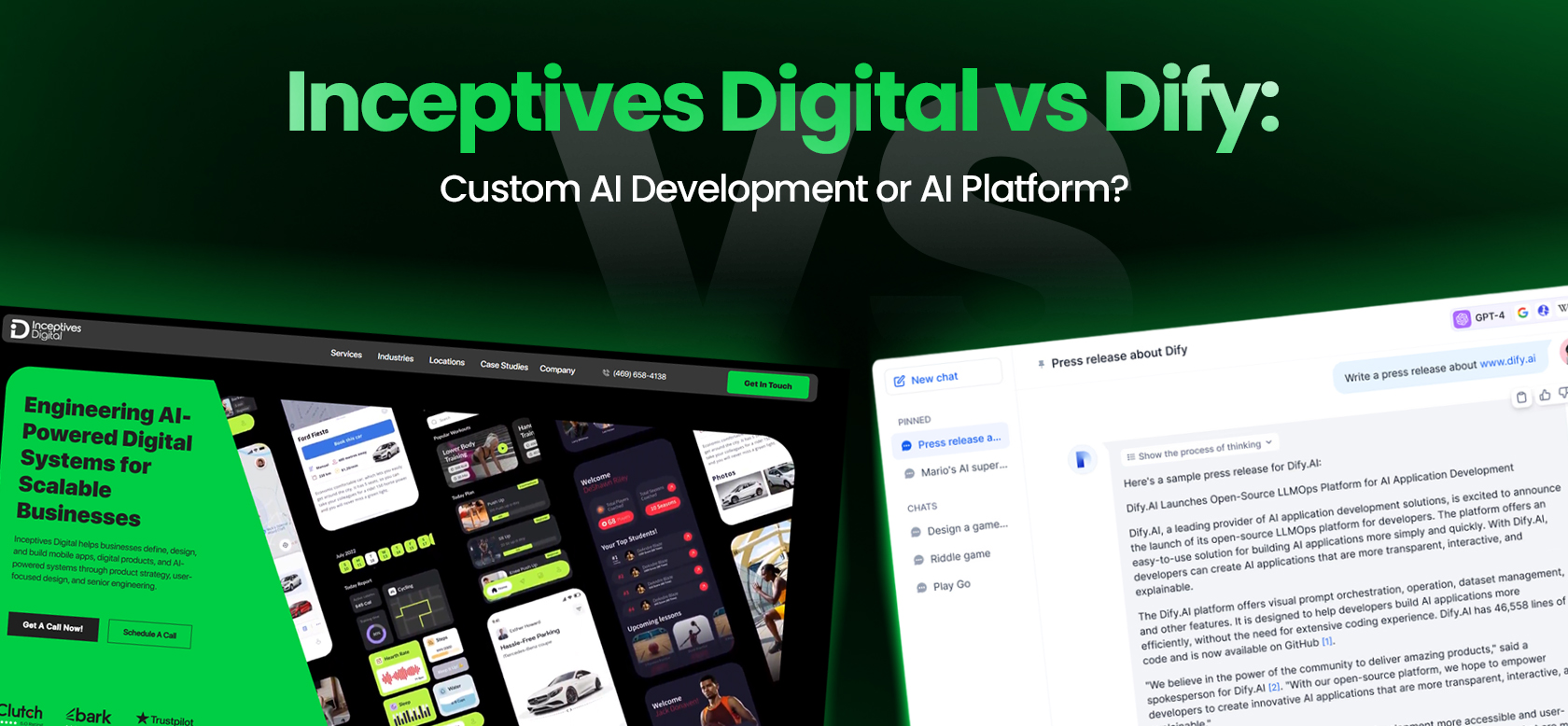
That is the real question behind the Inceptives Digital vs Dify comparison. Dify can help teams create AI workflows, RAG assistants, agents, and LLM-powered applications faster through a platform. Inceptives Digital works as an AI development company, offering AI app development services for businesses that need AI to become a custom product, integrated system, or production-ready workflow.
The difference matters because many AI projects do not fail at the idea stage. They fail after the first prototype, which ranks among the reasons digital products fail. Gartner predicted that at least 30% of generative AI projects would be abandoned after proof of concept by the end of 2025 because of poor data quality, inadequate risk controls, escalating costs, or unclear business value.
That is where the platform vs custom build decision becomes important. If the goal is to test an internal assistant or simple AI workflow, Dify may be enough. If the goal is to build a secure AI product with custom UX, backend architecture, data governance, integrations, role-based access, monitoring, and long-term ownership, the business usually needs a stronger product and engineering approach.
So the question is not simply, “Which is better?”
The better question is:
Do you need an AI platform to configure the first workflow, or a custom AI development partner to build the product around it?
Quick Answer: When to Choose Inceptives Digital or Dify
Dify is a strong option when you need a fast AI workflow, chatbot, RAG assistant, internal AI tool, or prototype that fits within a low-code AI platform.
Inceptives Digital is the stronger option when the AI solution needs to become a custom product or business system through custom software development. That usually means custom UX, backend logic, user roles, permissions, integrations, data governance, AI output review, admin dashboards, mobile or web apps, cloud infrastructure, testing, support, and a long-term roadmap.
| Choose Dify When | Choose Inceptives Digital When |
| You need a fast AI workflow, chatbot, or internal assistant | You need a custom AI product, SaaS platform, mobile app, or business system |
| The use case fits a visual workflow platform | The workflow is unique, operationally complex, or customer-facing |
| You want to test RAG, agents, or AI automation quickly | You need product strategy, UX, backend engineering, integrations, and support |
| Your team can manage workflow configuration | You need a team to own discovery, architecture, development, QA, and launch |
| The first version is mostly internal | The product affects customers, revenue, operations, or compliance |
| Platform boundaries are acceptable | Long-term product ownership and custom control matter |
The choice is not always either-or. Sometimes Dify is the right tool for the first workflow, before a full AI product. Sometimes custom AI development is required from day one. Sometimes the best answer is hybrid: use Dify where it accelerates AI workflow development, and use Inceptives Digital to design and build the custom product around it.
What Dify Does Well as an AI Platform
Dify is useful because it gives teams a structured environment for building AI applications without starting from blank code.
Instead of building every layer manually, teams can use Dify to create AI workflows, connect model providers, configure knowledge bases, build RAG pipelines, test agent behavior, and publish AI applications as web apps or APIs. Dify’s official site describes support for agentic workflows, RAG pipelines, rich AI model and tool support, and deployment on cloud, VPC, or self-hosted infrastructure.
Dify’s strengths include:
- low-code AI workflow building
- RAG pipeline setup
- AI agents and tool use
- visual workflow canvas
- model provider support
- knowledge base creation
- document ingestion
- prompt and workflow configuration
- app publishing
- API-based deployment
- observability
- cloud, self-hosted, and enterprise paths
Its pricing page also shows that Dify supports both cloud simplicity and private infrastructure control, with cloud, self-hosted, and enterprise options for building, deploying, and scaling AI applications.
That makes Dify practical for teams that want to test internal AI tools, knowledge assistants, workflow automations, and agentic prototypes quickly before committing to AI agent development.
For example, a team may use Dify to build:
- an internal HR policy assistant
- a customer support knowledge bot
- a document Q&A assistant
- a sales research workflow
- a simple AI agent that calls tools
- a RAG assistant for internal documentation
- an operational workflow using LLM calls and branching logic
In these cases, Dify can reduce setup time. It gives teams a ready platform for AI workflow experimentation and can help validate whether your business is ready for AI and the use case has value before deeper investment.
But Dify is still a platform. It gives teams useful building blocks, but it does not automatically solve product strategy, user experience, custom backend architecture, complex business logic, deep integrations, governance, compliance planning, or post-launch product ownership.
That is where custom AI development becomes important.
Where AI Platforms Like Dify Can Become Limiting
Dify can be a strong AI platform, especially when the workflow fits its structure. The limitations usually appear when the AI solution needs to behave less like a platform-built workflow and more like a custom product or business-critical system.
This is not a weakness unique to Dify. It is the natural boundary of any AI app development platform, as the debate over app builders vs developers shows.
1. Custom Product Experience
Many AI projects start with a simple assistant or workflow.But once the solution becomes customer-facing, UI UX design matters more.
A customer-facing AI product may need:
- branded onboarding
- custom mobile app flows
- user-specific dashboards
- subscription and billing screens
- role-based interfaces
- admin controls
- analytics
- notifications
- human review states
- confidence indicators
- source visibility
- custom error handling
- account-specific behavior
Dify can help publish AI applications, but a full product experience often requires custom UX and frontend development. If the AI feature is part of a SaaS platform, mobile app, customer portal, healthcare workflow, fintech product, or marketplace, the interface cannot simply be an afterthought.
Users do not judge the product by the model alone. They judge it by the whole experience: what it asks, what it explains, how it handles uncertainty, how it recovers from errors, and whether it fits the moment they are in.
2. Business Logic Beyond the Workflow Canvas
Dify supports visual AI workflows, and that is useful. Its platform includes workflow, agents, knowledge pipelines, plugins, publishing, and monitoring as part of its product structure.
But custom AI products often need logic that goes beyond a workflow canvas.
Real business systems may require:
- account-level behavior
- approval states
- exceptions
- audit trails
- human review queues
- role-based actions
- event handling
- workflow recovery
- subscription logic
- payment logic
- reporting
- escalation flows
- rollback behavior
- business-specific rules
An AI workflow may start simple: retrieve information, call a model, return an answer. But production systems rarely stay that clean. The AI output may need to trigger an action, create a record, notify a user, update a dashboard, route a case, ask for approval, or stop because the confidence level is too low.
That is where backend API development matters.
3. Deep Integration With Existing Systems
Connecting a tool is not the same as designing an operational workflow.
A custom AI solution may need to work with:
- CRM systems
- ERP platforms
- healthcare systems
- payment systems
- subscription platforms
- internal databases
- data warehouses
- mobile apps
- SaaS platforms
- admin portals
- third-party APIs
- document repositories
- analytics tools
A basic connector can move information. Product-grade system integration api automation needs permissions, data mapping, validation, error handling, logs, retries, and workflow logic.
For example, a customer support AI assistant may need access to help center content. That is a platform-fit use case. But if the assistant also needs to understand customer subscription status, ticket history, account permissions, billing information, previous complaints, and escalation rules, the work becomes a custom product and systems integration problem.
That is usually where a digital product studio adds value through digital product development.
4. Security, Governance, and Compliance Requirements
Dify Cloud materials describe hardened infrastructure, encryption in transit and at rest, and managed cloud deployment. Dify also offers self-hosted and enterprise paths for organizations that need more infrastructure control.
Those options matter. But compliance is not only about where the platform runs.
AI product security includes:
- product-level access control
- role-based permissions
- document-level permissions
- user-level data isolation
- audit logs
- encryption strategy
- data retention planning
- prompt and output logging policy
- vendor and model provider review
- human-in-the-loop workflows
- admin moderation
- secure API design
- deployment controls
- monitoring and incident response
An AI platform may provide controls at the platform level. The product still needs controls at the business level, supported by app security best practices.
This becomes especially important when AI touches healthcare-related workflows, financial data, legal documents, customer records, employee information, private company knowledge, or proprietary operational data.
Compliance-aware architecture, such as HIPAA compliant app development, cannot be added at the end. It shapes how the system retrieves data, generates outputs, stores logs, manages permissions, and lets humans review sensitive responses.
5. Long-Term Product Ownership
AI products do not end at launch.
They need:
- output monitoring
- user feedback loops
- prompt tuning
- retrieval tuning
- model evaluation
- usage cost monitoring
- security updates
- integration maintenance
- data refreshes
- roadmap decisions
- feature iteration
- support processes
If a business builds inside a platform, it still needs to plan for hidden software development costs and decide who owns the roadmap. Who improves the UX? Who monitors answer quality? Who handles model changes? Who reviews user complaints? Who manages the data? Who decides when the solution needs to be extended or rebuilt?
Dify can support AI workflow development. It does not remove the need for product ownership or post launch analytics iteration.
Has Your AI Platform Reached Its Limits?
When existing tools cannot support your product requirements, custom development may be the answer. Our engineers can assess your workflows and recommend the right architecture.
Discuss Your AI Requirements!What Inceptives Digital Brings Beyond an AI Platform
Inceptives Digital helps businesses move from “we want AI” to a product that can be designed, engineered, integrated, launched, and improved.
That is different from giving teams access to an AI platform.
Our work starts with the business problem and the product path. Before we decide whether something should be built custom, configured through a platform, or developed as a hybrid system, we look at the use case, workflow, data, users, risk, integrations, and long-term operating model.
1. AI Product Strategy
Many AI projects become expensive because the team starts with a model or tool before defining the product, a gap that product strategy consulting closes.
We start by clarifying:
- What problem should AI solve?
- Who is the user?
- What workflow should change?
- What output should the AI produce?
- What data does it need?
- What happens when the AI is wrong?
- What should remain human-controlled?
- What should the first version prove?
- What should wait until later?
This prevents common AI app mistakes, such as building AI features that sound impressive but do not improve a real workflow.
2. Custom UX and Product Design
AI product design is not only about screens. It is about trust.
A user needs to understand what the AI is doing, where the answer came from, what confidence they should place in it, and what action they should take next.
Our design work can include:
- mobile app UX
- web app UX
- SaaS product design
- AI assistant interaction flows
- admin dashboard design
- human review screens
- source visibility
- confidence states
- fallback states
- error states
- user feedback loops
- subscription journeys
This matters because AI output often carries ambiguity. A standard software feature usually behaves the same way every time. AI output can vary. The UX must help users interpret that output safely and clearly.
3. Custom AI Engineering
Custom AI development can include many technical paths. The right path depends on the product.
Our AI engineering work can include:
- LLM integration
- OpenAI API implementation
- RAG architecture
- AI agent workflows
- prompt architecture
- OCR-enabled workflows
- model evaluation
- output guardrails
- human-in-the-loop AI review
- retrieval quality testing
- AI workflow orchestration
- source-grounded responses
We do not treat AI as a single feature. We treat it as a system layer that must connect with data, users, business rules, and product outcomes.
4. Backend and Platform Engineering
A serious AI product usually needs more than a model call.
It may need authentication, user roles, databases, admin dashboards, reporting, subscription logic, business rules, APIs, and integrations.
Our backend and platform engineering capabilities include:
- Node.js APIs
- Laravel APIs
- Next.js systems
- authentication
- JWT
- role-based access
- database architecture
- admin dashboards
- business logic
- reporting systems
- payment integrations
- third-party APIs
- workflow orchestration
This is where custom AI development separates itself from a prompt wrapper. The AI may be one layer, but the product around it determines whether the system works in real use.
5. Cloud, Infrastructure, and Deployment
AI systems need reliable infrastructure.
Depending on the product, infrastructure work may include:
- AWS infrastructure planning
- EC2
- RDS
- S3
- VPC
- cloud deployment
- monitoring
- logging
- backup and recovery planning
- infrastructure cost visibility
For AI products, infrastructure decisions affect performance, reliability, cost, security, and scale. The goal is not to overbuild. The goal is to create an environment that fits the product stage and can grow as usage grows.
6. Security and Compliance-Aware Architecture
We avoid casual claims around compliance. The right wording matters.
Our approach includes compliance-aware planning, such as:
- GDPR-aware data handling
- HIPAA-aware architecture where healthcare workflows are involved
- SOC 2-focused engineering practices
- role-based access control
- encryption planning
- audit log planning
- secure API design
- data retention planning
- access governance
- security testing
For AI products, governance is part of the architecture. It affects who can access data, how outputs are reviewed, how activity is logged, and how sensitive workflows are controlled.
Inceptives Digital AI Project Experience and Relevant Work
The difference between platform configuration and custom AI product development is easier to understand through real work.
At Inceptives Digital, our AI and product experience includes mobile applications, AI-powered workflows, OCR, subscriptions, admin systems, cloud deployment, production support, and governance mechanisms that help make AI usable in real products.
1. Pets B4 Profit
Pets B4 Profit is an AI-powered veterinary cost transparency platform built for pet owners in the United States.
| Category | Details |
| Client | Pets B4 Profit |
| Industry | Pet Healthcare |
| Region | United States |
| Product Type | Mobile Application + AI Platform |
| Platforms | iOS, Android, Web |
| Users | Pet Owners, Platform Administrators |
| Status | Live in Production |
| Engagement | Discovery → Design → Development → Support |
The challenge was not simply to build an AI feature. Veterinary billing lacked transparency for pet owners. Medical invoices were difficult for non-clinical users to understand. Pet owners had no independent benchmark for treatment pricing. Financial uncertainty caused some owners to delay treatment decisions. Veterinary records were fragmented across providers and systems. Ethical veterinary practices were difficult to identify and verify.
The challenge was not replacing veterinary advice.
The challenge was reducing information asymmetry between clinics and pet owners.
The project had five non-negotiable requirements:
- translate veterinary invoices into language pet owners could understand
- provide AI-assisted cost analysis without replacing veterinary judgment
- support invoice scanning without manual data entry
- create a centralized medical record system for pets
- build trust into every recommendation and provider listing
Several product strategy decisions shaped the platform.
First, AI-generated cost analysis reports could not operate as unsupervised outputs. Healthcare-adjacent recommendations require accountability, so human-in-the-loop AI review became part of the product architecture.
Second, OCR became the primary input method. Most users interact with the product after receiving a paper invoice or PDF estimate. Manual entry would have created friction at the worst possible moment.
Third, the Vet Check directory was designed as a moderated ecosystem rather than an open listing platform. Trust depended on governance.
Fourth, the user experience had to be empathy-first. Many users arrive during stressful situations involving sick pets and unexpected expenses. The product needed to support users under pressure, not ideal conditions.
The final solution shipped as two connected systems.
The mobile application for pet owners included:
- OCR invoice scanning
- AI-powered veterinary bill analysis
- cost breakdown explanations
- market price benchmarking
- pet medical record management
- treatment history tracking
- ethical clinic discovery
- subscription management
The administration platform included:
- AI output review and moderation
- Vet directory governance
- user management
- subscription analytics
- content management
- platform reporting
The technology stack included:
| Layer | Technology |
| Mobile | React Native |
| AI Processing | OpenAI APIs |
| OCR | Document Recognition Engine |
| Backend | Node.js APIs |
| Payments | RevenueCat |
| Authentication | JWT |
| Infrastructure | Cloud Deployment |
| Administration | React Dashboard |
Pets B4 Profit shows the kind of AI product work that goes beyond platform configuration. The product required React Native app development, OCR, AI processing, human review, backend architecture, subscriptions, admin governance, and production support working together as one system.
2. WordSmith Pro
WordSmith Pro is another example of AI product development where the work was not just about connecting a model to a text box.
The platform needed to support users who wanted to improve writing, not only correct surface-level mistakes. That required AI writing assistance, language analysis, feedback loops, OCR input, subscription flows, and administrative control.
The product involved:
- mobile application development
- admin dashboard
- OpenAI APIs
- LanguageTool
- OCR
- RevenueCat
- real-time feedback
- grammar, clarity, tone, and structure support
- subscription and enterprise model
- production-ready AI platform support
This matters because many AI writing tools fail when they become generic prompt wrappers. The product has to understand the user journey: where the writing comes from, what type of feedback is useful, how improvements are shown, how the user tracks progress, and how the business model supports long-term use.
WordSmith Pro required product UX, AI output behavior, writing analysis, OCR, subscriptions, admin controls, and production-ready mobile delivery.
3. FEG Human Crane
Not every relevant project needs to be purely AI to show AI product capability. AI systems still depend on strong infrastructure, monitoring, storage, processing, and support.
The FEG Human Crane work demonstrates production infrastructure and cloud delivery experience.
The project involved:
- AWS infrastructure
- EC2
- S3
- RDS
- VPC
- video processing workflow
- cloud cost optimization
- monitoring
- maintenance reports
- deployment planning
- ownership and support
This matters for AI development because AI products also need reliable cloud systems. A RAG assistant needs storage, retrieval, monitoring, and infrastructure cost visibility. An AI agent needs logs, failure handling, and secure access. A mobile AI product needs backend APIs, authentication, deployment, and support.
AI does not remove the need for disciplined engineering. It increases it.
How Inceptives Digital Solves AI Product Problems
Our process does not start with a tool. It starts with the problem.
That is important because the wrong AI build path can create expensive rework. Some businesses overbuild custom AI before the workflow is proven. Others stay too long inside a platform when the product clearly needs custom UX, deeper integrations, or stronger governance.
1. We Start With the Workflow, Not the Model
The model is not the product.
Before choosing OpenAI APIs, Dify, another AI platform, an open-source model, custom RAG, or an agent framework, we clarify the workflow and answer the key AI project questions.
We ask:
- What decision should AI support?
- What user action should become easier?
- What workflow should change?
- What should stay human-controlled?
- What risk should the system reduce?
- What should the user see?
- What should the system do when confidence is low?
- What needs to be measured after launch?
This prevents AI from becoming a disconnected feature.
2. We Check Data Before Committing to the Build
AI quality depends on data quality.
Before development begins, we review:
- what data exists
- where it lives
- whether it is structured or unstructured
- whether it can be accessed safely
- whether permissions are required
- whether the AI needs source-grounded answers
- how often the data changes
- whether the data carries regulatory or privacy concerns
This step is especially important for RAG development, AI agents, document processing, OCR workflows, and internal knowledge assistants.
A platform can help connect data. It cannot automatically make the data useful, clean, permission-aware, or safe for the workflow.
3. We Choose the Build Path Based on Product Fit
We do not force custom development when a platform is enough.
Depending on the project, the right path may involve:
- Dify
- another AI platform
- OpenAI APIs
- open-source models
- custom RAG architecture
- custom AI agents
- fine-tuning
- OCR workflows
- full custom software
- hybrid architecture
The right build path depends on the product requirement.
If the use case is an internal assistant, Dify may be enough. If the product needs mobile UX, subscriptions, user-specific data, admin governance, and production workflows, custom development may be needed. If Dify can accelerate the AI workflow layer while the product needs custom UX and backend systems, hybrid may be the best answer.
4. We Design for Real Users, Not Demo Conditions
AI demos are easy to make look impressive. Real users are harder.
A production AI product needs to handle:
- unclear inputs
- emotional context
- incomplete data
- low-confidence answers
- user mistakes
- role differences
- edge cases
- failed retrieval
- human review
- trust signals
- source visibility
- error recovery
In Pets B4 Profit, for example, users may be stressed, confused, and worried about the cost of caring for a pet. The product could not behave like a cold technical tool. The UX needed empathy, clarity, and governance.
That is product work, not only AI work.
5. We Build Governance Into the System
Governance should not be treated as a final review.
For AI products, governance may include:
- human review
- admin moderation
- output validation
- source visibility
- user feedback
- auditability
- role-based access
- permission-aware retrieval
- escalation paths
- compliance-aware data handling
The more sensitive the workflow, the earlier governance needs to be designed.
AI output may influence decisions. That means the system must be built with accountability in mind.
Inceptives Digital’s Technical Process for Custom AI Development
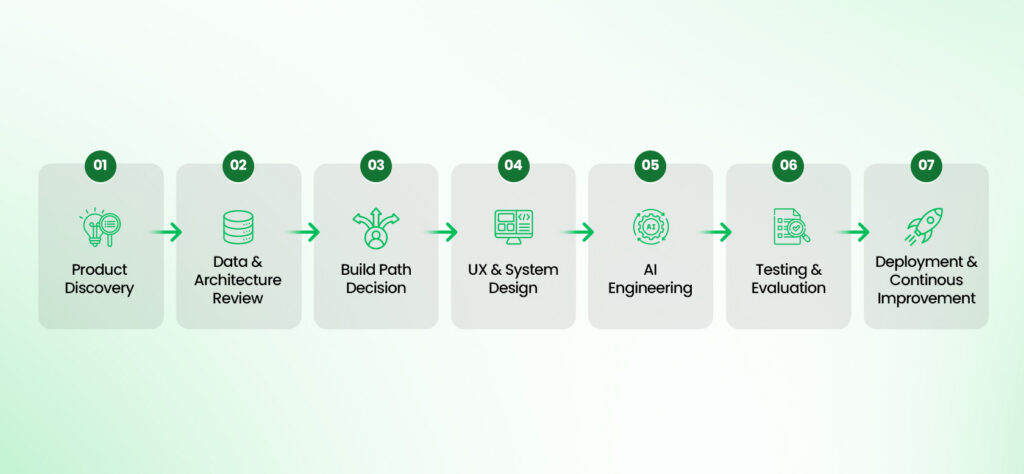
Custom AI development is not just model integration. It is a product lifecycle.
The process moves from discovery to architecture, design, engineering, testing, deployment, monitoring, and iteration.
1. Product and Workflow Discovery
We begin with a discovery sprint to understand the business goal, user group, and workflow.
This phase covers:
- business goals
- user personas
- workflow mapping
- problem validation
- AI fit review
- success metrics
- scope definition
The goal is to decide whether AI is actually needed, where it should fit, and what the first version should prove.
2. Data Readiness and Architecture Review
Next, we review the data.
This may include:
- data source review
- structured and unstructured data review
- document quality review
- permissions
- data sensitivity
- retrieval strategy
- retention requirements
- data update frequency
For RAG systems and AI knowledge assistants, this stage is critical. Retrieval quality depends on ingestion, chunking, embeddings, vector storage, metadata, permission rules, and source ranking.
For OCR-driven products, document quality and extraction accuracy become central.
For products built through machine learning development services, historical data quality and labeling matter more.
3. Build Path Decision
Once the product and data are clear, we decide the technical path.
That decision may include:
- use Dify
- use another AI platform
- use OpenAI or other model APIs
- build custom RAG
- build custom AI, agents
- use OCR
- use fine-tuning
- build custom backend
- use hybrid architecture
This is where product judgment matters. A platform may save time. A custom build may save rework. A hybrid system may give the best balance.
4. UX and System Design
After the build path is clear, we design the product experience and system behavior.
This may include:
- web or mobile interfaces
- admin dashboards
- assistant interaction flows
- review screens
- source visibility
- confidence states
- error states
- subscription flows
- workflow states
- human-in-the-loop steps
AI UX is not only about making the interface look good. It must help users understand AI output and take the right action.
5. AI Architecture and Engineering
The engineering phase connects the AI layer with the product layer.
This may include:
- prompts
- RAG pipeline
- embeddings
- vector storage
- model integration
- agent workflows
- OCR workflows
- API orchestration
- guardrails
- backend APIs
- integrations
- logging
- monitoring
The exact architecture depends on the use case. A veterinary invoice analysis platform, AI writing assistant, internal RAG tool, and AI operations agent do not need the same architecture.
6. Testing, Security, and Evaluation
AI products require more than standard QA, including mobile app testing strategies for mobile builds.
We test:
- functional behavior
- AI output quality
- retrieval accuracy
- hallucination risk
- OCR accuracy
- permissions
- edge cases
- performance
- security
- usage cost
- fallback behavior
A system can work technically and still fail the user. That is why AI output evaluation, edge case review, and security testing matter.
7. Deployment, Monitoring, and Iteration
After launch, the product still needs ownership.
Post-launch work may include:
- production deployment
- monitoring
- model behavior review
- user feedback
- bug fixes
- data updates
- infrastructure optimization
- prompt tuning
- retrieval tuning
- roadmap iteration
- support
AI systems change because data changes, models change, usage changes, and workflows change.
Maintenance is not optional when the AI system affects users, decisions, or operations.
Dify vs Inceptives Digital by Capability
The difference between Dify and Inceptives Digital becomes clearer when viewed by capability.
| Capability | Dify | Inceptives Digital |
| AI workflow creation | Visual workflow builder for AI apps and agents | Custom workflows or platform-assisted workflows based on product fit |
| RAG assistant setup | Strong platform support for knowledge and retrieval workflows | Custom RAG with UX, permissions, governance, integrations, and source visibility |
| AI agents | Useful for platform-based agent workflows | Custom agents with business rules, tools, approval states, fallback logic, and monitoring |
| Custom UX | Limited by platform or requires external frontend | Fully custom mobile, web, SaaS, and dashboard UX |
| Backend architecture | Platform-dependent | Custom APIs, databases, authentication, roles, business logic, and integrations |
| Integrations | Platform-supported tools, APIs, or extensions | Deep custom integrations with business systems |
| Product strategy | Not the platform’s main role | Discovery, roadmap, MVP planning, workflow strategy, and product decisions |
| Security and compliance | Platform and deployment controls | Product-level access, logs, data handling, governance, and compliance-aware architecture |
| Deployment | Cloud, self-hosted, and enterprise paths | Cloud architecture designed around the product’s technical and business needs |
| Maintenance | Workflow and platform maintenance | Product, AI, infrastructure, monitoring, and roadmap support |
Dify gives teams an AI platform. Inceptives Digital gives businesses product and engineering ownership.
That does not make one universally better. It means they are designed for different levels of responsibility.
When We Would Recommend Dify
A serious AI development partner should not push custom development when a platform solves the first problem well.
We may recommend Dify when:
- the AI use case is internal
- the workflow fits Dify’s platform structure
- the business needs to test quickly
- custom UX is not critical
- the first version is a knowledge assistant
- the team wants visual AI workflow control
- the use case is mostly RAG or chatbot-based
- deep integrations are not required yet
- speed matters more than ownership
- the goal is workflow validation before custom build
For example, if a company wants to test whether employees will use an internal knowledge assistant, Dify may be a practical first step.
If the use case is a support bot connected to documentation, Dify may help validate the workflow quickly.
If the team wants to experiment with agentic workflows and tool calls, Dify may reduce early setup effort.
The point is simple: if Dify is enough, use Dify.
When We Would Recommend Custom AI Development
Custom AI development becomes important when the AI solution needs to fit the business more deeply than a platform allows.
We recommend custom AI development when:
- AI is part of a customer-facing product
- the system needs a custom mobile or web app
- the product requires roles, permissions, and account logic
- workflows include approvals, exceptions, or human review
- data is sensitive, proprietary, or permission-based
- the AI output affects decisions
- the solution needs custom dashboards or analytics
- integrations are deep or business-critical
- the product roadmap goes beyond platform limits
- long-term differentiation matters
Custom AI development is justified when the system needs to fit the business, not when the business has to fit the platform.
That does not always mean everything must be built from scratch. It means the architecture should be chosen around the product.
When the Best Answer Is Inceptives Digital + Dify
The best architecture is not always all-platform or all-custom.
Sometimes the right answer is Inceptives Digital + Dify.
Dify can accelerate development with AI at the workflow layer. Inceptives Digital can design and build the custom product, backend, mobile app, dashboard, integrations, governance, and support structure around it.
1. Dify for Prototype, Custom Build for Production
A business may use Dify to test workflow logic quickly before moving into AI MVP development.
Once the workflow proves useful, Inceptives Digital can help decide whether to extend Dify, build a custom frontend around it, or rebuild the AI workflow into a custom production architecture.
This avoids building too heavily before validation.
2. Dify for Internal AI Workflow, Custom Product for Users
Internal teams may manage AI workflows in Dify while customers use a custom product built by Inceptives Digital.
This can work when internal flexibility is useful, but the customer experience needs custom UX, authentication, analytics, and product controls.
3. Dify for RAG Layer, Custom UX and Backend Around It
Dify may support the knowledge assistant or RAG workflow.
Inceptives Digital can build the portal, authentication, dashboards, analytics, admin controls, user permissions, and system integrations around that workflow.
This helps businesses move faster without forcing the entire product to live inside a platform interface.
4. Dify for Admin-Controlled AI Operations
In some systems, business users may need to adjust prompts, workflows, or knowledge sources without waiting for engineering.
Dify can support that operational layer of your AI automation services, while the product still uses custom governance, backend services, user interfaces, and integrations.
The right architecture keeps speed where speed helps and custom control where the product needs it.
Need Help Choosing Between Dify and Custom AI Development?
You may not need to build everything from scratch. Let our team evaluate your use case and identify where a platform or custom solution makes sense.
Get an AI Architecture Consultation!Security, Compliance, and Governance: How We Think About AI Systems
Security, compliance, and governance are often discussed too late in AI projects.
That is a mistake.
For AI products, compliance-aware architecture should influence the system from the beginning: how data is accessed, how responses are generated, who can see what, what gets logged, how output is reviewed, and how risk is handled.
1. Data Classification
The first question is what kind of data the AI will use.
Is the data public, internal, sensitive, regulated, proprietary, healthcare-related, financial, legal, or customer-specific?
The answer affects architecture.
An internal policy assistant using public company documents does not need the same controls as a healthcare-adjacent AI system reviewing veterinary invoices or a financial system handling transaction data.
2. Role-Based Access and Permissions
AI systems must respect user roles.
That may include:
- user roles
- admin roles
- document-level permissions
- account-level permissions
- approval rights
- auditability
- user-specific data retrieval
- restricted outputs
Permission-aware retrieval is especially important for RAG systems. The AI should not retrieve or expose information a user is not allowed to see.
3. AI Output Governance
AI output should be reviewed according to the risk of the workflow, using app development risk management.
Governance may include:
- human-in-the-loop review
- admin moderation
- output quality checks
- source visibility
- escalation workflows
- unsafe output handling
- user feedback loops
- model behavior review
Pets B4 Profit is a strong example. AI-assisted veterinary bill analysis carried healthcare implications, so administrative oversight and recommendation quality review were designed into the platform.
4. Compliance-Aware Architecture
We use careful language because compliance depends on the specific project, jurisdiction, data, and operating model.
Our approach can include:
- GDPR-aware data handling
- HIPAA-aware architecture when healthcare workflows are involved
- SOC 2-focused engineering practices
- audit log planning
- secure API design
- data retention planning
- vendor and model provider review
- access governance
- security testing
Compliance cannot be added at the end of an AI product. It shapes the architecture from the start.
5. Monitoring and Post-Launch Control
AI governance continues after launch.
The system may need:
- output monitoring
- cost monitoring
- model behavior review
- data refreshes
- security updates
- compliance changes
- workflow updates
- user feedback review
- prompt and retrieval tuning
This is one reason a custom AI product needs product ownership. A launch is not the end of the AI lifecycle.
Cost: Dify Platform Cost vs Custom AI Development Cost
Dify and Inceptives Digital are priced differently because they provide different things.
Dify is a platform. Its cost may include a cloud plan, message credits, model provider usage, knowledge document limits, self-hosted infrastructure, enterprise licensing, workflow setup time, workflow maintenance, integration work, and custom frontend or backend development if needed. Dify’s pricing page describes cloud, self-hosted, and enterprise paths, with message credits and knowledge document limits included in plans.
Inceptives Digital is a custom AI development and digital product studio partner. Cost depends on the actual product scope.
Custom AI development cost can include:
- discovery
- product strategy
- UX design
- mobile or web development
- backend development
- AI architecture
- data engineering
- OCR workflows
- RAG development
- AI agent development
- integrations
- security
- QA
- deployment
- monitoring
- maintenance
A Dify setup may cost less at the beginning when the workflow fits the platform. Custom AI development usually costs more upfront because it includes the wider product and engineering work required to make the AI system work inside a real business or customer environment.
| Cost Question | Dify | Inceptives Digital |
| What is cheaper to start? | Usually Dify | Usually higher upfront |
| What is faster for testing? | Dify | Depends on scope |
| What gives more product control? | Limited by platform fit | Custom ownership |
| What reduces custom engineering? | Dify | Uses engineering where custom control is needed |
| What works better for full products? | Only if platform fit is enough | Stronger fit |
| What lowers rework risk? | Dify if workflow fits | Inceptives Digital if the product is complex |
A cheaper first version is not always cheaper long term, so review AI-native product development cost early.
Dify can reduce early setup cost. Inceptives Digital can reduce the cost of building the wrong product, rebuilding later, or missing the architecture needed for production.
Final Recommendation: Platform, Custom Build, or Hybrid?
Choose Dify when you need a fast AI workflow, internal assistant, RAG prototype, or platform-based agent.
Choose Inceptives Digital when you need a custom AI product, mobile app, SaaS platform, business system, secure workflow, deep integration, or long-term product roadmap.
Choose both when Dify can accelerate the workflow layer, but the product still needs custom UX, backend, security, integrations, governance, and ownership.
The decision should not start with the tool.
It should start with the product path:
- What problem should AI solve?
- Who will use it?
- What data does it need?
- What workflow should change?
- What risk does the system carry?
- What must be custom?
- What can be configured?
- What should be tested first?
A platform can help you move faster. A product studio with AI development expertise helps you decide what should be built, what should be configured, what should be tested first, and what needs custom ownership.
That is the real difference between Dify and Inceptives Digital.